
Session 20 — Make It Yours
Duration: 60 min · Format: live online
What you'll learn: by the end, you can write simple CSS rules to change colours, fonts, backgrounds, and spacing, turning plain HTML into a page that looks like yours.
Soft skill focus — Creativity
Today you'll also grow Creativity. CSS is where the same plain page becomes uniquely yours — your colours, your fonts, your style choices.
Try this: don't copy one "right" colour scheme — pick colours and fonts that feel like you, and be ready to say why you chose them.
Think about: What choice did you make today that made the page feel like yours?
What you'll need
- Open CodePen and start a new Pen. There are three boxes: HTML, CSS, and JS — today you'll use HTML and CSS.
- A small starter page in the HTML box to style (a heading, a paragraph, an image).
- A few colour names to try (red, teal, gold, hotpink, skyblue).
- The page sketch you made for homework in Session 19.
Hook
Picture a plain black-and-white HTML page. Now imagine a few lines of CSS make it burst into colour. Think about:
- Same words, totally different look — what do you think just happened?
- If HTML is the bricks of a house, what would you call the paint, wallpaper, and furniture?
Here's the big idea: the paint and style is called CSS, and today you'll decorate the page you built last time.
Teach — What is CSS? Colours and fonts
Here are the key words:
- CSS = Cascading Style Sheets. HTML says what's on the page; CSS says how it looks.
- A CSS rule has three parts: a selector (what to style), a property (what to change), and a value (what to change it to).
- The shape is always:
selector { property: value; }
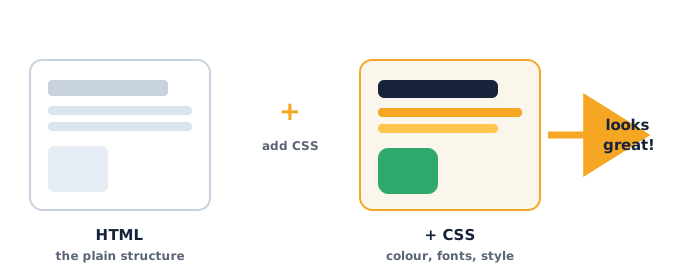
Use this diagram to see how HTML gives the plain structure while CSS adds the colour, fonts, and style on top:
Type this in CodePen (in the CSS box):
h1 {
  color: teal;
}
Here's each part: h1 is which tag to style, color is the property, teal is the value. The ; ends the line and { } hold the rules.
⚠ Watch for the #1 CSS mistake: forgetting the semicolon
;at the end of a line, or the curly braces{ }. If nothing changes, check those first.
Add a font and colour for paragraphs:
h1 {
  color: teal;
}
p {
  color: darkslategray;
  font-family: Arial;
}
Quick question: what do you think changes if you write color: hotpink; instead? (Answer: the text turns hot pink — try it.)
Teach — Backgrounds and spacing
You can colour the whole page background and add space so things aren't squashed together. The body selector styles the whole page.
Type this in CodePen:
body {
  background-color: lightyellow;
  text-align: center;
}
Notice: background-color paints behind everything; text-align: center; pulls the text to the middle.
Now add spacing so it breathes:
body {
  background-color: lightyellow;
  text-align: center;
  padding: 20px;
}
h1 {
  color: teal;
  margin-bottom: 10px;
}
Here are the two spacing words:
padding= space inside, between the edge and the content (like a cushion around it).margin= space outside, pushing other things away.
⚠ Watch for: spelling. It's
background-color(with the dash and the American spelling color), not "background colour." A tiny typo means the rule is ignored.
Quick question: what's the difference between padding and margin? (Answer: padding is space inside the box; margin is space outside it.)
Activity — Style your page
Make it yours (≈20 min). Reopen the page you built in Session 19 (or paste the starter page) into a Pen and add CSS. Your styled page must include at least four of these:
- A text colour for the heading (
color). - A background colour for the page (
background-color). - A font for the paragraphs (
font-family). - Centered text somewhere (
text-align: center;). - Some spacing (
paddingormargin).
If a rule doesn't work, check for a missing brace or semicolon.
Remember: same HTML as last week, but now it looks like yours. That's the power of CSS.
Check yourself
Try these — answers are after the arrow.
- What is the job of CSS? → It controls how the page looks (colours, fonts, spacing) — the "paint," not the bricks.
- What is missing here:
h1 { color: red }→ The semicolon afterred:h1 { color: red; }. - What's the difference between
paddingandmargin? →paddingis space inside a box;marginis space outside it, pushing other things away.
Wrap-up
- Name your favourite CSS change you made today and the property that did it.
- Try this at home — Plan Your Big Page: on paper, plan a multi-section page about yourself or a topic you love for Session 21 — think of 3 sections (e.g. "About Me," "My Favourites," "My Goals"), each with a heading and a couple of lines. Pick your colours too. Bring it next time — you'll build and present it.
Tips & extra challenges
- Watch out: it's easy to think "CSS changes the words on the page." Actually, CSS never changes what the words are (that's HTML) — it only changes how they look. Same text, new style.
- Want more? Try this: use a
classto style just one special item. In the HTML, addclass="special"to a paragraph, then style it:
.special {
  color: white;
  background-color: purple;
  padding: 10px;
}
See if you can explain why the dot . is needed before special in the CSS (it means "the thing with this class"). Then add a border:
.special {
  border: 3px solid gold;
}
Vocabulary
| Term | Meaning |
|---|---|
| CSS | The code that styles how a page looks |
| Rule | One instruction: selector { property: value; } |
| Selector | What you're styling, like h1 or body |
| Property | What you're changing, like color |
| Value | What you set it to, like teal |
| Background | The colour or fill behind the content |
| Padding | Space inside a box, around the content |
| Margin | Space outside a box, pushing others away |
Resources
- CodePen — write CSS and watch the page change instantly (main tool).
- MDN — CSS first steps — friendly reference for more properties.
- W3Schools — CSS Colors — the full list of colour names to try.
- Coolors — generate pretty colour combos for the page.
Practice set
Practise on your own. Answers are after the arrow.
- What do the letters CSS stand for, and what is it for? → Cascading Style Sheets — it controls how a web page looks.
- Name the three parts of this rule:
p { color: blue; }→ Selectorp, propertycolor, valueblue. - Write a CSS rule that makes all
<h1>headings the colour orange. →h1 { color: orange; } - Write a rule that gives the whole page a skyblue background. →
body { background-color: skyblue; } - You wrote
p { color: green }and nothing happened after you added more lines. What's likely wrong? → The semicolon is missing aftergreen:p { color: green; }. - Which property adds space inside a box, and which adds space outside it? →
paddingis inside;marginis outside.
Going deeper (optional)
- Colours beyond names. Besides names like
teal, colours can be written as hex codes like#ff69b4. Open CodePen's little colour swatch (click the tiny square next to a colour), pick a shade, and copy the code. Names are easy, but hex codes let you choose from millions of colours. - Why it's called "cascading." If two rules disagree, the one written lower down usually wins. Stack two
p { color: ... }rules and predict which colour appears. This shows that order matters in CSS.
Common mistakes & fixes
If it's not working, check these common mix-ups:
- Mistake: forgetting the semicolon, e.g.
color: red. → Fix: end every declaration with;—color: red;. Say "one line, one semicolon." - Mistake: dropping a curly brace, e.g.
h1 { color: red;. → Fix: every rule needs an opening and closing brace:h1 { color: red; }. - Mistake: British spelling, e.g.
colourorcentre. → Fix: CSS uses American spelling —color,text-align: center. - Mistake: putting CSS in the HTML box (or HTML in the CSS box). → Fix: tags like
<h1>go in the HTML box; rules likeh1 { }go in the CSS box. - Mistake: using a space in a property name, e.g.
background color. → Fix: join the words with a dash:background-color.
What's next
Session 21 — Build & Share Your Site: you'll combine HTML and CSS into a fun multi-section page about yourself or a topic you love, then present it — the unit's build project.