
Session 9 — Think Like an Inventor
Duration: 60 min · Format: live online
What you'll learn: by the end, you can follow the design thinking cycle, name a real problem worth solving, and brainstorm many ideas — landing on the one problem you'll build your final project around.
Soft skill focus — Creativity
Today you'll also grow Creativity. The brainstorm step rewards lots of ideas, even the silly ones — that's where the best inventions hide.
Try this: during the 5+ ideas brainstorm, ban the word "bad" and cheer the wildest idea you can think of; push yourself past your first three "obvious" answers.
Think about: Which of your ideas was the wildest, and what useful part is hiding inside it?
What you'll need
- The diagram below (you'll see it on screen — the design thinking cycle).
- Paper and a pencil — you'll interview someone and write a problem sentence.
- This is the start of the final unit: over the next four sessions you'll invent, build, and present your own project.
Hook
Let's think about these — jump in with your answers (chat or unmute):
- "What's something that annoys you every single day?"
- Ideas to spark you: a messy bag, forgetting homework, a boring wait, losing a pencil.
Here's the big idea: every annoying thing is really a problem to solve — and that's where every invention begins. Today you become an inventor.
Teach — Inventors start with a problem, not a gadget
Here's the key idea:
- Great inventors do not start with "let's build a robot."
- They start with "someone has a problem — how can I help?"
- The gadget or app comes last. The problem comes first.
⚠ Watch for the common mistake: it's tempting to jump straight to a cool gadget ("I'll make a flying car!") before naming a real problem. Catch yourself every time — ask "whose problem does that solve?" A project with no clear problem has nothing to aim at.
Think about this: "What's your favourite invention — a game, an app, a tool? What problem do you think it was made to fix?"
Teach — The design thinking cycle
Here's how designers work: they follow a simple loop, and you can too. Look at the diagram:
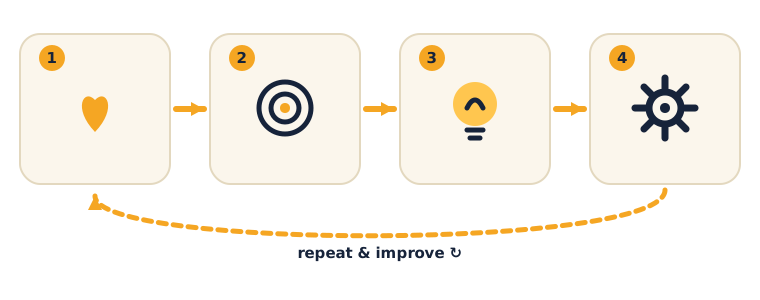
The four steps are:
- Understand — who has the problem? How do they feel about it?
- Define — say the problem clearly in one sentence.
- Idea — brainstorm lots of ideas (even silly ones!).
- Build & Test — make a rough version and try it.
The big thing to notice: the arrow loops back — you repeat and improve. Nobody gets it perfect on the first try.
Think about this: "Why do you think the cycle has an arrow that loops back to the start instead of just stopping?" (Because testing shows what to fix — you go around again and it gets better each time.)
Activity — Become a problem-finder
Your turn — work through the first three steps of the cycle on paper.
- Understand: interview someone nearby (a friend, sibling, or parent) — or interview your instructor as a whole class. Ask: "What's something annoying in your day?" Write down 3 answers.
- Define: pick one and finish this sentence: "__ needs a way to _ because ___."
- Idea: brainstorm 5+ ideas to solve it. Remember: no idea is too silly right now.
If you get stuck on a gadget, pull yourself back toward the problem.
You just did the first half of design thinking — understand, define, and idea. That's exactly how real inventors begin.
Check yourself
Try these questions:
- What do great inventors start with — a gadget or a problem? → A problem someone has. The solution comes last.
- Name the four steps of the design thinking cycle. → Understand → Define → Idea → Build & Test (then repeat).
- True or False: while brainstorming, you should throw out silly ideas right away. → False — wild ideas often lead to the best ones; never say "that's bad" during a brainstorm.
Wrap-up
- Finish the sentence: "A good inventor starts with…"
- Try this at home: choose the one problem you want to solve for your final project (Session 12). Write your problem sentence — "__ needs a way to _ because ___" — and keep it safe. You'll build on it for the next three sessions.
Tips & extra challenges
- Watch out: don't think "inventing means starting with a cool gadget." Instead, start with a problem — the solution comes last.
- Want more? Try this — the Problem Detective challenge: find three different problems (from three different people or three different places — home, school, playground) and write a sharp problem statement for each — who has it, what they need, why it matters. Then rank the three by which is most worth solving and defend your pick in one sentence. For the winner, ask: could AI or data help? Think back to Units 1 & 2 — a classifier (Teachable Machine) or a survey + chart could be part of the solution. Finally, define success: "I'll know my project works if ______."
Vocabulary
| Term | Meaning |
|---|---|
| Design thinking | A loop for solving problems |
| Problem | Something that needs fixing |
| Empathy | Understanding how others feel |
| Brainstorm | Making lots of ideas fast |
| Prototype | A rough first version to test |
Resources
- Scratch — where you'll build your idea soon.
- Teachable Machine — in case your project uses AI.
- A short "design thinking for kids" video — a fun visual intro if you'd like one.
Practice set
Practise on your own to sharpen problem-finding and brainstorming. Work them easiest to hardest.
- Gadget or problem? For each, say which one it is: "a flying skateboard" · "kids forget their water bottles" · "a robot that barks" · "the library is too noisy to think." → Problems are the second and fourth (forgetting bottles, noisy library). The first and third are gadgets — no problem attached yet. Ask "whose problem does that solve?"
- Finish the problem sentence. Complete: "My little brother needs a way to __ because ____." → Any answer that names a real need and a real reason, e.g. "…find his shoes in the morning because he's always late for school." The because must give a genuine reason, not just "because it's cool."
- Fix the weak statement. Improve this one: "I want to make an app." → It names no person and no problem. A fixed version: "Grandpa needs a way to remember his pills because he sometimes forgets." Aim for who + what + why.
- Speed brainstorm. Set a 2-minute timer and list 10 ideas to solve "people forget their homework." → Success is quantity, not quality — even silly ideas count (a homework alarm, a glowing folder, a reminder pet). If you wrote 10 without crossing any out, you did it right.
- Empathy detective. Pick a person (a teacher, a bus driver, a baby) and write two problems they face that you might never notice. → Rewards perspective-taking, e.g. a bus driver can't see kids in the very back; a baby can't say what hurts. Any thoughtful, specific answer works.
- Loop-back reasoning (hardest). A student tests their idea and it fails. Draw where they go on the design thinking cycle and say why. → They loop back — usually to Idea or Define — because testing revealed what to fix. The whole point of the arrow is that failing once is normal and expected.
Going deeper (optional)
Optional — for a bigger challenge, or a richer homework talk.
The "5 Whys" trick for finding the real problem. Sometimes the first problem you name isn't the real one — it's a symptom. Try asking "why?" up to five times. Worked example: "Kids are late to class." Why? "They can't find their stuff." Why? "Their bags are a mess." Why? "There's no place for each thing." Now the real problem is clear — bags need a place for each item — and it's far more buildable than the vague "kids are late." Run 5 Whys on your own problem sentence and see if it changes.
Silly ideas are seeds, not jokes. When we say "no idea is too silly" during a brainstorm, it's not just to be nice — wild ideas hide useful pieces. Worked example: "a backpack that yells at you" sounds silly, but pull out the useful seed — a reminder that gets your attention — and you get a gentle buzz or a light instead. Take your silliest brainstorm idea and find the one useful seed hiding inside it.
Common mistakes & fixes
If it's not working, check these:
- Mistake: Starting with a gadget ("I'll build a flying car!") instead of a problem. → Fix: Ask "whose problem does that solve?" every single time. Name a person and a need before any building talk.
- Mistake: A problem sentence with no because — "people need a faster bike." → Fix: Add the reason. Why does it matter? A problem without a reason has nothing to aim at.
- Mistake: Crossing out ideas during the brainstorm ("that one's dumb"). → Fix: In the Idea step there are no bad ideas — you judge later, not now. Wild ideas often lead to the best ones.
- Mistake: Picking a problem so huge it can't be built ("end all pollution"). → Fix: Shrink it to something one kid could prototype — "my street's bins overflow because no one knows when they're full." Small and real beats big and vague.
- Mistake: Skipping the interview and inventing a problem from thin air. → Fix: Ask a real person (or interview your instructor as a class). Real problems come from real people, not guesses.
What's next
Session 10 — Build Your Prototype: turn your idea into a rough first version you can actually try.