
Session 12 — Showcase Day
Duration: 60 min · Format: live online
What you'll learn: today you present your final project, give kind and helpful feedback to your classmates, and reflect on how far you've come across the whole course.
Soft skill focus — Teamwork
Today you'll also grow Teamwork. A showcase runs on a supportive audience — a great listener helps a presenter as much as a great presenter helps the room.
Try this: use "two stars and a wish" for every classmate — name a specific, true star and a kind wish. If you catch yourself thinking "that's boring," turn it into a wish instead.
Think about: What is one kind, specific thing you said that helped a classmate today?
What you'll need
- The diagram below (you'll see it on screen — plan → build → test → showcase).
- Your place in the running order — the list of who presents when.
- The "Two stars and a wish" feedback rule handy so you can use it while others present.
- Your prototype, one-page summary, and presentation open and ready.
Hook
Today is the finish line — welcome!
- Remember: everything you've learned across the whole course comes together today.
- Quick warm-up: type one word in the chat for how your project feels right now (proud, nervous, excited).
Set the tone: today the room is a supportive audience — everyone cheers everyone on.
Teach — How the showcase runs
Here's the plan so you know exactly what to do. Look at the diagram:
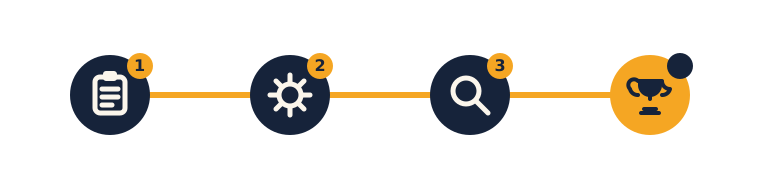
Here's how your whole project fits together:
- Plan (Session 9) → your problem & idea.
- Build (Session 10) → your prototype.
- Test → made it a little better.
- Showcase (Session 11 skills) → present it today.
You'll each present for about 1–2 minutes using the recipe: Problem → Solution → Demo → Thank you. Then take a bow.
⚠ Watch for feedback that stings: it's easy to blurt out "that's boring" without meaning harm. Learn the rule before the first presentation and use it kindly every time.
The feedback rule — "Two stars and a wish": after each project, the audience gives two things they loved and one wish to make it even better. No mean comments — only kind, helpful ones.
Think about this: "Can you give an example of a star and a wish you might say?"
Showcase — your presentation
When it's your turn, present your project. Here's the rhythm for each person (about 3–4 minutes each):
- Present (1–2 min) — Problem → Solution → Demo → Thank you.
- Feedback (1–2 min) — two audience members give two stars, then one gives a wish.
- Applause, then the next presenter goes.
Tips while you take part:
- Keep an eye on time — when you get a quiet "30 seconds" signal, start wrapping up so everyone gets a turn.
- If the room goes quiet during feedback, use a prompt: "What was the coolest part of the demo?" · "What problem did this solve?" · "What's one idea to make it even better?"
- If your demo breaks live, stay calm and keep going — even real engineers hit bugs on stage.
- When you give feedback, name something specific and true: "I loved how you showed it working, not just talking about it."
Reflection — look how far you've come
Take a moment to look back over the whole journey:
- In Unit 1 you taught a computer to see and understood AI.
- In Unit 2 you collected data and told its story.
- In Unit 3 you invented and built your own project.
Answer these (chat or unmute):
- "What are you most proud of?"
- "What would you build next?"
Here's the big idea: that is exactly what real builders and scientists do.
Wrap-up
- Congratulations — you've finished the course as a Young Builder who can understand and train AI, collect data and tell its story, and invent, build, and present your own project.
- Try this at home — start a portfolio: save your project — photos, the Scratch or Teachable Machine link, and your one-page summary — in one folder. This is your first builder portfolio.
- Look ahead: the adventure isn't over — next comes the bonus module on generative AI, where you'll explore AI that creates pictures, words, and music.
Tips & extra challenges
- Watch out: don't think "feedback means finding what's wrong." It's two stars and a wish — mostly celebrating, with one kind idea to grow.
- Want more? Try this — the encore challenge: deliver the full package — a working prototype + a one-page project brief + a confident presentation. Once you've presented and have time to spare, be an audience leader: give the sharpest, kindest "two stars and a wish" of the day. Then ask: could this project grow in a future course? Write one concrete idea to make it bigger or smarter (a new feature, more training data, a real user to test with) and add it to your new portfolio folder.
Vocabulary
| Term | Meaning |
|---|---|
| Final project | Your big capstone build |
| Showcase | Sharing your project proudly |
| Portfolio | A collection of your projects |
| Reflect | Thinking about what you learned |
Resources
- Google Slides / Canva — polish the one-page summary.
- Scratch · Teachable Machine — the demo tools.
Practice set
Practise on your own — quick presentation-skills drills to run before the showcase starts, or while you wait for your turn. Easiest to hardest.
- Power-pose countdown. Stand tall like a superhero for 10 seconds, then say your opening line. → No wrong answer — the goal is the feeling. Standing tall really does shrink nerves; it's a trick real presenters use.
- One-breath opener. Take one slow breath, look up, and deliver just your first sentence clearly. → Aim for a slow, clear, eyes-up opener. If you rushed or looked down, run it once more — the opening sets the whole tone.
- Two stars and a wish. Watch a quick sample demo and give two stars and one wish. → A star names something specific and true ("I loved the demo"); a wish is a kind idea ("I wish it were a little slower to read"). Turn any "that's boring" into a wish.
- Trim to time. A student's talk runs 4 minutes; the limit is 2. Name one part to cut. → Cut the long telling — extra description — and protect the demo. Keep Problem, Solution, Demo, Thank you; trim everything around them.
- Recover from a bug. Pretend a demo just froze on stage. What do you say and do? → Stay calm, smile, say something like "even real engineers hit bugs on stage" and switch to a screenshot or narrate what it would do. Composure impresses an audience more than a flawless run.
- Field a surprise question (hardest). An audience member asks something you didn't prepare for. Give a calm, honest reply. → "Great question — here's what I think…" buys a second and keeps you steady. Honesty beats bluffing; it's fine not to know everything.
Going deeper (optional)
Optional — for a bigger challenge, or a debrief after the showcase.
A great audience is as skilled as a great presenter. Showcase Day isn't only about presenting — it's about listening well. Worked example: compare a lazy comment ("it was good") with a skilled one ("Two stars: your demo actually worked live, and your opening question grabbed me. One wish: I'd love the buttons a little bigger"). The skilled version is specific, true, and kind. Challenge yourself to give the most specific two-stars-and-a-wish of the day — naming the exact moment you mean.
Name what you learned, not just what you built. The strongest closes don't just say "thanks" — they share a real lesson. Worked example: instead of "…and that's my project, thanks," you could end with "The biggest thing I learned is that my first idea failed the test, and fixing the weakest part made it way better." That shows the whole design-thinking journey in one sentence. Write a one-line "the biggest thing I learned was…" to close on.
Common mistakes & fixes
If it's not working, check these:
- Mistake: All talk, no demo — describing the project instead of showing it live. → Fix: Put the demo in the middle: run the prototype, the Scratch app, or the chart. Showing beats telling.
- Mistake: Blurting "that's boring" without meaning harm. → Fix: Use two stars and a wish every time — a wish, never a put-down.
- Mistake: A demo breaks live and you panic or apologize for ages. → Fix: Use the calm line — "even real engineers hit bugs on stage" — then switch to a screenshot or narrate it. Cheer the effort and move on.
- Mistake: Rushing through nerves and finishing in 20 seconds. → Fix: Remember the recipe's four parts and the 1–2 minute target; a breath and a power pose slow you down. A quiet "30 seconds" signal helps you pace.
- Mistake: Racing so quiet or slower classmates get skipped or rushed. → Fix: Keep time gently, but make sure every person gets their full turn and their applause — the point of the day is that everyone is celebrated.
What's next
Session 13 — The AI That Creates: the start of the bonus generative-AI module, where you explore AI that creates pictures, words, and music.