
Session 2 — Patterns Everywhere
Duration: 60 min · Format: live online
What you'll learn: by the end, you can spot patterns around you, sort things into groups (classify), and predict what comes next.
Soft skill focus — Critical thinking
Today you'll also grow Critical thinking. Deciding whether something is really a pattern — or just a random group — is a judgement call, not a guess.
Try this: in the sorting-champion activity, when you name a rule, test it by asking "could something belong to both groups?" instead of accepting the first rule that sounds right.
Think about: How did you check that your rule was actually a real pattern?
What you'll need
- A small box of mixed objects (toys, blocks, crayons) to sort.
- Paper and a pencil.
- Optional: a device to open Quick, Draw! and watch classifying in action.
Hook
Clap this out loud: clap – stomp – clap – stomp – clap – …
- What comes next? Say it out loud.
- That's a pattern — something that repeats by a rule. Your brain guessed the next part super fast.
- That's exactly the AI superpower — and today you become a pattern-spotter yourself.
Teach — What is a pattern?
A pattern is something that repeats in a way you can predict. Once you know the rule, you can guess what's next.
Look at this diagram:
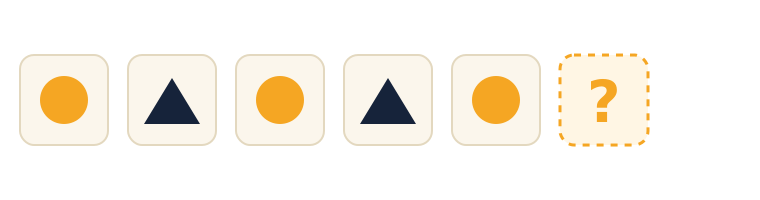
Circle, triangle, circle, triangle, circle… what shape comes next? (The rule is circle, triangle, repeating.)
Patterns are everywhere:
- Day and night, over and over
- Stripes on a zebra
- The beat in a favourite song
- The days of the week
⚠ Watch out: it's easy to call any group of things a "pattern." A real pattern must repeat by a rule you can predict — otherwise you can't guess what's next.
Teach — Sorting into groups = Classifying
When you put things into groups, you are classifying. AI does this all the time — remember from Session 1 how it sorted pictures into "cat" or "dog"? Those groups are called classes.
Look at this diagram:
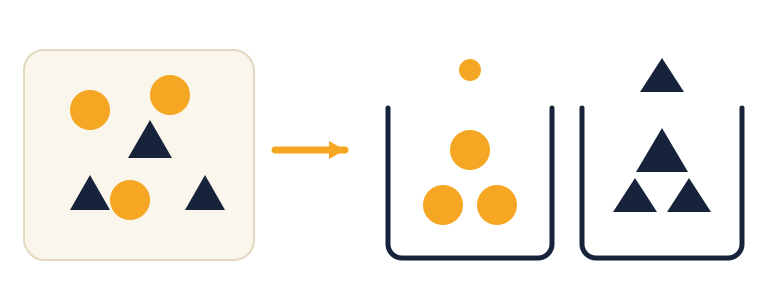
- To sort, you look for clues: Is it round or pointy? What colour? How big? AI looks for clues too.
- The big idea: guessing "cat!" is really just sorting a picture into the cat group. Classifying is the AI's #1 job.
⚠ Watch out for the mix-up: a pattern is what repeats; classifying is sorting things into groups using clues. They connect (AI spots patterns to decide which group), but they're not the same word.
What clues might an AI use to tell a cat from a dog? (Think: ear shape, whiskers, nose, size.)
Activity
Activity 1 — Sorting champion (≈10 min, no computer). Grab a box of small things (toys, blocks, crayons) and sort them into 2 or 3 groups. Then have a partner guess your rule — by colour? by size? by shape?
- Test your rule: could something belong to both groups? If so, sharpen your clue until each thing has one clear home.
Activity 2 — Make a pattern (≈10 min). Draw or build a repeating pattern (like triangle, circle, triangle, circle). Then have a partner add the next 3 items.
If your partner found your rule, that's exactly what an AI does — spot the pattern, then predict what comes next.
Check yourself
Try to answer these, then check yourself after the arrow.
- In the shapes picture, what comes next? → A triangle — the rule is circle, triangle, circle, triangle…
- What do we call sorting things into groups? → Classifying — and the groups are called classes.
- What clues might an AI use to tell a cat from a dog? → Things like ear shape, whiskers, nose, and size — the AI looks for repeating patterns in the pictures.
Wrap-up
- Finish this sentence in your own words: "A pattern is…"
- Try this at home — Pattern hunter: find 3 patterns at home or outside, and invent one secret pattern to challenge a family member to continue. Bring them to Session 3.
Tips & extra challenges
- Watch out: it's easy to think "any group is a pattern." A pattern repeats by a rule you can predict; classifying is sorting with clues.
- Want more? Try this: learn the word features — the clues an AI uses to decide (pointy ears, whiskers, colour); more helpful features → better sorting. Then peek at a neural network: a big team of tiny helpers, each checking one small clue ("pointy ears? yes/no") and voting on the answer. Challenge: pick two animals and write 3 features that tell them apart — exactly what you'd teach an AI.
Vocabulary
| Term | Meaning |
|---|---|
| Pattern | Something that repeats by a rule |
| Classify / Sort | Putting things into groups |
| Class / Group | One of the groups (like "cats") |
| Predict | Guess what comes next |
| Clue / Feature | The hint used to decide (ears, colour…) |
Resources
- Quick, Draw! — watch it classify drawings into groups.
- Code.org — Hour of Code — fun pattern & logic puzzles.
- Teachable Machine — next session you teach it to classify.
Practice set
Practise on your own — the answer comes after the arrow.
- Circle, triangle, circle, triangle, circle… what comes next, and what is the rule? → A triangle; the rule is circle, triangle, repeating.
- Which of these is a real pattern? (a) red, blue, red, blue, red (b) red, blue, green, yellow, orange. → (a) — it repeats by a rule you can predict; (b) does not repeat, so you cannot be sure what comes next.
- You sort a box into "round things" and "pointy things." What is this called, and what are the two groups called? → It is classifying; the groups are classes.
- Name two clues (features) an AI might use to tell a cat from a dog. → Any two of: ear shape, whiskers, nose, size, face shape.
- Pattern: 2, 4, 6, 8, ___. What comes next and why? → 10 — the rule is "add 2 each time" (a number pattern).
- You want to sort fruit into "apples" and "bananas." Name two features that separate them, and one fruit that might be hard to sort. → Features like shape (round vs long) and colour; a green banana or a red-and-yellow apple could be tricky because the clues overlap.
Going deeper (optional)
- When features overlap. Try a sorting problem where the clue is not clean: sort animals into "has 4 legs" vs "does not." Then think about a snake, a bird, a person — some do not fit neatly. The big idea: a good feature clearly separates the groups; a weak feature leaves things stuck between two bins. This is exactly the judgement you'll use when you pick classes to train in Session 3.
- Growing versus repeating patterns. Not all patterns just repeat — some grow. Look at 1, 2, 4, 8… (double each time) or a staircase that gets one step taller each row. What is the rule? Predict the next two. This stretches the idea of "pattern" beyond simple repeats while keeping the core idea: once you know the rule, you can predict what comes next.
Common mistakes & fixes
- Mistake: calling any group or list a "pattern." → Fix: use the test — does it repeat by a rule you can predict? If you cannot say what comes next, it is not a pattern.
- Mistake: using the words pattern and classify as if they mean the same thing. → Fix: pattern = what repeats; classify = sorting into groups using clues. They connect but are different jobs.
- Mistake: picking a sorting rule where an item could belong to both groups. → Fix: ask "could something fit in both bins?" and sharpen the clue until each item has one clear home.
- Mistake: only continuing a pattern in one direction, or ignoring the rule and guessing randomly. → Fix: say the rule out loud first ("circle, triangle, repeating"), then apply it step by step.
- Mistake: thinking more clues always means better sorting, even useless ones. → Fix: only clues that actually separate the groups help; "it is nice" does not help you sort.
What's next
Session 3 — Teach the Computer: you train your very own AI to tell two things apart.