
Session 11 — Tell Your Story
Duration: 60 min · Format: live online
What you'll learn: by the end, you can structure your project as a four-part story, deliver it with confidence, and give kind, helpful feedback — ready to present at Showcase Day.
Soft skill focus — Confidence & presenting
Today you'll also grow Confidence & presenting. Nerves are normal — even famous scientists feel them — and confident delivery is a skill you practise, not a gift.
Try this: stand tall in a 10-second power pose, take a slow, clear opening line, then rehearse your talk out loud twice. Notice how looking up and slowing down makes you feel braver.
Think about: What is one trick that helped you feel braver right before you presented?
What you'll need
- The diagram below (you'll see it on screen — the presentation recipe).
- Your prototype from Session 10 and paper and a pencil (or slides open).
- A spot to try a 10-second power pose and a slow, clear opening line — you'll practise confident delivery.
Hook
Let's think about this — jump in with your answer (chat or unmute):
- "Two inventors made the same cool thing. One mumbles and stares at the floor. The other smiles and explains it clearly. Who gets everyone excited?"
Here's the big idea: presenting is a superpower — and it can be learned. Today you'll turn your project into a story people can't wait to hear.
Teach — A presentation is a story in 4 parts
Here's how a good presentation works: it follows a simple recipe, so you're never stuck. Look at the diagram:
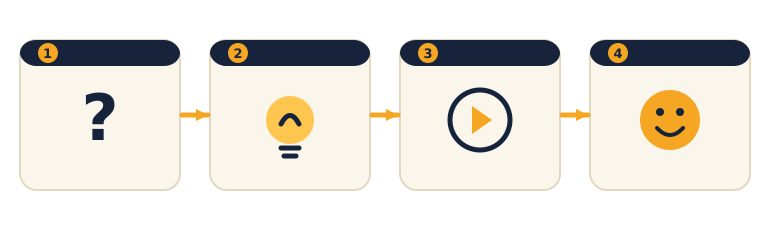
The four parts are:
- Problem — what problem did you solve? Why does it matter?
- Solution — what did you build?
- Demo — show it working. (This is the best part.)
- Thank you — what you learned, then "any questions?"
The big thing to notice: the demo is the heart of it — showing the thing work beats a hundred words describing it.
⚠ Watch for the "all talk, no demo" trap: it's easy to plan to describe your project the whole time and skip actually showing it. Put a live demo in the middle — a screen, the prototype, or a chart.
Think about this: "In one sentence, what's the problem your project solves?"
Teach — Presenting like a star
Here's the secret: small delivery tricks make a big difference. Try each one:
- Look up at people, not at the floor.
- Speak slowly and clearly — take a breath.
- Show, don't just tell — a live demo beats 100 words.
- Smile — if you're excited, the audience will be too.
- Power pose — stand tall like a superhero for 10 seconds before starting; it really helps beat nerves.
The big thing to notice: nerves are normal — even famous scientists feel them. Practising out loud twice shrinks the nerves.
Think about this: "What's one quick thing you can do right before you present to feel braver?" (Power pose, deep breath, look up, remember you practised.)
Activity — Build and rehearse your presentation
Prepare your Showcase Day presentation now.
- Make 4 simple slides or a poster — one for each recipe part (Problem, Solution, Demo, Thank you).
- Put the demo in the middle (screen, prototype, or chart).
- Practise out loud twice. Time it — aim for 1–2 minutes.
- If there's time, present to the group and take a quick round of feedback.
If you're only telling, add a real demo.
You now have a story and a demo. One more practice at home and you're ready to showcase.
Check yourself
Try these questions:
- What are the 4 parts of the presentation recipe? → Problem → Solution → Demo → Thank you.
- What's the best part of most presentations? → The demo — showing it actually working.
- What's a quick fix for nerves? → Practise out loud a couple of times, breathe, and look up (a power pose helps too).
Wrap-up
- Name the first part of the recipe (Problem).
- Try this at home: give your presentation to your family. Ask each person for one thing they liked and one tip — kind feedback only. Bring your polished presentation to Session 12, Showcase Day.
Tips & extra challenges
- Watch out: don't think "a good presentation is just talking a lot about your project." It's a short story with a live demo at its heart.
- Want more? Try this — the press-conference challenge: write a one-page project brief — Problem → Solution → How it works → Result → What's next — with real numbers ("my classifier was right 8 out of 10 times") because numbers build trust. Then run a mini press conference: think of the 3 hardest questions an audience could ask ("What if it gets it wrong?" · "Why should I care?" · "How is this better than what already exists?") and write a calm one-sentence answer to each. Bonus: craft a strong opening line — a question or a surprising fact — that hooks the audience in the first 5 seconds.
Vocabulary
| Term | Meaning |
|---|---|
| Presentation | Showing your work to others |
| Demo | Showing it working live |
| Audience | The people watching |
| Feedback | Helpful comments to improve |
| Confidence | Believing you can do it |
Resources
- Google Slides or Canva — make simple, clear slides.
- Scratch — a live demo can run here.
- A short "presentation tips for kids" video — a fun visual model if you'd like one.
Practice set
Practise on your own — extra exercises on story structure and confident delivery. Easiest to hardest.
- Put the recipe in order. These four parts are scrambled: Demo · Thank you · Problem · Solution. Put them in presentation order. → Problem → Solution → Demo → Thank you. You name the problem, say what you built, show it working, then close and invite questions.
- Spot the missing part. A presentation goes: "Kids forget their homework. So I made this. Any questions?" Which recipe part is missing? → The Demo (and really the Solution is thin too). They never showed it working — the heart of the talk is missing. Push for a live demo in the middle.
- Write your problem line. In one sentence, state the problem your project solves so a stranger gets it instantly. → Any clear one-liner naming who and what, e.g. "Little kids can't tell recycling from trash, so my app sorts it for them." If a stranger would understand it, it works.
- Fix the nervous opener. A student starts by mumbling at the floor: "um, so, this is my thing, I guess." Give them two fixes. → Look up and slow down; open with a hook — a question or the problem said with energy: "Have you ever forgotten your homework? I did — so I built this." Confidence is a skill, not a gift.
- Turn telling into showing. A student plans to say "my Scratch game is really fun." How could they show it instead? → Play it live — let the audience watch the sprite react, the score climb, the win screen appear. Showing beats telling every time; a live demo is worth 100 words.
- Handle the hard question (hardest). An audience member asks, "But what if your AI gets it wrong?" Write a calm, honest answer. → Something like "Good question — it's right about 8 out of 10 times, and here's how I'd make it better with more examples." Honesty plus a next step builds trust; pretending it's perfect does not.
Going deeper (optional)
Optional — for a bigger challenge or a keen homework group.
The demo is the heart — plan it so it can't flop. The middle of the talk, where you show the thing working, is what people remember. Worked example: a live internet demo could fail on the day, so a pro move is a backup — a short screen-recording or three screenshots ready to narrate if the live version breaks. Plan your demo and a backup, and rehearse the exact three sentences you'll say while it runs, so there's no awkward silence. A demo that keeps talking beats a demo that just sits there.
Numbers make a story believable. "My project works well" is a claim; "my classifier was right 8 out of 10 times" is proof. Worked example: take a vague line from your talk and add a real number from your Session 10 testing — "most people finished it" becomes "4 out of 5 testers finished it without help." Find one place in your presentation to swap a vague word for a real number. Trust goes up instantly.
Common mistakes & fixes
If it's not working, check these:
- Mistake: Talking the whole time and never showing the project ("all talk, no demo"). → Fix: Put a live demo in the middle — a screen, the prototype, or a chart. Showing beats describing.
- Mistake: Reading slides word-for-word with eyes down. → Fix: Slides hold pictures and a few words, not a script. Look up at the audience and talk to them; the slide is a backdrop, not a teleprompter.
- Mistake: Racing through it because nerves make you speed up. → Fix: Practise the power pose and a slow, clear opening line; take one breath before starting. Rehearsing out loud twice shrinks the speed-up.
- Mistake: A weak ending — trailing off with "um, that's it." → Fix: End on the recipe's Thank you: one thing you learned, then a clear "any questions?" A firm close earns the applause.
- Mistake: Freezing when asked a question you didn't expect. → Fix: Prepare 2–3 likely questions and answers in advance; it's fine to say "great question — here's what I think." Preparation beats panic.
What's next
Session 12 — Showcase Day: the big finish — finish, present, and celebrate your very own project in a live showcase.