
Session 13 — The AI That Creates
Duration: 60 min · Format: live online
What you'll learn: by the end, you can tell "sorting AI" from "creating AI," explain how generative AI guesses the next word, and name the rules for using it safely and kindly.
Soft skill focus — Curiosity
Today you'll also grow Curiosity. The best way to understand a guessing machine is to poke at it — ask why a word fit, and when the AI got confused.
Try this: during "Be the AI" and AutoDraw, keep asking "why did that word fit?" and "when did it guess wrong, and why?" — test the machine's limits instead of just accepting its output.
Think about: What is one question you want to ask an AI to see if it can be fooled?
What you'll need
- A kid-safe generative-AI tool on screen, driven by a grown-up from their account — you watch and suggest prompts.
- AutoDraw open in a tab.
- The two diagrams below (you'll see them on screen — sorting vs creating and guess the next word).
- Paper and a pencil ready.
Hook
Let's finish this out loud together (chat or unmute):
- "Once upon a time, there was a dragon who was afraid of ___."
Notice that everyone made something new — nobody looked up the "right" answer, you created one. Today you'll meet an AI that does exactly this: it makes brand-new things from your words.
Teach — Two kinds of AI
Here's the key idea:
- Earlier in the course we trained AI to sort pictures into groups (cat or dog?).
- Generative AI is a newer kind — instead of sorting, it creates something brand-new.
Look at this diagram and notice the difference:
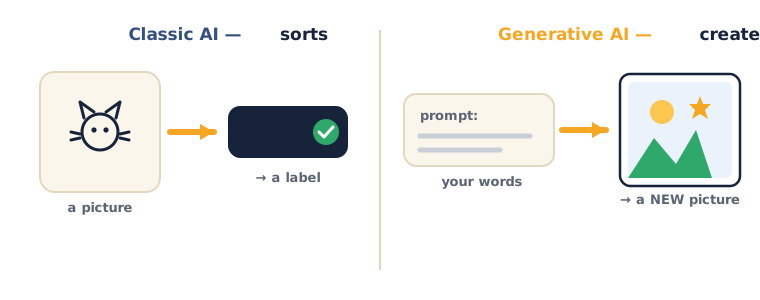
- Sorting AI: you show it a picture → it gives a label ("Cat").
- Generative AI: you give it words (a prompt) → it makes a new picture, story, or song.
⚠ Watch for the safety point: it's easy to think "if the AI made it, it must be true." Remember this early — generative AI can be confidently wrong and just make things up. It creates; it does not check the facts. A grown-up or a real book still decides what's true.
Think about this: "Which one gives you a label, and which one gives you a new thing?"
Teach — How does it create? It guesses what's next!
Here's how it works: generative AI writes by guessing the most likely next word, again and again. Look at the diagram:
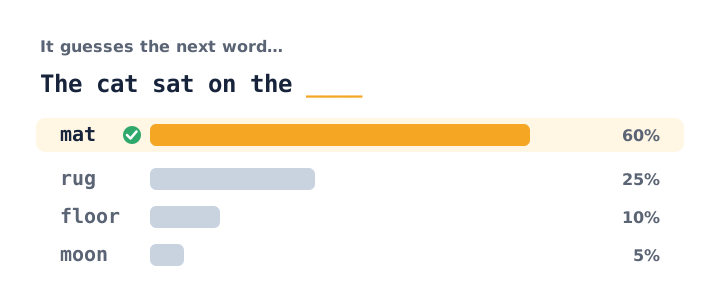
Here's what's happening:
- It learned patterns from millions of sentences.
- So for "The cat sat on the…" it thinks "mat" is most likely, "moon" is unlikely.
- It picks a next word, then guesses the next, and the next — string enough together and you get a whole story.
The big thing to notice: pictures work the same way, but with tiny dots instead of words. It's all guessing what comes next from patterns.
Think about this: "If it's just guessing the next likely word, could it ever guess wrong and write something silly or untrue?" (Yes — that's why we always check. This mistake even has a name: a hallucination.)
Activity 1 — Be a generative AI (≈10 min, no computer)
Sit in a circle (or go around the chat). Build one story one word at a time — each person adds the next word that makes sense: "The… robot… ate… my…"
- Ask as you go: "Why did that word fit? What word would not have made sense here?"
- Notice: that's exactly what the AI does — guessing the next word from patterns.
Activity 2 — Draw with AI (≈10 min)
Open AutoDraw. Try a scribble and watch the AI guess and finish the drawing.
- Notice: it learned from millions of doodles other people made.
- Ask as you play: "When did it guess right? When did it get confused? Why?"
Whether it's words or drawings, generative AI is guessing what comes next from the patterns it learned.
Check yourself
Try these questions:
- What does generative AI do that sorting AI doesn't? → It creates brand-new things (text, pictures, music) instead of just giving a label.
- How does an AI write a sentence? → By guessing the most likely next word, over and over.
- True or False: if the AI says it, it must be true. → False — it can make things up (a hallucination). Always check with a grown-up or a real book.
Wrap-up
- Finish the sentence: "Generative AI is…"
- Try this at home — Smart Checker: with a grown-up, ask a chatbot to "write a funny 4-line poem about a sleepy cat." Find one thing it got a little silly or wrong, and note it down. Bring it to Session 14.
Tips & extra challenges
- Watch out: don't think "if the AI made it, it's true." It guesses; it doesn't check — so a person always checks.
- Remember the safe-AI rules: always check what it says with a grown-up or a real book; never share private stuff (your name, school, address, photos); and always be kind in what you ask for and make. A grown-up drives the tool from their account — you watch and suggest.
- Want more? Try this — "Trap the guesser" mini-challenge: first, learn about tokens — the AI doesn't read whole words, it breaks text into little chunks called tokens and predicts them one at a time. Then: (1) Ask a chatbot the same question twice — did it answer differently? It adds a little randomness so it stays creative, not a copy machine. (2) Try to trick it: write a sentence where the easy next word is wrong on purpose (e.g. "The astronaut put on a warm woolly…" — most people guess "hat," but the story might need "spacesuit"). Watch it guess the likely word, not the right one. (3) Finally, write down one helpful and one risky way someone your age might use generative AI, and share with the class. Big idea: it guesses what's likely, which is not always what's true.
Vocabulary
| Term | Meaning |
|---|---|
| Generative AI | AI that creates new things |
| Prompt | The words you give the AI |
| Predict | Guess what comes next |
| Hallucination | When AI makes something up |
| Safe & kind | Using AI responsibly |
Resources
- AutoDraw — draw and let AI finish it (free, no login; main demo).
- Quick, Draw! — see AI recognise your doodles.
- For grown-ups: try a chatbot together with your child and talk about what it got right and wrong.
Practice set
Practise on your own — extra questions for class time or homework. Easy → hard. Answers are after the →.
- Sort or create? You show an AI a photo and it says "dog." Is that sorting AI or generating AI? → Sorting — it gave a label, it didn't make anything new.
- Sort or create? You type "draw a purple dinosaur eating pizza" and it makes a picture. Which kind is it? → Generating (creating) — words in, a brand-new picture out.
- Finish the guess. The AI reads "I poured milk on my…" — name a likely next word and a silly next word. → Likely: cereal. Silly: shoes / dragon (both possible, just far less likely from the patterns).
- Prompt drill (easy). Write a prompt asking an AI to make a short bedtime story about a brave turtle. → Example: "Write a short bedtime story about a brave turtle who saves his friends." (Any clear ask that names what to make.)
- Prompt drill (harder). Rewrite the vague prompt "make a poem" so it says what it's about, how long, and the mood. → Example: "Write a happy 4-line poem about a puppy learning to swim."
- Safe-use judgement. A chatbot writes that "penguins can fly to the moon." What do you do before you believe it? → Check it with a grown-up or a real book — the AI can be confidently wrong (a hallucination); it guesses, it doesn't fact-check.
Going deeper (optional)
Optional — for a curious group or a fast class.
- Why does it sometimes make things up? The AI never looks anything up the way we look in a book — it only guesses the next likely chunk from patterns it saw in training. So if lots of sentences online sound a certain way, it will happily continue in that style even when the facts are wrong. Try this with a grown-up: ask a chatbot to "tell me three facts about the planet Zorbon." There is no planet Zorbon — yet many chatbots will invent confident "facts." That shows, not tells, why we always check. It's the clearest way to make hallucination real.
- Words and pictures, same trick. A picture-maker guesses tiny dots (pixels) the way a story-maker guesses words. Watch a scribble in AutoDraw becoming a clean drawing, and notice: it isn't "understanding" your cat — it's matching your shape to millions of doodles and predicting the most likely finished picture. Same guessing engine, different pieces.
Common mistakes & fixes
If it's not working, check these:
- Mistake: "The AI said it, so it must be true." → Fix: It guesses the next likely word — it never checks facts. Always confirm with a grown-up or a real book before you trust it.
- Mistake: Typing your name, school, address, or a photo of yourself into the chatbot. → Fix: Never share private stuff with an AI. Keep prompts about the topic, not about you.
- Mistake: Asking the AI to do a homework question and copying the answer straight down. → Fix: Use it to learn — ask it to explain the idea, then do the work yourself in your own words.
- Mistake: Thinking sorting AI and generating AI are the same thing. → Fix: Sorting gives a label (in → "cat"); generating makes a new thing (words in → new story/picture).
- Mistake: Believing the AI "remembers" or "means" what it writes, like a person. → Fix: It has no feelings or memory of you — it's a very good pattern-guesser, not a friend who knows you.
What's next
Session 14 — Prompt Power: learn the secret to getting amazing results from AI — how to ask a clear, specific question.