
Session 14 — Prompt Power
Duration: 60 min · Format: live online
What you'll learn: by the end, you can say what a prompt is, write a clear four-part prompt, and use AI to learn rather than to copy answers.
Soft skill focus — Communication
Today you'll also grow Communication. A prompt is just clear communication — vague in gets vague out, specific in gets amazing out.
Try this: when you level up a lazy prompt, label the Task, Details, Style, and Audience out loud, then compare the before-and-after answers so you can see how clearer words changed the result.
Think about: What made your second prompt clearer than your first?
What you'll need
- A kid-safe generative-AI tool on screen, driven by a grown-up from their account — you suggest prompts and watch the before-and-after.
- The diagram below (you'll see it on screen — the four parts of a prompt).
- Paper and a pencil ready — you'll draft prompts before anything is typed.
Hook
Let's think about these — jump in with your answers (chat or unmute):
- "Imagine I ask a friend to draw an animal. What might they draw?"
- "Now I ask them to draw a happy blue elephant on a skateboard. Which picture can you already see in your head?"
Notice: the clearer the ask, the better the result — with friends and with AI. Today you learn prompt power.
Teach — A great prompt has 4 parts
Here's the key idea:
- A prompt is the instructions you give the AI.
- The best prompts include four things.
Look at this diagram and notice each part:
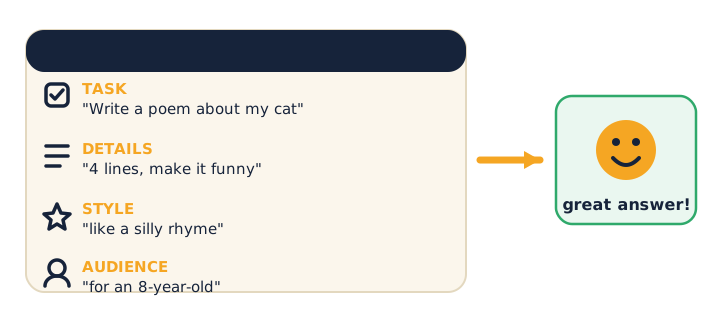
- Task — what you want: "Write a poem about my cat."
- Details — how much / what kind: "4 lines, make it funny."
- Style — the flavour: "like a silly rhyme."
- Audience — who it's for: "for an 8-year-old."
The big thing to notice: vague in → vague out; specific in → amazing out. The more clearly you ask, the better the answer.
⚠ Watch for the responsible-use point: a clearer prompt can make it easier to use AI to cheat (asking it to do your homework for you). Remember plainly — we use AI to learn and understand, not to copy answers. And AI can still be confidently wrong, so we fact-check what it tells us.
Think about this: "In the cat-poem prompt, which words are the Task? Which are the Style?"
Activity — Level up a lazy prompt (on paper first)
Here's a weak prompt: "tell me about space." Rewrite it using all 4 parts on paper, and label Task / Details / Style / Audience. If you're stuck, here's an example:
"Explain why the sky is blue (task), in 3 short bullet points (details), like a fun science friend (style), for a 9-year-old (audience)."
Then, on the shared screen, a grown-up types in one before prompt and its after prompt so you can compare.
- Ask yourself: "Which answer is better? Which parts made the difference?"
You didn't make the AI smarter — you made your question clearer. That's prompt power.
Check yourself
Try these questions:
- What is a prompt? → The instructions/words you give the AI to tell it what you want.
- Name two parts of a great prompt. → Any two of: Task, Details, Style, Audience.
- What happens with a vague prompt? → You usually get a vague, meh answer — be specific.
Wrap-up
- Finish the sentence: "A great prompt has…"
- Try this at home — Study Buddy: with a grown-up, write a prompt that turns AI into your study buddy — e.g. "Quiz me on my times tables, one question at a time, and cheer me on." Try it and note whether it helped you learn (not just gave you answers).
Tips & extra challenges
- Watch out: don't think "a better prompt = an easier way to copy answers." AI is a study buddy, not a homework machine — we use it to understand.
- Remember the safe-AI rules: fact-check what the AI says (it can be confidently wrong); never share private stuff in a prompt (your name, school, address); be kind in what you ask for. You suggest prompts; a grown-up types them from their account.
- Want more? Try this — "Prompt pro" mini-challenge: first, learn about few-shot prompting — show the AI an example of what you want ("Write it like this: 'Roses are red…'") so it copies the pattern. Then try three levels: (1) Take a plain prompt and add "explain step by step" so the AI shows its thinking — compare before and after. (2) Add a one-line example of the style you want and see how much closer the answer gets. (3) Write your best 4-part prompt to help you understand a topic you find tricky at school — not to get the answer, but to get a clear explanation. Read it out and let the class spot the Task / Details / Style / Audience. ("Prompt engineer" is a real paid job — writing great instructions for AI is a genuine skill.)
Vocabulary
| Term | Meaning |
|---|---|
| Prompt | The instructions you give AI |
| Specific | Clear and exact |
| Audience | Who the answer is for |
| Cheating vs learning | Copy answers vs use AI to understand |
| Fact-check | Making sure it's actually true |
Resources
- Machine Learning for Kids — build AI projects with text.
- AutoDraw — practise "creating with AI."
- For grown-ups: try prompt makeovers together — vague vs specific — and compare the answers.
Practice set
Practise on your own — extra questions for class time or homework. Easy → hard. Answers are after the →.
- Spot the part. In "Write a poem about my dog, 4 lines, funny, for a 6-year-old," which words are the Audience? → "for a 6-year-old."
- Vague or specific? Which gets a better answer: "tell me about dogs" or "give me 3 fun facts about puppies for a school poster"? → The second — specific in, amazing out.
- Prompt drill (easy). Add a Style to this Task-only prompt: "Explain how rain forms." → Example: "Explain how rain forms like a fun science friend."
- Prompt drill (medium). Turn "write about the ocean" into a full 4-part prompt (Task, Details, Style, Audience). → Example: "Write about the ocean (task), in 3 short facts (details), like an excited explorer (style), for a 7-year-old (audience)."
- Prompt drill (harder) — learn, don't cheat. You have a spelling test tomorrow. Write a prompt that makes the AI a study buddy instead of giving you the answers. → Example: "Quiz me on these 10 spelling words one at a time, and tell me if I'm right without showing the whole list."
- Safe-use judgement. Your prompt could include your full name and school to "make it personal." Should you? → No — never put private stuff in a prompt. Keep it about the topic, not about you.
Going deeper (optional)
Optional — for a curious group or a fast class.
- The "show me an example" trick (few-shot), worked live. With a grown-up, first ask "Write a two-line cheer about brushing teeth." Then ask again but add an example: "Write it like this: 'Brush, brush, morning and night — keep those teeth shiny and bright!'" Listen to how the example pulls the AI toward the rhythm and rhyme you wanted. The lesson: sometimes the fastest way to explain what you want is to show one, not just describe it.
- "Explain your thinking" for learning, not answers. Take a tricky idea (say, why we have seasons). Compare two prompts: "Why do we have seasons?" versus "Explain step by step why we have seasons, for a 9-year-old, and stop so I can guess before you tell me." The second turns the AI into a patient tutor that helps you think — exactly the "study buddy, not homework machine" habit we want. A great prompt doesn't just get a better answer, it can protect you from copying.
Common mistakes & fixes
If it's not working, check these:
- Mistake: Writing a one-word or vague prompt and expecting a great answer. → Fix: Vague in → vague out. Add the 4 parts: Task, Details, Style, Audience.
- Mistake: Using a sharp, clear prompt to get the AI to do your homework and copying it. → Fix: That's cheating and you don't learn. Ask it to explain or quiz you, then do the work yourself.
- Mistake: Believing the answer just because the prompt was good. → Fix: A clear prompt still gets confidently-wrong answers sometimes. Fact-check important things with a grown-up or a real book.
- Mistake: Putting private information (full name, school, address, photo) into a prompt to "make it personal." → Fix: Keep prompts about the topic. Never share private stuff with an AI.
- Mistake: Stuffing everything into one giant messy sentence. → Fix: Keep the four parts short and clear — the AI follows a tidy prompt better than a rambling one.
What's next
Unit 4 — Make Games: the bonus is done and you can now create with AI and stay a smart, safe, and honest builder. Next you start building real, playable games in Scratch — beginning with Session 15 — Make Your First Game.