
Course 1 — The Young Builders
Format: live online · Sessions: 21 × 60 min
The learning path:
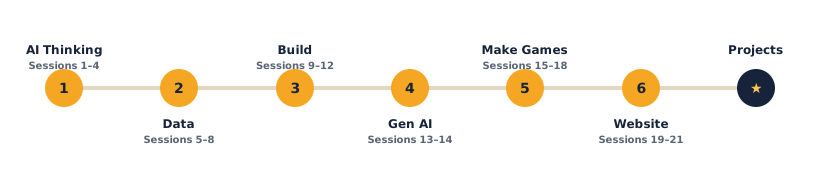
Welcome to The Young Builders — your first adventure into AI, data and building real things. Each lesson gives you something to learn, a project to make, and challenges to try. Open any lesson below to see exactly what you'll do.
What the course covers
- Unit 1 — AI Thinking (Sessions 1–4): what AI is, spotting patterns, and training a computer to recognise pictures.
- Unit 2 — Data & Problem-Solving (Sessions 5–8): collecting information, reading charts, and solving a real problem with data.
- Unit 3 — Build Something Real (Sessions 9–12): students turn an idea into a project and present it.
- Bonus — Generative AI (Sessions 13–14): meeting generative AI and learning to prompt it safely.
- Unit 4 — Make Games (Sessions 15–18): build real games in Scratch.
- Unit 5 — Make a Website (Sessions 19–21): build and publish a web page with HTML & CSS.
What students produce
- A trained image model, a small data project, and a build-and-present project.
- A course certificate at the end.
Soft skills — the human side of tech
Coding is only half the job. Every session also carries a Soft skill focus — it names one human skill, gives you a concrete way to grow it during the activity, and ends with a short reflection at the wrap-up. Across the course, students practise all eight of the skills that every tech career needs:
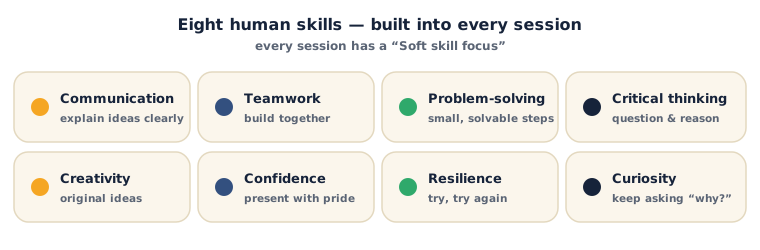
Look for the Soft skill focus box near the top of each session — it tells you which skill to grow that day, and exactly how.
Tools (all free)
Quick, Draw! · Teachable Machine · Google Sheets · Machine Learning for Kids — the exact links you need are in each session's Resources.
How each lesson works
Every lesson follows the same friendly flow: What you'll need → learn it → your turn (do the activity) → check yourself (questions with the answers) → a wrap-up and a try-at-home idea → then Tips & extra challenges, Vocabulary and Resources. Look for the ⚠ Watch out notes — they flag the tricky bits before they trip you up.
Sessions
Unit 1 — AI Thinking
- Session 1 — What is AI?
- Session 2 — Patterns Everywhere
- Session 3 — Teach the Computer
- Session 4 — Your First AI Project
Unit 2 — Data & Problem-Solving
- Session 5 — Be a Data Detective
- Session 6 — Charts & Graphs
- Session 7 — Data Solves Problems
- Session 8 — Tell a Data Story
Unit 3 — Build Something Real
- Session 9 — Think Like an Inventor
- Session 10 — Build Your Prototype
- Session 11 — Tell Your Story
- Session 12 — Showcase Day
Bonus — Generative AI
Unit 4 — Make Games
- Session 15 — Make Your First Game
- Session 16 — Score & Loops
- Session 17 — Levels & Challenge
- Session 18 — Design & Showcase Your Game
Unit 5 — Make a Website
Projects & Assessment
Each unit ends with a hands-on project + grading rubric, and the course finishes with a capstone. Use these to assess students and build their portfolio.
- Unit 1 Project — Train Your Own AI
- Unit 2 Project — Data Detective Report
- Unit 3 Project — Invent & Pitch
- Course Capstone — Build Something That Helps
- Certificate & Assessment Criteria
Ready? Open Session 1 — What is AI?