
Session 22 — Your AI Mini-Project & Showcase
Duration: 75 min · Format: live online
What you'll learn: by the end, you'll have built your own small image or text classifier, measured it honestly on data it never saw, named its limits, and presented it to the class in a clear structure.
Soft skill focus — Confidence & presenting
Today you'll also grow Confidence & presenting. Standing up to explain what your classifier does, how well it scores, and where it breaks is how a builder earns trust — honesty about limits is a strength, not a weakness.
Try this: in the showcase, give a calm 60–90 second talk hitting all five points — Question, Data, Method, Results, Limits — and applaud every other presenter, especially those who name a real failure.
Think about: what is one thing you'll do to present your next project even better?
What you'll need
- Google Colab → New notebook, ready for one of the two starter templates below.
- Your pick of track: vision or text. Both reuse code you already wrote in Sessions 19–21.
- Know your slot in the showcase running order so you're ready when it's your turn.
Hook
Think about these questions:
- For four sessions you learned how machines see and read. Today you build one. Vision or text — which is calling you?
- What's one real thing you'd love a small classifier to sort — doodles, movie reviews, spam, emojis, plant photos?
Here's the deal: today you're the builder, not the audience. The goal isn't a perfect model — it's a working one you can explain honestly, limits and all.
Teach — Pick your track + the honesty checklist
Here are the two tracks — both reuse code you already wrote:
- Vision track — classify images (the digits from Session 20, or your own two-category Teachable Machine model, exported and demoed).
- Text track — classify text (a sentiment classifier like Session 21, on your own labelled sentences: reviews, messages, spam vs not).
The honesty checklist — every project must answer all five:
- Question — what are you classifying, and into what categories?
- Data — where did your examples come from, how many, and is it balanced?
- Method — what turns your input into numbers, and what model did you train?
- Results — your test-set accuracy, in a number.
- Limits — one clear example it gets wrong, and why.
Key point: point 5 is not optional and not a weakness. Naming what your model gets wrong is what makes you a trustworthy builder — the whole message of this unit.
⚠ Watch for: the urge to hide or skip the failures. A project that honestly shows its limits beats one that pretends to be perfect. Every real AI has limits; the skill is knowing yours.
Build — Your mini-project in Colab
Open Google Colab → New notebook, pick a track, and start from the matching template. Get to a working model fast, then push on to the honest evaluation.
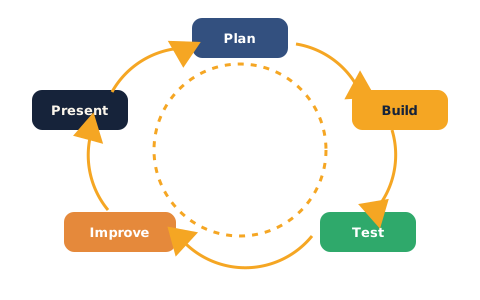
Your project moves through a cycle: plan, build, test, improve, present — your AI mini-project cycle.
Vision starter (type and run this in Colab):
from sklearn.datasets import load_digits
from sklearn.model_selection import train_test_split
from sklearn.linear_model import LogisticRegression
from sklearn.metrics import accuracy_score, confusion_matrix

digits = load_digits()
X, y = digits.data, digits.target

X_train, X_test, y_train, y_test = train_test_split(
    X, y, test_size=0.2, random_state=1)

model = LogisticRegression(max_iter=10000)
model.fit(X_train, y_train)

preds = model.predict(X_test)
print("Accuracy:", accuracy_score(y_test, preds))     # your Results number
print(confusion_matrix(y_test, preds))                # find a confusion to explain
Text starter (type and run this in Colab):
from sklearn.feature_extraction.text import CountVectorizer
from sklearn.model_selection import train_test_split
from sklearn.linear_model import LogisticRegression
from sklearn.metrics import accuracy_score

# Replace with YOUR labelled examples — aim for 16+ and keep it balanced
texts  = ["I love this", "So much fun", "Absolutely great", "Best ever",
          "I hate this", "So boring", "Really terrible", "Worst ever"]
labels = ["positive", "positive", "positive", "positive",
          "negative", "negative", "negative", "negative"]

X_train, X_test, y_train, y_test = train_test_split(
    texts, labels, test_size=0.25, random_state=1)

vectorizer = CountVectorizer()
X_train_v = vectorizer.fit_transform(X_train)
X_test_v  = vectorizer.transform(X_test)              # SAME vectorizer

model = LogisticRegression()
model.fit(X_train_v, y_train)
print("Accuracy:", accuracy_score(y_test, model.predict(X_test_v)))
Do these three things (this is the real work):
- Make it yours — change the data (your own sentences, or a Teachable Machine model), the categories, or the test example.
- Get the Results number — print test-set accuracy. No number, no project.
- Find one honest failure — a misread image or a fooled sentence — and be ready to say why.
Watch out for the recurring traps from earlier sessions: measuring on training data (must be X_test), reshape(8, 8) for showing a flattened image, and fit_transform vs transform for text.
Showcase — Present your project
Give a 60–90 second talk following the five-point checklist, sharing your Colab screen for a quick live demo.
Hit all five out loud: Question → Data → Method → Results (the number) → Limits (the honest failure).
Be ready for an honesty question, such as:
- What's one input it would get wrong?
- Was your data balanced, or did one category have more examples?
- Would you trust this for something important? Why or why not?
The pattern across talks: the best projects aren't the ones with the highest accuracy — they're the ones whose builder can clearly explain what it does, how well, and where it breaks.
Check yourself + wrap-up
Can you answer these? The answer follows each arrow.
- Why must you report test-set accuracy, not training accuracy? → Training accuracy is data the model already saw; only the held-out test set honestly shows how it does on new inputs.
- Why is naming a limitation part of a good project, not a flaw? → Every real model has limits; stating them makes your work trustworthy and shows you understand it.
-
What's the shared recipe behind both tracks? → Turn the input (image or text) into numbers, then
train / test / .fit / .predict— the same pattern from Unit 1. -
You've built and honestly evaluated a real AI classifier — vision or language — from scratch. That's a real accomplishment.
- Keep for your portfolio: save the Colab notebook and a screenshot of the Results number and one honest failure — it's proof of a complete, honest project.
Tips & extra challenges
- Protect your build time: keep the planning short. You learn most by building and presenting today.
- Common blockers: measuring accuracy on training data; forgetting
reshape(8, 8)to show an image; usingfit_transformon test/new text; too few or unbalanced text examples so accuracy is meaningless. A model that's "100% accurate" on 8 sentences is a teaching moment, not a success. - Two honest project sizes are fine: even if you only reuse the digits or sample-sentence starter but nail the five-point honest write-up, you've met the goal. Customisation is a bonus, not a requirement.
- Want more? Try this — the fairness/limits paragraph: write a short "limitations" paragraph like a real project report: name one group or input type your model saw little data about, one situation it would fail in, and one concrete way you'd fix it (more/balanced data, more categories, a model that reads word order). This mirrors the honest project report from Unit 1 and is exactly what the Projects & Assessment section rewards.
Vocabulary
| Term | Meaning |
|---|---|
| Mini-project | A small, complete build you can demo and explain |
| Evaluation | Measuring honestly how well a model does |
| Limitation | A situation where the model fails or is unreliable |
| Balanced data | Roughly equal examples per category |
| Demo | Showing your model working live |
Resources
- Google Colab — where you build and demo (free).
- Google — Teachable Machine — a no-code image classifier for the vision track.
- scikit-learn — user guide — reference for
.fit,.predict, and metrics. - Kaggle — free datasets — real image and text data for a bigger version later.
Practice set
Practise on your own — planning and honesty tasks to sharpen the project. Do these while building or as a write-up; the answer follows each arrow.
1. Frame it: in one sentence each, state your project's Question and its categories. → e.g. "Is a movie review positive or negative?" — categories: positive, negative.
2. Balance check: you have 20 positive and 4 negative examples. What's the risk, and the fix? → The data is unbalanced, so the model leans positive and may look accurate while failing on negatives; add more negative examples.
3. Spot the cheat: a classmate reports 100% accuracy measured on the same data they trained on. Is it trustworthy? → No — that's the training set; report accuracy on the held-out test set.
4. Fix the bug (text): why is this wrong for the test set? → fit_transform re-learns the vocabulary from the test text; use vectorizer.transform(X_test) so the columns match the trained model.
X_test_v = vectorizer.fit_transform(X_test) # wrong
5. Write your Results line: you have preds and y_test. Write the line that prints your accuracy. → from sklearn.metrics import accuracy_score then print(accuracy_score(y_test, preds)).
6. Name a limit (harder): give one specific input your model would get wrong and explain why. → e.g. a sarcastic review ("great, another delay") — bag of words counts "great" and misses the tone; or a messy 4 that looks like a 9.
7. Design question (hardest): you want to grow this into a trustworthy tool. Name two concrete improvements. → e.g. collect more balanced data; add more categories; keep a human in charge of important decisions; use a model that reads word order or richer image features; report per-category accuracy, not just overall.
Going deeper (optional)
Ready for more? Combine both worlds, or measure your model per-category to make your honesty concrete. Print the score for each category so a hidden weak spot can't hide behind a good overall number:
from sklearn.metrics import classification_report

# for the text project (preds and y_test already exist)
print(classification_report(y_test, model.predict(X_test_v)))
Read the report: which category does the model handle worst, and is the training data for that category smaller or messier? Here's the closing lesson of the whole unit — a single accuracy number can flatter a model, but breaking the score down by category (and looking at real failures) is what an honest builder does. Challenge yourself to write the one improvement you'd make first, backed by what the report shows.
Common mistakes & fixes
If it's not working, check these:
- Mistake: reporting accuracy measured on the training data. → Fix: report the test-set number — the only honest measure of new performance.
- Mistake: skipping or hiding the limitations. → Fix: every project must name one real failure and why — that's what makes it trustworthy, not weaker.
- Mistake: unbalanced or tiny data giving a meaningless score. → Fix: aim for enough balanced examples per category; a great score on 8 items proves little.
- Mistake (text): using
fit_transformon new or test text. → Fix:fit_transformonce on training data, thentransformeverywhere else. - Mistake (vision): trying to show a flattened row as an image. → Fix:
reshape(8, 8)beforeimshow— 64 numbers must fold back into a grid.
What's next
This is the final learning session of Course 2 — you move to the Projects & Assessment section, where you pull everything together into a capstone project and earn your certificate.