
Session 2 — Playing with Data
Duration: 75 min · Format: live online
What you'll learn: by the end, you can store many values in a list, loop through them, and compute a total, an average, and the maximum.
Soft skill focus — Problem-solving
Today you'll also grow Problem-solving. A loop that builds a total is a vague goal ("add these up") turned into precise, repeatable steps the computer can follow.
- Try this: when you hit the "biggest" bug — the loop that only ever prints the last number — don't just guess at a fix. Trace the value of the variable after each pass, one step at a time, until you see exactly where it goes wrong.
- Think about: how did you break "find the biggest number" into steps a loop could actually do?
What you'll need
- A Google account and Google Colab → New notebook, where you'll type the list and loop live.
- Reopen last session's Colab notebook (or open a fresh one) so you can code along.
Hook
Think about this:
- Last session you stored one value in a variable. What if you had 500 test scores — would you make
score1,score2… all the way toscore500?
Here's the idea: data science means handling thousands of values at once. Today you learn the two tools that make that possible — a list holds all the values in one place, and a loop processes them in just a few lines.
Teach — A list holds many values
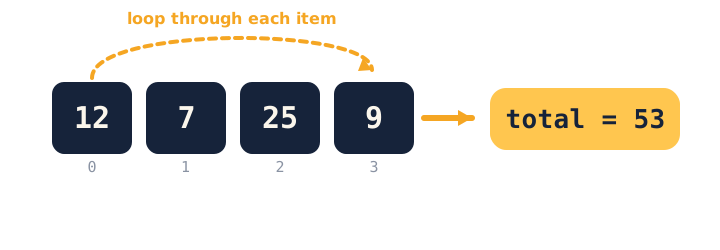
A list stores many values in order. Each value has a position called an index, and indexes start at 0, not 1.
Look at this diagram — trace the loop visiting each number to build a total:
Type and run this in Colab:
scores = [12, 7, 25, 9]

print(scores[0])      # 12  (first item)
print(len(scores))    # 4   (how many)
Ask yourself: "Why does scores[0] give 12 and not 7?" (Answer: lists start counting at 0, so index 0 is the first item.)
⚠ Watch for the off-by-one trap: it's tempting to expect
scores[1]to be the first item. It's actually the second. Counting from 0 is the single most common list mistake — watch for it early.
Teach — A loop repeats for every item
A for-loop runs the same steps for each item — whether the list has 4 numbers or 4 million. Notice the indentation: the indented line runs once per item.
Type and run this in Colab:
scores = [12, 7, 25, 9]
total = 0

for s in scores:
    total = total + s     # add each score to the total

print("Total:", total)          # 53
print("Average:", total / len(scores))   # 13.25
print("Highest:", max(scores))  # 25
Walk through one pass of the loop in your head: total starts at 0, then becomes 12, then 19, then 44, then 53.
Ask yourself: "What would happen if I put print("Total:", total) inside the loop, indented?" (Answer: it would print the running total four times, not once.)
⚠ Watch for: Python has handy shortcuts —
sum(scores),max(scores),min(scores)— and it's tempting to reach for them straight away. That's fine, but make sure you can also explain how the loop builds the total underneath. That's what makes you a real coder.
Activity — Analyse your own data
Open Google Colab and analyse a real list from your own life.
Type and run this in Colab:
sleep = [8, 7, 6, 9, 7, 10, 8]
Then:
- Use a loop (or
sum) to print the total and the average. - Print the most and least with
max()andmin(). - Bonus: count how many nights you slept 8 or more hours using a loop and an
if.
Watch out for the classic "biggest" bug. Here's some broken code — can you work out why it only ever prints 9?
scores = [12, 7, 25, 9]
for s in scores:
    biggest = s
print(biggest)
Why is biggest always the last number? Here's the fix: biggest is overwritten every loop, so it ends on the last item. To find the real biggest, start biggest = scores[0], then inside the loop if s > biggest: biggest = s. (Or just use max(scores).)
Check yourself
Try these — then check your answers:
- What is
scores[0]inscores = [12, 7, 25, 9]? →12— lists start counting at 0, so index 0 is the first item. - What does a for-loop do? → Runs the same steps for every item in a list, automatically.
- How do you get the average of a list? →
sum(list) / len(list)— the total divided by how many items.
Wrap-up
- In one sentence, explain why a loop beats writing
score1 … score500. - Try this at home — Real numbers from your life: collect a real list of numbers (steps per day, minutes of reading, goals scored). In Colab, print the total, average, highest, and lowest — plus one sentence about what you notice. Bring it to Session 3.
Tips & extra challenges
- Watch out: it's easy to assume "the first item is index 1." In Python it's index 0 — this trips up almost everyone at first.
- Common coding errors: forgetting to indent the line inside the
forloop (or indenting inconsistently); startingtotalat nothing instead of0; overwriting a variable inside the loop instead of comparing (the "biggest" bug above); dividing by the wrong count. - Want more? Try this — real-data explorer mini-project: it's time for real data. Pandas turns a data file into a DataFrame — a table you can code with. Load the penguins dataset below, then treat it like this session's list work scaled up: pick one numeric column and print its total, average, highest, and lowest using Pandas (
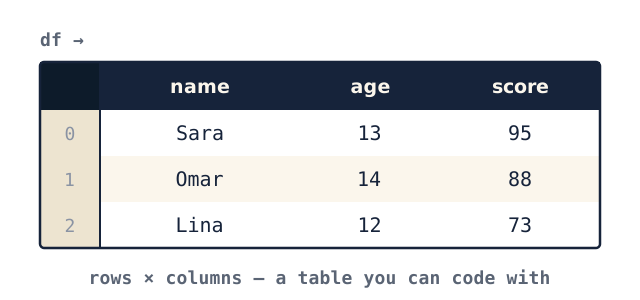
.sum(),.mean(),.max(),.min()). Your goal is to write one sentence describing what you found (e.g. "the heaviest penguin is 6300 g"), then repeat for a second column — a genuine first data analysis. Look at this diagram, then run the code:
import pandas as pd

# load a real, public dataset (thousands of rows!)
url = "https://raw.githubusercontent.com/mwaskom/seaborn-data/master/penguins.csv"
df = pd.read_csv(url)

print(df.shape)              # (rows, columns)
df.head()                    # peek at the first 5 rows
print(df["body_mass_g"].mean())   # average penguin mass
Real data has gaps — df = df.dropna() removes empty rows, then check df.shape again. Try printing the average of another column, and the count of each species with df["species"].value_counts().
Vocabulary
| Term | Meaning |
|---|---|
| List | Many values stored in order |
| Index | An item's position (starts at 0) |
| Loop | Repeating steps for each item |
| Average / Mean | Total ÷ how many |
| DataFrame | A table of data in Pandas |
Resources
- Google Colab — run your code.
- W3Schools — Python Loops — clear examples.
- Kaggle — Pandas (free course) — the next level for fast finishers.
- Our World in Data — free real datasets to download.
Practice set
Practise on your own — extra exercises on lists, indexing, loops, and totals/averages/max, easy to hard.
1. Predict the output: for nums = [4, 8, 15, 16, 23], what does print(nums[1]) show, and what does print(len(nums)) show? → 8 (index 1 is the second item) and 5.
2. Fix the index: you want the first item but wrote nums[1]. → Fix: lists start at 0, so the first item is nums[0].
3. Write a loop that prints every item in pets = ["cat", "dog", "fish"] on its own line. →
for pet in pets:
    print(pet)
4. Build a total with a loop (no sum): add up prices = [3, 5, 2, 10] and print it. → start total = 0, then loop adding each; answer 20.
prices = [3, 5, 2, 10]
total = 0
for p in prices:
    total = total + p
print(total)   # 20
5. Average: for temps = [20, 22, 19, 25, 24], print the average. → sum(temps) / len(temps) gives 22.0.
6. Count with if (harder): using a loop, count how many scores in [55, 90, 72, 40, 88] are 60 or higher. → answer 3.
scores = [55, 90, 72, 40, 88]
count = 0
for s in scores:
    if s >= 60:
        count = count + 1
print(count)   # 3
7. Fix the "biggest" bug (hardest): why does this always print 9, and how do you fix it? → biggest is overwritten every pass, so it ends on the last item. Fix: start biggest = scores[0] and compare inside the loop with if s > biggest: biggest = s (or just max(scores)).
scores = [12, 7, 25, 9]
for s in scores:
    biggest = s
print(biggest)   # bug: prints 9
Going deeper (optional)
If you're flying through this, here's a bonus — a loop can build a new list, not just a running number. Say we want to convert a week of hours slept into "enough / not enough":
sleep = [8, 7, 6, 9, 7, 10, 8]
labels = []                 # start with an empty list

for hours in sleep:
    if hours >= 8:
        labels.append("enough")
    else:
        labels.append("short")

print(labels)
append adds one item to the end of a list each pass, so the loop turns seven numbers into seven labels. This is the exact idea behind creating a new column from an old one in Pandas — you're learning the pattern before you meet the shortcut. Try counting how many "enough" nights there were by looping over labels.
Common mistakes & fixes
- Mistake: thinking the first item is
list[1]. → Fix: indexes start at 0, so the first item islist[0]and the last of a 4-item list islist[3]. - Mistake: forgetting to indent the body of a
forloop, causing anIndentationError. → Fix: the line(s) that repeat must be indented (4 spaces) under theforline. - Mistake: starting a total at nothing or building it before the loop, e.g. no
total = 0. → Fix: createtotal = 0before the loop, then add inside it. - Mistake: putting
print(total)inside the loop when you want one final answer. → Fix: move theprintoutside (unindent it) so it runs once after the loop finishes. - Mistake: overwriting instead of comparing when finding the biggest (
biggest = severy pass). → Fix: compare first:if s > biggest: biggest = s, after seedingbiggest = scores[0].
What's next
Session 3 — Your First Prediction: you'll build a real model that learns a pattern from data and predicts a new value with scikit-learn.