
Session 14 — Build with Generative AI
Duration: 75 min · Format: live online
What you'll learn: by the end, you can write strong prompts using pro patterns, design a chatbot with a system prompt, and use generative AI honestly, safely, and with integrity.
Soft skill focus — Critical thinking
Today you'll also grow critical thinking. A fluent AI answer is not proof it's true — using generative AI well means questioning it and checking it before you rely on it.
Try this: when your study-buddy bot gives an answer, fact-check one important claim against a trusted source and decide whether it's safe to trust.
Think about: When did you decide not to trust the AI, and what made you check?
What you'll need
- A chatbot / LLM open in a tab (one that supports custom instructions / a "custom GPT" / a Poe bot) on a school or grown-up account — you'll set up and test a system prompt live.
- For the Python path: a free Google AI Studio API key (aistudio.google.com) and a Colab notebook open, so you can run the code.
- The two diagrams below (prompt recipe and chatbot flow) to look at as you work.
- Paper and a pencil for drafting your system prompts.
Hook
Read both of these prompts. Which do you think gets the better result?
- "help me"
- "You are a patient tutor. Quiz me on Newton's laws, one question at a time, and explain my mistakes."
Make your guess, then here's the reveal: same AI — wildly different results. The skill isn't in the AI; it's in the asking. Today you'll learn the patterns pros use, build your own chatbot, and — most importantly — use it honestly and safely.
Prompt-engineering patterns
A great prompt goes far beyond one line. Pros stack techniques. Here's the recipe:
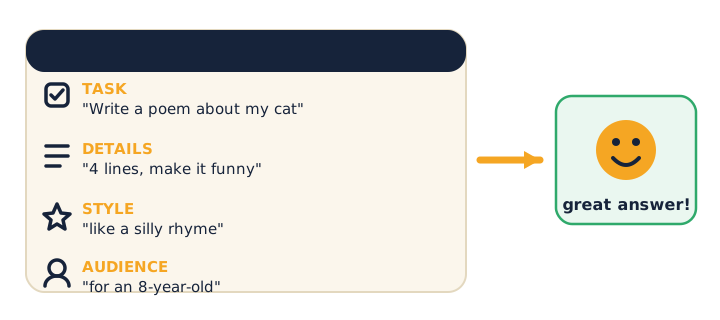
Here are the patterns — try one or two live in your chatbot as you read:
- Role / persona: "You are a strict but kind physics tutor."
- Context: give it the background it needs.
- Examples (few-shot): "Format answers like this: …" — show it what you want.
- Step by step: "Think through it step by step" — better reasoning.
- Output format: "Answer in a 3-row table."
⚠ Watch for lazy prompting: it's tempting to expect the AI to read your mind, then blame it for a bad answer. The fix is yours — add role, context, and format. A vague prompt gets a vague answer.
Quick challenge: take the prompt "write about dogs" and add a role, a format, and an audience to it.
Design a chatbot
A chatbot is a system prompt (its personality + rules) plus a back-and-forth conversation. Here's the flow:
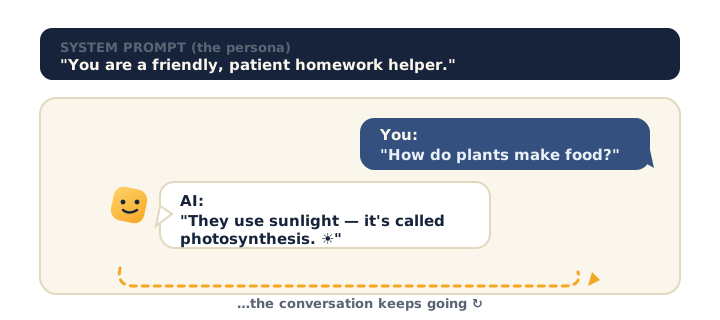
- The system prompt sets who it is and what it must and mustn't do — it runs behind every reply.
- Want it to use your notes? Give it your text inside the prompt — a simple version of RAG ("retrieval-augmented generation": grounding the AI in real, trusted data instead of its memory).
⚠ Watch for privacy here: grounding a bot in "your data" must never mean pasting personal or sensitive information (real names, addresses, passwords, other people's data). Ground it in safe text only.
Think it through: what one rule would you put in a study-buddy bot's system prompt so it helps you learn instead of just handing you answers?
Use it responsibly
This is the most important part of the whole module. Generative AI is powerful — which makes using it well a responsibility. Keep all four of these in mind:
- Fact-check everything important. It can hallucinate (Session 13).
- Integrity: use AI to learn, draft, and get unstuck — never to submit its work as your own. If you used AI, say so (cite it). Competitions and schools expect honesty.
- Privacy: never paste personal or sensitive info — names, addresses, passwords, or other people's data.
- Bias: it learned society's biases, so question its outputs, especially about people.
⚠ Watch for the academic-integrity line: the boundary is using AI to learn vs passing off AI's work as your own. The first is smart; the second is cheating. When in doubt, disclose how you used it — that's what real teams and judges respect.
Quick check: you used AI to help write a project. What are the two things you must do before you hand it in? (Answer: fact-check it, and disclose/cite that you used AI.)
Activity — Build a study-buddy bot
Start with Path A. If you're ready for code, try Path B too.
Path A — No code (everyone). In a chatbot that supports custom instructions / a "custom GPT" / a Poe bot, set a system prompt. Here's a starter to type in and then adapt:
"You are my Year-8 science study buddy. Quiz me one question at a time, wait for my answer, then explain gently. Never give the full answer first."
Use it for about 5 minutes, then tweak the system prompt until it behaves the way you want. Notice which change makes the biggest difference.
Path B — Python (Builders). With a free API key from Google AI Studio (ask a grown-up), open Colab.
Type and run this in Colab:
import google.generativeai as genai
genai.configure(api_key="YOUR_KEY")          # keep keys private!
model = genai.GenerativeModel("gemini-1.5-flash")

system = "You are a patient study buddy. Explain simply, then ask me one question back."
answer = model.generate_content(system + "\nStudent: How do vaccines work?")
print(answer.text)
⚠ Watch for this: the comment says it all — keep your API key private. A key is like a password; never paste it into chat, a shared doc, or a screenshot.
Check yourself
Answer these, then check yourself against the arrows:
- What does a system prompt do? → It sets the chatbot's persona and rules — who it is and how it behaves.
- What is "few-shot" prompting? → Giving the AI examples of what you want, so it copies the format and style.
- You used AI to help write a project. What must you do? → Fact-check it, and disclose/cite that you used AI — never pass it off as fully your own.
- True or False: it's fine to paste a friend's home address into a chatbot to plan a visit. → False — never share personal or sensitive data with an AI.
Wrap-up
- Look back at your system prompt and name the one change that improved it most.
- Try this at home — Portfolio chatbot: design and test a chatbot persona for a real need (revision coach, coding helper, idea generator). Write its system prompt, try it, note one improvement you made — and add a line stating how you used AI and how you checked it. Save it to your portfolio.
- Look how far you've come: from training tiny classifiers to commanding generative AI — responsibly.
Tips & extra challenges
- Watch out: it's easy to think "a better AI gives better answers." Not quite — the prompt is what changes. The same model gives vague answers to vague asks and strong answers to well-structured ones (role, context, examples, format).
- Integrity: the academic-integrity boundary matters — AI is a tool to learn and draft with, not a ghostwriter to submit. Disclosure and citation are the honest default; schools and competitions expect it.
- Hallucination + privacy: fact-check every important claim; never put personal or sensitive data into a prompt; keep your API keys private.
- Bias: the model can repeat society's biases, so its outputs about people deserve extra scrutiny.
- Want more? Try this — "Ship a tuned bot" mini-project: build, ground, test, and document a chatbot the way a real team would. (1) Ground it (mini-RAG). Paste a short, safe trusted source into the system prompt and add "answer ONLY from this text; if it's not here, say you don't know," then ask a question the text doesn't cover and confirm the bot refuses to invent — compare against the same bot answering from memory to see hallucinations drop. (2) Evaluate systematically. Write 5 test questions with known answers, run them through the bot, and score each pass/fail in a small table — the way real AI teams measure quality before shipping. Tweak the system prompt and re-run to see the score change. (3) Write the model card. In three lines, document the bot: its purpose, its one biggest limitation, and the rule that keeps it safe (e.g. never asks for personal data). (4) Ethics line for the report. Draft the sentence you'll add to any competition project stating how AI was used and how you checked it. Keep the guardrails throughout: no personal or sensitive data in any prompt, API keys stay private, and every factual claim gets verified.
Vocabulary
| Term | Meaning |
|---|---|
| Prompt engineering | Writing effective instructions for AI |
| System prompt | Sets the chatbot's persona and rules |
| Few-shot | Prompting with examples |
| RAG | Grounding AI in your own trusted data |
| Integrity | Honest, cited use of AI |
Resources
- Google AI Studio — free playground + API (with a grown-up).
- Learn Prompting — patterns, examples, best practices.
- Google — Be Internet Awesome / AI literacy — responsible AI use.
Practice set
Practise on your own to strengthen prompt engineering, chatbots, and responsible use — easy to hard. Answers follow the arrow (→). The Python tasks are for Builders with a grown-up and a free API key.
1. (Easy) Name the four ingredients of a strong prompt from the recipe diagram. → Task, details, style, audience (plus optional role, examples, and output format).
2. (Easy) What does a system prompt do? → It sets the chatbot's persona and rules — who it is and how it must behave — and runs behind every reply.
3. (Medium · prompt-improvement drill) Improve "write about dogs" by adding a role, an audience, and an output format. → e.g. "You are a friendly vet. Write 3 tips on caring for a puppy for a 9-year-old, as a short numbered list."
4. (Medium · prompt-improvement drill) Add a few-shot example to this prompt so the model copies your format: "Turn these facts into flashcards." → e.g. "Format each as 'Q: … / A: …'. Example — Q: Capital of France? A: Paris. Now do these: …"
5. (Medium) A friend wants to plan a surprise party and asks a chatbot, pasting in the guests' home addresses. What's wrong, and what should they do instead? → Sharing personal/sensitive data with an AI is unsafe; keep addresses out and ask only for general planning ideas.
6. (Hard) You used AI to help write a competition project. List the two things you must do before submitting, and why. → Fact-check every important claim (it can hallucinate) and disclose/cite that you used AI (integrity — never pass its work off as fully your own).
7. (Hard · prompt-improvement drill) Rewrite a study-buddy system prompt so it helps you learn rather than handing over answers. → e.g. "You are my science study buddy. Quiz me one question at a time, wait for my answer, then explain gently. Never give the full answer first."
8. (Builder · Python) Fill the blanks so this calls the model with a persona. Why is the comment important?
import google.generativeai as genai
genai.configure(api_key="YOUR_KEY")   # keep keys private!
model = genai.GenerativeModel("gemini-1.5-flash")

system = "You are a ____ that explains simply, then asks one question back."
reply = model.____("How does gravity work?")
print(reply.text)
→ Fill system with a persona (e.g. "patient tutor") and use model.generate_content(system + "\nStudent: How does gravity work?"). The comment matters because an API key is like a password — never paste it into chat, a shared doc, or a screenshot.
9. (Builder · Python · Hard) Ground the model in trusted text so it doesn't invent facts (a tiny RAG). Complete the prompt string:
source = "Our club meets every Tuesday at 4pm in Room 12."
question = "When does the club meet?"
prompt = f"Answer ONLY using this text: {source}\n\nQuestion: {question}"
print(model.generate_content(prompt).text)
→ The instruction "Answer ONLY using this text" grounds the reply in a trusted source, cutting hallucinations. Use only safe, non-personal text as the source.
Going deeper (optional)
Optional enrichment tied to the lesson — no new tools, just the chatbot or Colab you already have open.
- Few-shot, shown side by side. Run the same task twice. First zero-shot: "Turn these three facts into quiz questions." Then few-shot: add one worked example first — "Fact: The Sun is a star → Q: Is the Sun a star or a planet?" — then ask for the rest. You'll see the few-shot version match the format far more reliably. The lesson: showing beats telling — one good example often does more than a paragraph of instructions.
- A simple RAG, by hand. Retrieval-augmented generation, put plainly: instead of trusting the model's memory, you hand it the right text and tell it to answer only from that. Try two runs of a niche question — once from memory (watch it guess or hallucinate), once with a short trusted paragraph pasted in and "answer only from this text." The grounded answer is tighter and checkable. Keep the guardrail in mind: the pasted source must be safe, public, non-personal text — RAG grounds the bot, it is never an excuse to feed it private data.
Common mistakes & fixes
If it's not working, check these:
- Mistake: Expecting the AI to read your mind, then blaming it for a weak answer (lazy prompting). → Fix: The fix is yours — add a role, context, examples, and an output format; a vague prompt earns a vague answer.
- Mistake: Pasting personal or sensitive data — real names, addresses, passwords, other people's details — to "help" the bot. → Fix: Never share private data with an AI; ground it only in safe, public text.
- Mistake: Hard-coding or sharing an API key in chat, a screenshot, or a shared doc. → Fix: Treat the key like a password — keep it private, and never commit or paste it anywhere others can see.
- Mistake: Submitting AI's output as your own work. → Fix: Use AI to learn, draft, and get unstuck — then do the work yourself and disclose/cite that you used it; that's the honest default schools and competitions expect.
- Mistake: Trusting a fluent chatbot answer without checking it. → Fix: Fact-check every important claim against a trusted source before you use or hand it in — fluent wording is not proof of truth.
What's next
Unit 4 — Build a Web App: with generative AI understood and used responsibly, you'll now learn to build for the web. Next you meet HTML, CSS & JavaScript and start building a real app — beginning with Session 15 — The Web Stack.