
Session 21 — How Machines Read
Duration: 75 min · Format: live online
What you'll learn: by the end, you can explain how a sentence is split into tokens and counted into numbers, build and test a small sentiment classifier in Python, and name real limits like sarcasm and unseen words.
Soft skill focus — Critical thinking
Today you'll also grow Critical thinking. A model that counts words can look clever, so the real skill is questioning it — spotting that it has no idea what "love" means and can be fooled by sarcasm or a word it never saw.
Try this: during the stress-test, push past "it works" — deliberately try to break the classifier with sarcasm and unknown words, then explain the reason it failed rather than just noting that it did.
Think about: when a model gives a confident answer, what makes you decide whether to trust it?
What you'll need
- Google Colab → New notebook. You'll build the text classifier here. (scikit-learn is already in Colab — no setup.)
- Last session images became rows of numbers; today words become numbers too, then it's the same
.fit()/.predict()recipe from Unit 1. - Optional: for a wow-moment at the end, the Hugging Face
pipelinedemo (in Going deeper) — it needs a one-timepip install, so test it beforehand.
Hook
Think about these questions:
- An app flags a review as happy or angry before a human reads it. How could a computer possibly "read" the feeling?
- A computer only does math on numbers. So how do you turn the sentence 'I love this' into numbers?
Here's the idea: computers can't read words — but they can count them. Today you'll turn sentences into numbers and train a model to tell happy text from unhappy text — then find exactly where it gets fooled.
Teach — Text becomes tokens, then numbers
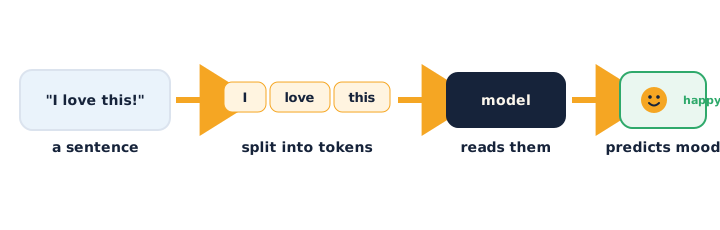
The first step in every language model is tokenizing — chopping text into pieces called tokens (here, simply words). Then each token becomes a number the computer can count.
This diagram shows how text is split into tokens, counted into numbers, and read by a model that predicts the mood:
Type and run this in Colab:
text = "I really love this movie"

tokens = text.lower().split()   # lowercase, then split on spaces
print(tokens)                   # ['i', 'really', 'love', 'this', 'movie']
print("Number of tokens:", len(tokens))
Each move: lower() so Love and love count as the same word, split() to break on spaces. Now see how a computer turns a whole set of sentences into a table of word counts — the "bag of words":
from sklearn.feature_extraction.text import CountVectorizer

texts = ["I love this", "I hate this"]
vectorizer = CountVectorizer()
counts = vectorizer.fit_transform(texts)

print("Words it found:", vectorizer.get_feature_names_out())
print(counts.toarray())         # one row per sentence, one column per word
Read the grid: each column is a word, each row is a sentence, each number is how many times that word appeared. The sentence is now just numbers.
Ask yourself: why lowercase everything first? (So Love, love, and LOVE are treated as the same word instead of three different ones.)
⚠ Watch for the #1 misconception: it's tempting to think the model understands the words. It doesn't — it only counts them. It has no idea what "love" means; it just learns that the count of certain words goes with "positive."
Teach — A bag of words can be classified
Once every sentence is a row of word-counts, text classification is the same train/test/.fit() recipe from Unit 1 — the features are just word counts instead of pixels. You give the model labelled examples (positive / negative) and it learns which words lean which way.
Type and run this in Colab:
from sklearn.feature_extraction.text import CountVectorizer
from sklearn.linear_model import LogisticRegression

texts = ["I love this", "This is great", "Absolutely wonderful", "Best day ever",
         "I hate this", "This is terrible", "So boring", "Worst day ever"]
labels = ["positive", "positive", "positive", "positive",
          "negative", "negative", "negative", "negative"]

vectorizer = CountVectorizer()
X = vectorizer.fit_transform(texts)   # words -> numbers (the features)

model = LogisticRegression()
model.fit(X, labels)                  # learn which words lean positive/negative
print("Trained on", len(texts), "examples.")
X is the bag-of-words table and labels is the target — identical shape to every model you've built.
Ask yourself: this model saw only 8 tiny sentences. Do you trust it yet? (No — far too little data; a great honesty setup for the activity.)
⚠ Watch for: you might assume more clever wording helps the model. What actually helps is more, varied, labelled examples — the same data lesson from Unit 1, now for text.
Activity — Build a sentiment classifier
Open your own Google Colab → New notebook, build the classifier above, then test it and try to break it.
Type and run this in Colab — predict on brand-new sentences:
new_texts = ["I really love this movie", "This was so boring"]
new_X = vectorizer.transform(new_texts)     # SAME vectorizer, don't refit
print(model.predict(new_X))
Notice the crucial detail: use vectorizer.transform (not fit_transform) on new text, so it uses the same word columns it learned. Then stress-test it:
- Try sentences that should be positive/negative and see if it agrees.
- Try to fool it with sarcasm:
"Oh great, another rainy day". Ask yourself: what does it say, and is it right? Why does it fail? - Try a word the model never saw, like
"This is fantastic"(iffantasticwasn't in training). Ask yourself: what happens to an unknown word? (It's ignored — the model has no column for it.)
Then measure honestly. See that unknown words simply vanish:
mystery = vectorizer.transform(["This is fantastic and superb"])
print(mystery.toarray())     # likely all zeros — none of those words were learned
Watch out for the classic mistakes: calling fit_transform on new text (which re-learns the vocabulary and breaks alignment) and expecting the model to handle words it never trained on.
Check yourself
Can you answer these? The answer follows each arrow.
- What is a token, and what's the first step to "read" text? → A token is a piece of text (here, a word); the first step is tokenizing — splitting text into tokens.
- How does "I love this" become numbers? → Bag of words — count how many times each known word appears; each count is a feature.
- Name one honest limit of this model. → e.g. sarcasm, unknown words it never saw, tiny/biased training data, or it ignores word order.
Wrap-up
- Explain, in your own words, why the model doesn't actually understand the sentence.
- Try this at home — Break your classifier: find 3 sentences your model gets wrong. For each, write one line on why — sarcasm? an unknown word? word order? Then write one sentence: what data would you add to fix it? Bring it to Session 22 — next session you pick vision or text and build your own project.
Tips & extra challenges
- Watch out: the model does not understand language. It only counts words; it has no meaning, no context, no idea what a word refers to.
fit_transformvstransform: callfit_transformonce on the training texts to learn the vocabulary, thentransformon all new text to reuse the same columns. Refitting on new text silently breaks the alignment — watch for it.- Word order is thrown away: "dog bites man" and "man bites dog" produce the identical bag of words. This is a real limitation and a reason more advanced models (which read order) exist.
- Want more? Try this — measure it, then peek inside: real evaluators split text data and check accuracy too. Build a bigger labelled list (12–20 sentences), do a train/test split, and print accuracy — then read which words the model treats as most positive/negative:
import numpy as np

words = vectorizer.get_feature_names_out()
weights = model.coef_[0]                       # how each word pushes the label
order = np.argsort(weights)
print("Most negative words:", words[order[:3]])
print("Most positive words:", words[order[-3:]])
Do the learned "positive" and "negative" words make sense — and what does a weird one reveal about small, biased data (a word looks positive only because it happened to sit in positive examples)? This ties straight back to Unit 1's bias lesson.
Vocabulary
| Term | Meaning |
|---|---|
| Token | A piece of text, usually a word |
| Tokenize | Split text into tokens |
| Bag of words | Counting how often each word appears, ignoring order |
| Sentiment | Whether text is positive or negative |
| Vectorizer | The tool that turns text into number counts |
Resources
- Google Colab — where you build it all (free).
- scikit-learn — text feature extraction — how
CountVectorizerworks. - Hugging Face — pipelines — a free, one-line sentiment model (see Going deeper).
- Kaggle — Natural Language Processing — free next-step lessons.
Practice set
Practise on your own — a mix of concept questions and short coding tasks on tokens, bag of words, and honest limits, from easy to hard.
1. Define it: what does it mean to tokenize a sentence? → Split it into pieces (tokens) — here, individual words.
2. Predict the output: what does this print? → ['i', 'love', 'pizza'] — lowercased and split on spaces.
print("I Love pizza".lower().split())
3. Reasoning: why do we lower() text before counting words? → So Love, love, and LOVE count as the same word, not three different ones.
4. Read the bag: for the sentences ["good good movie", "bad movie"], the word movie appears in both. In the counts table, what number sits in the movie column for each row? → 1 and 1 — it appears once in each sentence.
5. Fix the bug: why does predicting on new text with fit_transform misbehave? → fit_transform re-learns the vocabulary from the new text, breaking alignment with the trained model; use vectorizer.transform(...) instead.
new_X = vectorizer.fit_transform(["I love this"])   # wrong on new text
print(model.predict(new_X))
6. Reasoning (harder): the model gets "Oh great, another Monday" wrong and calls it positive. Why? → It counts the positive word great and can't detect sarcasm — it has no sense of tone or context.
7. Reasoning (hardest): "dog bites man" and "man bites dog" get the exact same bag of words. What limitation does this reveal, and why does it matter? → Bag of words ignores order, so it can't tell who did what — meaning that depends on order is lost.
Going deeper (optional)
Ready for more? Try a modern model that does handle unseen words and some context — a pretrained sentiment model in one line with Hugging Face. It's free but downloads a model the first time, so run it once yourself before you rely on it:
!pip install -q transformers
from transformers import pipeline

classifier = pipeline("sentiment-analysis")
print(classifier("I really love this movie"))
print(classifier("Oh great, another rainy day"))    # try to fool it too
Contrast it honestly with your own model: this one was trained on millions of examples, so it knows far more words and some tone — but it's still not perfect (test the sarcasm line and see). Here's the lesson: bigger training data buys more coverage, but no text model truly understands — they all have limits worth naming. This is exactly the honesty mindset for your Session 22 project.
Common mistakes & fixes
If it's not working, check these:
- Mistake: believing the model understands the words. → Fix: it only counts them; it learns which counts go with which label, nothing more.
- Mistake: calling
fit_transformon new text. → Fix:fit_transformonce on training data, thentransformon new text so the word columns stay aligned. - Mistake: expecting it to handle words it never trained on. → Fix: unknown words have no column, so they're ignored — add them to the training data to teach them.
- Mistake: trusting it on sarcasm or tone. → Fix: bag of words has no sense of tone; sarcasm regularly fools it — name this as a real limit.
- Mistake: thinking word order is captured. → Fix: bag of words ignores order — "dog bites man" equals "man bites dog" to the model.
What's next
Session 22 — Your AI Mini-Project & Showcase: you pick vision or text, build your own small classifier, evaluate it honestly, and present it — the build project for this unit.