
Session 20 — Build an Image Classifier
Duration: 75 min · Format: live online
What you'll learn: by the end, you can train a real image classifier on handwritten digits, measure its accuracy honestly on images it has never seen, and use a confusion matrix and a misread image to describe where and why it fails.
Soft skill focus — Resilience
Today you'll also grow Resilience. Even a strong model is wrong a few times in every hundred — the mature move is to face those mistakes head-on instead of hiding behind the accuracy number.
Try this: when you look a wrong prediction in the eye, treat the error as information, not failure. Describe why the mistake is understandable rather than feeling your model "lost."
Think about: when your model got something wrong, how did you decide what to do next?
What you'll need
- Google Colab → New notebook. You'll build the classifier here. (scikit-learn and matplotlib are already in Colab — no setup.)
- You know
train_test_split,.fit(),.predict(), and accuracy from Unit 1 (Session 3) — this session applies all of it to images. - Optional: Teachable Machine open if you want to try a no-code, webcam image classifier as a contrast at the end.
Hook
Think about these questions:
- Last session a digit was a grid of numbers. If you were only given 64 numbers — no picture — could you tell which digit it was?
- A model gets it right about 95 times out of 100. Is that impressive, or scary, if it's reading cheques?
Here's the plan: today you'll train a model that reads handwritten digits from numbers alone — and, just as importantly, you'll measure how often it's wrong and what it confuses. Honest evaluation is the real skill.
Teach — Flatten the image, then it's just Unit 1
scikit-learn learns from a table — one row per example, one column per feature. An 8×8 image has 64 pixels, so you lay those 64 numbers out in a single row. That "flattened" image is just 64 features. After that, it's the exact same .fit() / .predict() recipe from Unit 1.
Type and run this in Colab:
from sklearn.datasets import load_digits

digits = load_digits()
X = digits.data     # each image already flattened to 64 numbers (the features)
y = digits.target   # the correct digit 0–9 (the label we want to predict)

print("X shape:", X.shape)   # (1797, 64) = 1797 images, 64 features each
print("First image as 64 numbers:", X[0])
print("Its correct label:", y[0])
Ask yourself: what is one feature here, and what is the label? (Each of the 64 pixel-brightness numbers is a feature; the label is the digit 0–9.)
⚠ Watch for: you might expect to feed the model a picture. It only takes a row of numbers (
X). The picture is for you to look at; the model never sees an image, just features.
Teach — Honest evaluation: the test set doesn't lie
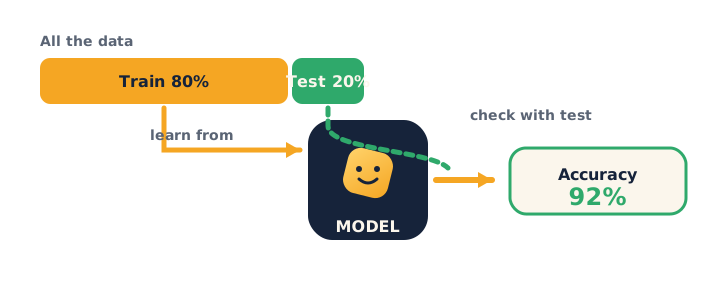
Exactly like Unit 1, you split the data — the model learns from the training set and is graded on a hidden test set it never saw. Accuracy on the test set is the only honest number. But accuracy alone hides what it gets wrong, so you also read a confusion matrix — a grid showing which digits get mistaken for which.
Picture the train/test split: split the data into training and test sets, train on one, then check accuracy on the unseen data.
Type and run this in Colab:
from sklearn.model_selection import train_test_split
from sklearn.linear_model import LogisticRegression
from sklearn.metrics import accuracy_score

X_train, X_test, y_train, y_test = train_test_split(
    X, y, test_size=0.2, random_state=1)

model = LogisticRegression(max_iter=10000)
model.fit(X_train, y_train)          # learn from the training images

preds = model.predict(X_test)        # guess on images it has NEVER seen
print("Accuracy:", accuracy_score(y_test, preds))
Run it — you'll see something around 0.95–0.97. Celebrate, then immediately push: that still means a few out of every hundred are wrong. Which ones?
Ask yourself: why test on X_test and never on X_train? (The model already saw the training answers; grading on them is cheating and hides real mistakes — the Unit 1 rule.)
⚠ Watch for: it's tempting to stop at the accuracy number and call it a win. Push yourself to ask which digits it confuses and why — that's the difference between a demo and real evaluation.
Activity — Train, test, and interrogate your classifier
Open your own Google Colab → New notebook, build the classifier above, then interrogate it.
Type and run this in Colab — read the confusion matrix:
from sklearn.metrics import confusion_matrix

print(confusion_matrix(y_test, preds))
Here's how to read it: row = the true digit, column = the model's guess. Big numbers on the diagonal = correct. Any big number off the diagonal is a specific confusion (e.g. some 8s guessed as 1).
Now look a wrong prediction in the eye:
import numpy as np
import matplotlib.pyplot as plt

wrong = np.where(preds != y_test)[0]   # positions the model got wrong
print("Number wrong out of", len(y_test), ":", len(wrong))

i = wrong[0]
plt.imshow(X_test[i].reshape(8, 8), cmap="gray")
plt.show()
print("Model said:", preds[i], " | Real answer:", y_test[i])
Ask yourself as you run it: look at the messy digit — can you even tell what it is? Is the model's mistake understandable? (Often the handwriting is genuinely ambiguous — a great honesty moment.)
Then experiment:
- Change
random_stateto0or42and re-run. Ask yourself: does accuracy move a little? Why isn't it identical? (Different images land in the test set.) - Look at
wrong[1],wrong[2]. Ask yourself: is there a pattern to what it confuses?
Watch out for the two common errors: forgetting .reshape(8, 8) when showing a flattened row (it's 64 numbers, not a grid), and calling .predict() before .fit().
Check yourself
Can you answer these? The answer follows each arrow.
- Why do we flatten each image into 64 numbers? → scikit-learn learns from a table of features — one row per example; the 64 pixels become 64 features.
- Why is test-set accuracy the honest score? → It's measured on images the model never saw; testing on training data is cheating and hides mistakes.
- What does a confusion matrix tell you that accuracy doesn't? → Which digits get mistaken for which — the specific errors, not just the overall rate.
Wrap-up
- State your model's accuracy and one digit it confused — "impressive and imperfect."
- Try this at home — Honest report card: run your classifier, then write 4 lines: (1) your accuracy, (2) how many test images it got wrong, (3) one specific confusion from the matrix, (4) one sentence on why that confusion makes sense. Screenshot the wrong image. Bring it to Session 21 — next session you switch from images to text.
Tips & extra challenges
- Watch out: high accuracy does not mean the model understands digits. It matches number patterns; it has no idea what a digit is, which is why ambiguous handwriting fools it.
- The model never sees a picture: it trains on
X(rows of 64 numbers). You onlyreshape(8, 8)andimshowfor human eyes — the model itself never gets an image. - If
LogisticRegressionwarns about convergence: it's harmless here;max_iter=10000usually silences it. You can also swap inKNeighborsClassifier()for a fast alternative — same.fit()/.predict()recipe, good for a model comparison. - Want more? Try this — model showdown + per-digit fairness: real evaluators compare models and check performance isn't lopsided. Train a second model and compare, then check which digit is the model's weakest — a per-class honesty check:
from sklearn.neighbors import KNeighborsClassifier
from sklearn.metrics import classification_report

knn = KNeighborsClassifier()
knn.fit(X_train, y_train)
print("KNN accuracy:", knn.score(X_test, y_test))

# per-digit precision/recall for the first model
print(classification_report(y_test, preds))
Which model wins? Which single digit does the model handle worst (lowest score in the report), and why might that digit be hard? Connect back to Unit 1: a single accuracy number can hide a weak spot.
Vocabulary
| Term | Meaning |
|---|---|
| Classifier | A model that sorts inputs into categories (here, digits 0–9) |
| Flatten | Lay an image's pixels out as one row of numbers |
| Accuracy | Fraction of test images the model gets right |
| Confusion matrix | A grid of which classes get mistaken for which |
| Held-out test set | Data kept hidden to grade the model honestly |
Resources
- Google Colab — where you build it all (free).
- scikit-learn — recognizing handwritten digits — the classic version of today's project.
- Google — Teachable Machine — train your own image classifier with no code.
- Kaggle — Intro to Machine Learning — free practice with
.fit,.predict, and accuracy.
Practice set
Practise on your own — a mix of concept questions and short coding tasks on training, testing, and honest evaluation, from easy to hard.
1. Vocabulary check: in this project, what is X and what is y? → X = the flattened images (64 features each); y = the correct digit label 0–9.
2. Spot the "learning" line: which line teaches the model? → model.fit(X_train, y_train) — .fit() learns the pattern; .predict() only uses it.
3. Fix the bug: this errors when showing a test image — why, and how do you fix it? → a flattened row is 64 numbers, not a grid; reshape it: X_test[i].reshape(8, 8).
import matplotlib.pyplot as plt
plt.imshow(X_test[0], cmap="gray")   # errors: X_test[0] is 64 numbers in a row
4. Reasoning: a classmate reports 100% accuracy but tested on X_train. Trustworthy? → No — the model already saw those answers; grade on the held-out X_test instead.
5. Read the matrix: in a confusion matrix, the cell at row 4, column 9 holds 6. What does that mean? → Six images that were really a 4 were guessed as a 9 — a specific 4↔9 confusion.
6. Write it (harder): print how many test images the model got wrong. → count the mismatches:
import numpy as np
# preds and y_test already exist
# print the number of wrong predictions here
→ print(np.sum(preds != y_test)).
7. Reasoning (hardest): your model is 96% accurate overall but only 80% on the digit 8. Why does the overall number hide this, and why does it matter? → Accuracy averages over all digits, so a weak class gets buried; it matters because the model is quietly unreliable for 8s — check per-class scores to catch it.
Going deeper (optional)
Ready for more? See that the model gives a confidence, not a certainty — and that low confidence often lines up with its mistakes. predict_proba returns the probability the model assigns to each digit:
import numpy as np

probs = model.predict_proba(X_test)     # probability for each digit, per image
i = 0
print("Model's guess:", model.predict(X_test)[i:i+1][0])
print("Its confidence:", np.max(probs[i]).round(3))   # highest probability
Find a wrong prediction (from the wrong array earlier) and print its confidence — it's usually lower than a correct one. Here's the lesson: a responsible builder doesn't just take the guess, they check how sure the model is, and can flag low-confidence cases for a human. This is the honest-evaluation mindset you'll carry into your own project in Session 22.
Common mistakes & fixes
If it's not working, check these:
- Mistake: trying to feed a picture into the model. → Fix: the model trains on
X— rows of 64 numbers; images are only for humans to look at. - Mistake: showing a flattened row with
imshowand getting an error. → Fix:reshape(8, 8)first — 64 numbers need to be folded back into an 8×8 grid. - Mistake: judging the model on
X_trainand trusting a high score. → Fix: measure on the hiddenX_test— the only honest check (the Unit 1 rule). - Mistake: stopping at the accuracy number. → Fix: read the confusion matrix and look at real wrong images to see what and why it fails.
- Mistake: calling
.predict()before.fit(). → Fix: always.fit()first so the model has learned, then.predict().
What's next
Session 21 — How Machines Read: you switch from images to text — turning words into numbers (tokens) and building a small sentiment classifier in Python.