
Session 19 — How Machines See
Duration: 75 min · Format: live online
What you'll learn: by the end, you can explain that a picture is really a grid of brightness numbers, describe what a feature is and how a CNN stacks simple patterns into whole objects, and load and inspect a real image dataset in Colab.
Soft skill focus — Curiosity
Today you'll also grow Curiosity. Seeing that a photo is secretly a grid of numbers only pays off if you keep poking at it — printing different digits, testing what "ink" reveals, asking what else the numbers hide.
Try this: during the dataset activity, go off-script — swap in images[10], compare the ink of a 1 and an 8, and share anything unexpected you find.
Think about: what is one question about how machines see that you now want to go and answer?
What you'll need
- Google Colab → New notebook. You'll print an image as numbers here. (scikit-learn and matplotlib are already installed in Colab — no setup needed.)
- You already know Python, scikit-learn, and the train/test idea from Unit 1 — today builds straight on that.
- Optional: Quick, Draw! or Teachable Machine open in a tab for a quick "computers can see" moment.
Hook
Think about these questions:
- When you unlock your phone with your face, what do you think it actually looks at?
- A computer has no eyes and no brain. So what does a photo even look like to it?
Here's the big idea for today: to a computer, a picture is not a picture at all — it's a grid of numbers. "Seeing" is just doing math on those numbers. By the end you'll have printed a real image as numbers and watched a computer pull it apart.
Teach — An image is a grid of numbers
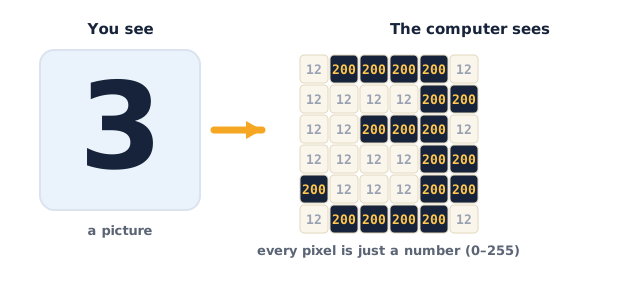
A screen is made of tiny dots called pixels. Each pixel stores a number for how bright it is. A small grey image is just a grid — rows and columns of brightness numbers. Low number = dark, high number = bright.
This diagram shows an image as a grid of brightness numbers, where each cell is one pixel's value:
Type and run this in Colab:
from sklearn.datasets import load_digits
import matplotlib.pyplot as plt

digits = load_digits()

first = digits.images[0]   # one small picture of a handwritten digit
print(first)               # the SAME picture, printed as a grid of numbers
You'll see an 8×8 grid of numbers. The big numbers trace the shape of the digit and the zeros are the dark background. Now see that it really is a picture:
plt.imshow(first, cmap="gray")
plt.show()
print("This digit is labelled:", digits.target[0])
Ask yourself: the grid of numbers and the picture are the same thing — where are the biggest numbers, and what part of the digit do they line up with? (The bright ink strokes; the zeros are the empty background.)
⚠ Watch for the #1 misconception: it's tempting to think the computer "sees" the way you do. It doesn't — there is no picture inside the computer, only numbers. Every bit of computer vision is math done on that grid.
Teach — Features, and what a CNN does
A feature is a useful clue the computer measures from the numbers — not the whole image, just something telling. The simplest possible feature is how much ink is in the image: add up all the brightness numbers.
Type and run this in Colab:
import numpy as np

ink = np.sum(first)              # add up every brightness number
print("Total ink in this digit:", ink)
A fat digit like 8 has more ink than a thin 1. That single number already helps a computer tell some digits apart. Real vision uses thousands of smarter features — edges, corners, curves.
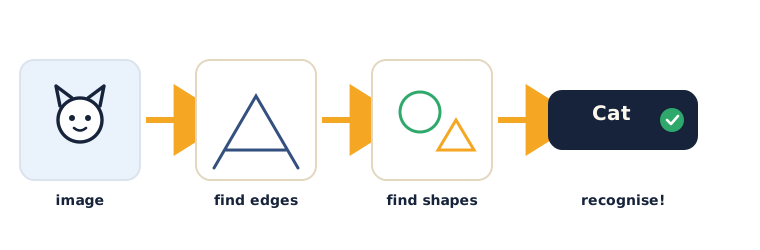
Here's how a CNN builds them up (intuition only, no math): a CNN (Convolutional Neural Network) uses tiny grids called filters that slide across the image looking for one simple pattern each — one filter fires on horizontal edges, another on a curve. Then it stacks them:
- Layer 1 finds tiny edges and dots.
- Layer 2 combines edges into shapes — corners, curves, loops.
- Later layers combine shapes into parts and whole objects — an eye, a wheel, a face.
This diagram shows how a vision model builds up in stages — from edges, to shapes, to the whole object and its label:
Ask yourself: why start with edges instead of jumping straight to "that's a cat"? (Every object is built from simple edges and curves, so learning those first lets the same building blocks recognise many objects.)
⚠ Watch for: it's easy to imagine the computer stores a "cat photo" to compare against. It doesn't — it learned patterns of numbers (edges → shapes → objects) from many examples, exactly like the pattern-learning from Unit 1.
Activity — Inspect a real image dataset
Open your own Google Colab → New notebook and explore the same handwritten-digits dataset.
Type and run this in Colab:
from sklearn.datasets import load_digits
import matplotlib.pyplot as plt

digits = load_digits()

print("How many images:", len(digits.images))
print("Size of one image:", digits.images[0].shape)   # (8, 8) = 8 rows, 8 columns
Then show a wall of examples so you feel the dataset:
for i in range(8):
    plt.subplot(1, 8, i + 1)
    plt.imshow(digits.images[i], cmap="gray")
    plt.axis("off")
    plt.title(digits.target[i])
plt.show()
Now try these on your own:
- Change
digits.images[0]todigits.images[10]and print it as numbers and as a picture. Ask yourself: what digit is it? Do the big numbers match the shape? - Compute the ink (
np.sum) for a1and for an8. Ask yourself: which has more ink? Would ink alone reliably tell a1from a7? (No — both are thin; you need more features.)
Watch out for a common mix-up: digits.images is the 8×8 grid for pictures, while digits.data is the same image flattened into 64 numbers in a row — you'll use data next session to train a model.
Check yourself
Can you answer these? The answer follows each arrow.
- What is an image, to a computer? → A grid of numbers — one brightness number per pixel. There's no picture inside, only numbers.
- What is a feature? → A useful clue measured from the image (e.g. total ink, an edge, a curve) that helps tell things apart.
- What does a CNN do, in order? → It stacks filters: finds edges first, combines them into shapes, then into whole objects.
Wrap-up
- Finish the sentence: "To a computer, a photo is really…"
- Try this at home — Pixel hunt: open any photo on your device and zoom in as far as it goes until you see the blocky pixels. Screenshot it. In two lines, write: (1) roughly how many pixels wide it looks, and (2) one feature a computer might measure to tell what's in the photo. Bring it to Session 20 — next session you'll train a computer to read these digits.
Tips & extra challenges
- Watch out: the computer does not see like you do. Every time, reframe it: there is only a grid of numbers, and vision is math on those numbers.
imagesvsdata:digits.images[0]is the 8×8 grid (great for showing);digits.data[0]is those 64 numbers flattened into one row (what scikit-learn trains on). Keep this straight and Session 20 lands cleanly.- Want more? Try this — colour is three grids: grey images are one grid, but colour photos are three stacked grids — Red, Green, Blue — each a brightness number 0–255. Work out how many numbers a 100×100 colour photo holds (100 × 100 × 3 = 30,000) and why big images are "a lot of numbers." Then darken the digit by subtracting from every pixel and re-showing it:
import matplotlib.pyplot as plt
darker = first - 4          # subtract 4 from every brightness number
plt.imshow(darker, cmap="gray")
plt.show()
Ask what changed and why — proof that editing an image is just doing arithmetic on the numbers.
Vocabulary
| Term | Meaning |
|---|---|
| Pixel | One dot of an image, storing a brightness number |
| Grid / array | Rows and columns of numbers making up an image |
| Feature | A useful clue measured from the image |
| CNN | A model that stacks filters: edges → shapes → objects |
| Filter | A tiny grid that slides across an image to find one pattern |
Resources
- Google Colab — where you run it all (free).
- Google — Teachable Machine — see a vision model react to your webcam in seconds.
- Quick, Draw! — a vision model guessing millions of doodles.
- scikit-learn — the digits dataset — the exact data used today.
Practice set
Practise on your own — a mix of concept questions and short coding tasks on pixels, features, and CNNs, from easy to hard.
1. Define it: in one sentence, what is a pixel? → The smallest dot of an image; it stores a number for how bright that spot is.
2. Predict the output: what shape does this print, and what do the two numbers mean? → (8, 8) — the image has 8 rows and 8 columns of pixels.
from sklearn.datasets import load_digits
digits = load_digits()
print(digits.images[0].shape)
3. Reasoning: two digits have ink totals of 55 and 12. Which is more likely the fat 8 and which the thin 1? → 55 = the 8 (more ink); 12 = the 1 (less ink).
4. Order the layers: put these CNN stages in the order they happen — whole object, edges, shapes. → edges → shapes → whole object.
5. Write it: print the total ink of the image at index 3 in the digits dataset. → use np.sum:
import numpy as np
from sklearn.datasets import load_digits
digits = load_digits()
# print the total ink of digits.images[3] here
→ print(np.sum(digits.images[3])).
6. Reasoning (harder): why is "total ink" a weak feature for telling a 6 from a 9? → They have almost the same amount of ink; ink says nothing about where it is, so the model needs shape/position features too.
7. Count the numbers (hardest): a colour photo is 200×200 pixels with 3 colour channels (Red, Green, Blue). How many brightness numbers is that in total? → 200 × 200 × 3 = 120,000 numbers.
Going deeper (optional)
Ready for more? Make "the model only knows numbers" concrete by editing the picture through the numbers. Flip a digit left-to-right with nothing but array math, then see that the label is now visually wrong even though the pixels are unchanged in value — only their positions moved:
import matplotlib.pyplot as plt
from sklearn.datasets import load_digits

digits = load_digits()
first = digits.images[0]

flipped = first[:, ::-1]        # reverse the columns = mirror the image
plt.imshow(flipped, cmap="gray")
plt.show()
Predict what [:, ::-1] does before running it, then explain the result: mirroring an image is just reordering the numbers. Here's the point — because a picture is only a grid of numbers, every filter, edit, and effect is arithmetic. This is exactly why a CNN can be trained: patterns in numbers are things math can learn.
Common mistakes & fixes
If it's not working, check these:
- Mistake: believing the computer "sees" a picture the way people do. → Fix: there is only a grid of numbers; vision is math on those numbers, nothing more.
- Mistake: thinking a CNN stores example photos and compares against them. → Fix: it learned patterns — edges, then shapes, then objects — from many examples; it doesn't keep the photos.
- Mistake: confusing
digits.images(the 8×8 grid) withdigits.data(the 64-number row). → Fix: useimagesto show a picture,datato train a model — same picture, two shapes. - Mistake: assuming one simple feature (like total ink) is enough to recognise anything. → Fix: it isn't — real vision combines many features; ink can't tell a
6from a9. - Mistake: thinking bigger/colour images are a different kind of thing. → Fix: they're just more numbers — colour is three stacked grids (R, G, B), still all brightness numbers.
What's next
Session 20 — Build an Image Classifier: you'll train a real model on these handwritten digits, test it on images it has never seen, and evaluate it honestly.