Course 2 — The Rising Builders
Format: live online · Sessions: 22 × 75 min
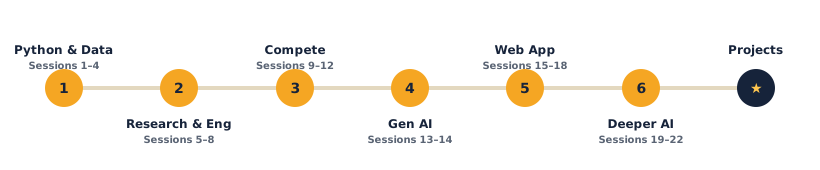
The learning path:
Welcome to The Rising Builders — where you write real code and build serious projects: machine-learning models, a smart gadget, web apps and more. Each lesson gives you something to learn, live code to run, a project to build, and challenges to push yourself. Open any lesson below to see exactly what you'll do.
What the course covers
- Unit 1 — Applied AI & Data Science (Sessions 1–4): Python, working with datasets, building a prediction model, and what AI can and can't do.
- Unit 2 — Research & Engineering (Sessions 5–8): how real research works, reading and writing science, and building electronics with Arduino.
- Unit 3 — Competition & Portfolio (Sessions 9–12): turning work into a competition entry, a written report with peer review, and a final presentation.
- Bonus — Generative AI (Sessions 13–14): how LLMs work, and building with generative AI responsibly.
- Unit 4 — Build a Web App (Sessions 15–18): HTML, CSS & JavaScript to build and deploy a real web app.
- Unit 5 — Deeper AI (Sessions 19–22): computer vision and NLP mini-projects in Python.
What students produce
- A working prediction model and a small data-science project.
- A research report + an engineered/data prototype.
- A competition-ready project and a portfolio piece, plus a course certificate.
Soft skills — the human side of tech
Coding is only half the job. Every session also carries a Soft skill focus — it names one human skill, gives you a concrete way to grow it during the activity, and ends with a short reflection at the wrap-up. Across the course, students practise all eight of the skills that every tech career needs:
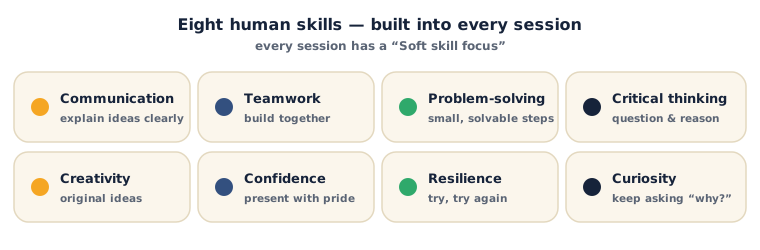
Look for the Soft skill focus box near the top of each session — it tells you which skill to grow that day, and exactly how.
Tools (all free)
Google Colab (Python in the browser) · Tinkercad Circuits (Arduino, no hardware) · Google Sheets · free datasets — the exact links are in each session's Resources.
How each lesson works
Every lesson follows the same flow: What you'll need → learn it → your turn (build it, with code you type and run yourself) → check yourself (questions with the answers) → a wrap-up and a try-at-home idea → then Tips & extra challenges, Vocabulary and Resources. Watch for the ⚠ Watch out notes — they flag the common mistakes before they trip you up.
Sessions
Unit 1 — Applied AI & Data Science
- Session 1 — Speak Python
- Session 2 — Playing with Data
- Session 3 — Your First Prediction
- Session 4 — What AI Can (and Can't) Do
Unit 2 — Research & Engineering
- Session 5 — Think Like a Scientist
- Session 6 — Read Like a Scientist
- Session 7 — Hello, Hardware!
- Session 8 — Build a Smart Gadget
Unit 3 — Competition & Portfolio
- Session 9 — Enter the Arena
- Session 10 — Polish Your Project
- Session 11 — Write It Up & Peer Review
- Session 12 — Showtime! (Final Showcase)
Bonus — Generative AI
Unit 4 — Build a Web App
- Session 15 — The Web Stack
- Session 16 — Make It Interactive
- Session 17 — Build a Real App
- Session 18 — Ship It
Unit 5 — Deeper AI
- Session 19 — How Machines See
- Session 20 — Build an Image Classifier
- Session 21 — How Machines Read
- Session 22 — Your AI Mini-Project & Showcase
Projects & Assessment
Each unit ends with a hands-on project + grading rubric, and the course finishes with a portfolio-ready capstone.
- Unit 1 Project — Build a Predictor
- Unit 2 Project — Research & Build
- Unit 3 Project — Competition Entry
- Course Capstone — Research & Innovation Project
- Certificate & Assessment Criteria
Ready? Open Session 1 — Speak Python