
Session 12 — Design & Showcase Your Game
Duration: 60 min · Format: live online
What you'll learn: by the end, you'll have designed your own game (one-sentence goal → sketch → blocks you'll need), built enough to play, playtested it with a partner, fixed the weakest part, and showcased it to the class with pride.
Soft skill focus — Confidence & presenting
Today you'll also grow Confidence & presenting. The session ends with you standing up to show the game you designed, so today the whole room is a stage.
- Try this: for your 30-second showcase, use this frame — "In my game you… and one thing I improved is…" Take a calm, proud tone, and clap for every other presenter.
- Think about: what is one tip you'd give someone who feels nervous about showing their game?
What you'll need
- Scratch open in a tab.
- The diagram below to look at (the project cycle: plan, build, test, improve).
- Any Unit 3 project you can remix — the catch game, the maze, or the story — as a starting point. A fresh idea is welcome too.
- A simple playtest note card to fill in: "One thing I liked… / One thing that confused me… / One idea…"
Hook
Let's think about this:
- Name your favourite game. Now say what you do in it, in one sentence. (Like "You jump over pipes." or "You catch falling fruit.")
Here's the secret: every giant game started as one sentence like that. Today you are the game designer. You'll write your one sentence, sketch it, build it, let a friend test it — then make it better. That last part is the real trick: real designers never get it perfect the first try. They loop.
Teach — The project cycle & designing your game
Look at this diagram and follow the loop with your finger as each step is named:
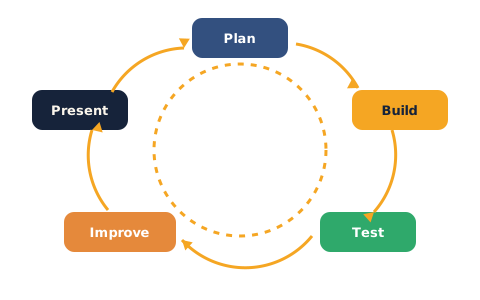
Here's the loop — this is the big idea of the whole course:
- 1 · Plan. Write your game in one sentence (the goal), sketch it on paper, and list the blocks you'll need.
- 2 · Build. Make the smallest version that you can actually play — don't add everything at once.
- 3 · Test. Let someone else play. Watch where they get stuck.
- 4 · Improve. Fix the weakest part. Then loop back and test again.
Here's a design thought out loud, so you can see the thinking:
1. One-sentence goal: "Catch 10 stars before the timer runs out."
2. Sketch (say what you'd draw): a bowl at the bottom, stars falling from the top, a score in the corner.
3. Blocks I'll need: when green flag clicked, forever, if touching, a score variable with change score by 1, glide/go to x y to drop the stars, a timer.
Notice it didn't start with the blocks — it started with the one sentence. Why does that help? (The sentence tells you what the game is, so you only build blocks that serve it — no getting lost.)
⚠ Watch out for the "too big to finish" trap: it's tempting to want a game with 20 levels, 10 enemies and a boss. Shrink it: "What's the one thing the player does? Build that first — you can always add more if there's time." A tiny finished game beats a huge broken one.
Teach — How to playtest: watch, don't help
A playtest is when someone else plays your game while you watch quietly. The rule that makes it work is hard: don't help, don't explain. If you have to tell them "no, click there," that's exactly the confusing bit you need to fix.
Picture it: a friend plays your game and you stay silent while they hunt for the button. Then here's the note you'd write:
1. One thing I liked: "The falling stars look great."
2. One thing that confused me: "I didn't know the arrow keys moved the bowl."
3. One idea: "Maybe show 'Use arrow keys!' at the start."
There are two jobs:
- Tester: be kind, specific and useful — point at the game, never the person. "The jump felt too slow" beats "it's boring."
- Maker: just say "thank you" and write it down. Don't argue or defend — you're collecting gold.
Think about it: why is it better to watch someone play than to ask them "was it good?" (People say "yeah it's good" to be nice — but where they got stuck shows you the truth.)
Activity — Design, build, test & improve
Run the whole loop on your own game. Keep an eye on the time and move through each phase.
Plan (5 min, on paper):
- Write your one-sentence goal at the top.
- Sketch the screen: sprites, where the score/timer go.
- List the blocks you'll need (peek at your catch, maze or story project for the ones you know).
Build (10 min, in Scratch):
- Build the smallest playable version — the one thing the player does. Get it working before adding extras.
- Start from a new project, or remix one of your Unit 3 games as a base.
Test & improve (10 min, in pairs):
- Swap: your partner plays your game while you watch in silence and they think aloud. Then swap.
- Write your partner one note card — liked / confused / idea.
- Fix the weakest part. Pick the one thing that confused your tester most and improve just that.
As you go, ask yourself: what's my one sentence? What did my tester get stuck on? What am I fixing first?
Showcase + reflection
No quiz today — you present. When it's your turn, you get 30 seconds:
- Say your one sentence: "In my game, you…"
- Play it live for the class from the green flag.
- Name one thing you improved after your playtest.
The class gives a round of applause (or claps in chat) after each game. Then a quick reflection — one line each in the chat:
- "The best part of my game is…"
- "Next time I build a game, I will…"
Celebrate loudly. You finished a whole course and shipped a game of your own design — that's a real achievement.
Wrap-up
- Name the four steps of the project cycle (plan → build → test → improve).
- Try this at home — Polish & share: apply one more improvement from your playtest notes, then save and share your project on Scratch and add it to your portfolio. You are now a Scratch Creator.
Tips & extra challenges
- Watch out: a good game is not finished in one go. Professional games are tested and rebuilt dozens of times. Getting stuck, fixing, and testing again isn't failing — it is the job. Be proud when you change your game after a playtest, even more than when it "just works."
- Want more? Try this: run a second loop — playtest with a different partner, since a fresh player finds fresh problems. Or add a start screen with the instructions your first tester was missing (a backdrop +
say/broadcastfrom Session 11).
Vocabulary
| Term | Meaning |
|---|---|
| Design | Planning what your game is before you build it |
| Prototype | The smallest playable version you make first |
| Playtest | Watching someone else play to find what's confusing |
| Feedback | Kind, specific notes that help you improve |
| Iterate | To loop: build, test, improve, and repeat |
Resources
- Scratch editor — where you build, save and share (free, in the browser).
- Scratch Ideas page — starter cards and tutorials to spark or extend a game idea.
- Scratch Design Studio — themed design challenges to keep building after the course.
Practice set
Practise on your own with these design-thinking and build tasks to run the whole loop. Work them easy → hard. Answers follow each arrow.
1. One sentence. Write your game as a single sentence saying what the player does. → e.g. "You steer a fish to eat 5 smaller fish without touching the shark." (Any clear one-sentence goal is correct.)
2. Name the step. You just watched a friend play and you're writing down what confused them. Which step of the cycle is that? → Test (playtesting).
3. Shrink it (spot the trap). A friend's plan is "a racing game with 50 cars, 20 tracks and a shop." What's your kind advice? → Make it smaller — build one car on one track that you can drive first; add more only if there's time.
4. Give a good note. Turn "your game is boring" into a useful playtest note. → Be specific and about the game, e.g. "There's nothing to do for the first few seconds — maybe start the action sooner."
5. Make it (build task). Build the smallest playable version of your one-sentence game — just the one thing the player does, working from the green flag. → A single mechanic that runs, e.g. when green flag clicked → forever → if key pressed → move; extras come later.
6. Improve the weakest part (harder). Your tester didn't know the game had started. Name one change and the blocks for it. → Add a start message — a backdrop or sprite that does when green flag clicked → say "Press SPACE to start!" for 2 seconds, or a when space key pressed → broadcast [start] so the game begins on a clear signal.
Going deeper (optional)
Optional — for when you have shipped a game and want to think like a real studio.
The loop never really ends. Notice the cycle diagram is a circle, not a line. After "improve," you go back to "test." Real games get updated for years — every patch is another trip around the loop. The skill you practised today isn't "make a game"; it's make it, then make it better — and that works for stories, science projects, and anything you'll ever build.
Watching beats asking. The most useful thing a designer owns isn't a fancy tool — it's the habit of watching a real person use their thing without helping. Every confusing moment you see is a gift. Test with someone who has never seen your game (a younger sibling is perfect) — beginners find the problems experts have stopped noticing.
Common mistakes & fixes
If it's not working, check these:
- Mistake: Designing a game too big to finish, so nothing works by showcase time. → Fix: build the one core action first; treat every extra as a bonus, not a requirement.
- Mistake: Helping or explaining during a playtest, hiding the real problems. → Fix: stay silent, let the tester struggle, and write down exactly where they got stuck.
- Mistake: Giving vague feedback like "it's good" or "it's boring." → Fix: be specific and point at the game — "the bowl moved too slowly," not "it's bad."
- Mistake: Arguing with or ignoring a tester's notes. → Fix: just say thank you and write it down; you can decide later what to change.
- Mistake: Trying to fix everything at once and breaking the game. → Fix: change one thing, test again, then change the next — small steps around the loop.
What's next
Projects & Assessment: put everything together — build your capstone game, then earn your certificate.