
Scratch Creators
Format: live online · Sessions: 12 × 60 min
The learning path:
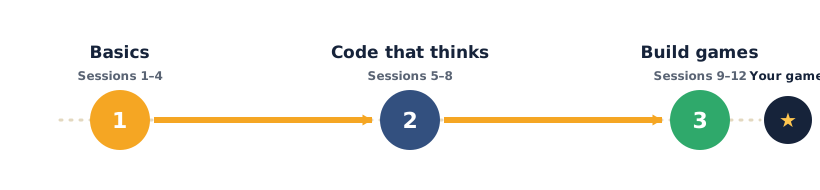
Welcome to Scratch Creators — your hands-on first course in real coding, using Scratch. Each lesson gives you something to learn, something to build, and something to try, with games and stories you make yourself. Open any lesson below to see exactly what you'll do.
Scratch is the world's most popular way for children to start coding: they snap colourful blocks together instead of typing, so there's nothing to spell wrong — all their energy goes into thinking like a programmer. By the end, your students won't just have "played with Scratch" — they'll understand loops, decisions, variables and events, and they'll have built and shared real games and stories of their own.
What the course covers
- Unit 1 — Scratch Basics (Sessions 1–4): the Scratch screen, moving sprites, costumes, looks and sound, and the two ideas every program needs — events and loops.
- Unit 2 — Code That Thinks (Sessions 5–8): if–then decisions, keeping score with variables, the x–y grid, and making a project talk back with ask-and-answer.
- Unit 3 — Build Real Games (Sessions 9–12): a catch game, a maze game, an animated story, then design, playtest and showcase a game of their own.
What students produce
- A moving, talking, animated sprite; a scored mini-game; and an interactive quiz.
- Three real projects — a catch game, a maze game, and an animated story.
- A final game of their own design, plus a course certificate.
Soft skills — the human side of tech
Coding is only half the job. Every session also carries a Soft skill focus — it names one human skill, gives you a concrete way to grow it during the activity, and ends with a short reflection at the wrap-up. Across the course, students practise all eight of the skills that every tech career needs:
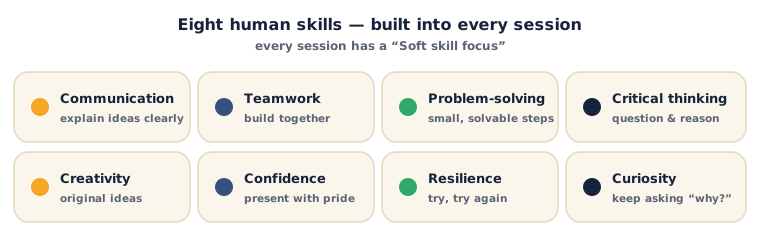
Look for the Soft skill focus box near the top of each session — it tells you which skill to grow that day, and exactly how.
Tools (all free)
Scratch — runs free in any web browser; a signed-in account lets students save and share their projects. Scratch offline editor is available where internet is limited. That's it — no other software, no purchases.
How each lesson works
Every lesson follows the same friendly flow: What you'll need → learn it (a clear explanation with pictures) → your turn (build it yourself) → check yourself (quick questions with the answers) → a wrap-up and a try-at-home idea → then Tips & extra challenges, Vocabulary, Resources, a Practice set, Going deeper, and Common mistakes & fixes for when something isn't working. Watch for the ⚠ Watch out notes — they flag the tricky bits before they trip you up.
Sessions
Unit 1 — Scratch Basics
- Session 1 — Welcome to Scratch
- Session 2 — Make It Move
- Session 3 — Costumes, Looks & Sound
- Session 4 — Events & Loops
Unit 2 — Code That Thinks
- Session 5 — If–Then Decisions
- Session 6 — Keep Score with Variables
- Session 7 — The X–Y Grid
- Session 8 — Ask, Answer & Build a Quiz
Unit 3 — Build Real Games
- Session 9 — Catch the Falling Apples
- Session 10 — Escape the Maze
- Session 11 — Tell an Animated Story
- Session 12 — Design & Showcase Your Game
Projects & Assessment
Each unit ends with a hands-on project + grading rubric, and the course finishes with a portfolio-ready capstone game.
- Unit 1 Project — Bring a Sprite to Life
- Unit 2 Project — A Game with Rules & a Score
- Unit 3 Project — Your Own Playable Game
- Course Capstone — Design, Build & Present a Game
- Certificate & Assessment Criteria
Ready? Open Session 1 — Welcome to Scratch