
Session 10 — Build Your Prototype
Duration: 60 min · Format: live online
What you'll learn: by the end, you can say what a prototype is, build the simplest working version of your project idea, and test it to find one thing to improve.
Soft skill focus — Resilience
Today you'll also grow Resilience. A first prototype is rough on purpose — the whole point is to test it, find what's weak, and improve it.
Try this: when a test shows something broken, cheer — "great, I found the part to fix" — then improve the one weakest part and re-test, instead of giving up or restarting.
Think about: What broke in your test, and what did you do next instead of quitting?
What you'll need
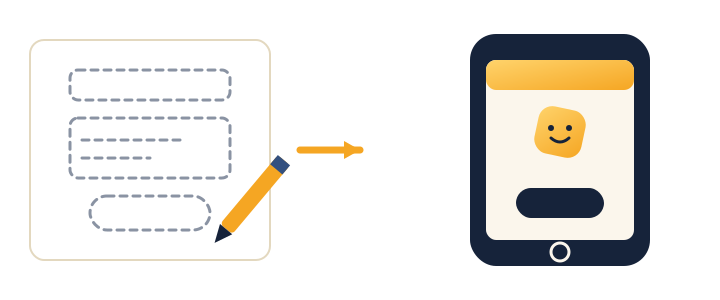
- The diagram below (you'll see it on screen — from rough sketch to first working version).
- Scratch and Teachable Machine open in tabs — you may use either build path.
- The problem sentence you wrote in Session 9, plus paper and a pencil.
Hook
Let's think about these — jump in with your answers (chat or unmute):
- "Would you rather spend a month building the perfect thing that might be wrong…"
- "…or one hour on a rough version you can test today?"
Here's the big idea: smart builders pick the rough version every time. Today you'll build a rough first version — a prototype.
Teach — A prototype is a rough first try
Here's the key idea:
- A prototype is a quick, rough version of your idea — just enough to test it.
- It is not meant to be perfect.
Look at this diagram and notice the jump from sketch to something that runs:
A prototype can be:
- Paper — draw your app's screens.
- Scratch — make it move and react.
- AI — a Teachable Machine model.
- Data — a survey + chart that answers a question.
⚠ Watch for the perfection trap: it's tempting to keep polishing before you'll show anyone. Remember the builder motto — "Done and testable beats perfect and imaginary." The point of a prototype is to learn fast, not to impress.
Think about this: "For your project, which build path fits best — paper, Scratch, AI, or data? Why?"
Teach — Build → Test → Improve
Here's how it works: the magic loop is simple — make a version, try it, fix the weakest part, try again. Every trip around makes it better.
The steps are:
- Build — make the simplest version that works.
- Test — try it, or have someone else try it.
- Improve — fix the one part that worked worst, then loop back.
The big thing to notice: you don't fix everything at once — you find the weakest part and improve that, then go around again.
Think about this: "If your test shows three things are broken, what should you fix first?" (The biggest/weakest one — improve one thing, test again, then move to the next.)
Activity — Build your project prototype
Use the problem you picked in Session 9. Choose one build path:
- Paper prototype: draw each screen or part of the idea on paper. Label the buttons.
- Scratch: open Scratch and make a sprite do the main action.
- AI helper: open Teachable Machine and train the model your project needs.
Remember: make the simplest version that works — you can always add more later. If you catch yourself polishing details, ask "does the main thing work yet?"
You made something real this session — that's what builders do. Next we make it clear enough for others to understand.
Check yourself
Try these questions:
- What is a prototype? → A rough first version of your idea, made quickly so you can test it — not perfect on purpose.
- What's the build loop? → Build → Test → Improve, over and over.
- True or False: your prototype should be perfect before you show it. → False — rough is good; you build it to learn, then improve.
Wrap-up
- Finish the sentence: "A prototype is…"
- Try this at home: test your prototype with one person. Write down one thing that worked and one thing to improve — then improve it. Bring the improved version to Session 11.
Tips & extra challenges
- Watch out: don't think "a prototype has to look finished and perfect." It's rough on purpose, built to learn.
- Want more? Try this — the version-2 challenge: push for a working model that actually runs — a Scratch app that reacts, or a Teachable Machine classifier your project uses. Then run the full loop again on purpose: test it 5 times and record how many worked (e.g. 4/5), find the single weakest part, improve only that, and re-test the 5 to see if the score goes up. Note your tools (Scratch, Teachable Machine, Sheets) for your project brief next session. Bonus: write one sentence naming what you'd add if you had another whole session.
Vocabulary
| Term | Meaning |
|---|---|
| Prototype | A rough first version |
| Test | Trying it to see what happens |
| Iterate / Improve | Making it better, again and again |
| Feedback | What testers tell you |
Resources
- Scratch — build interactive projects.
- Teachable Machine — add an AI brain.
- Scratch ideas & tutorials — starter guides.
Practice set
Practise on your own — extra exercises on prototyping and the Build → Test → Improve loop. Easiest to hardest.
- Which is a prototype? For each, say yes or no: a finished, sold-in-shops video game · a paper drawing of an app's home screen · a Scratch cat that moves when you build the idea · a perfect, bug-free program. → Yes to the paper drawing and the rough Scratch version — both are quick and made to test. No to the finished game and the "perfect" program — a prototype is rough on purpose.
- Pick the build path. A student wants to make "an app that sorts photos of cats and dogs." Which path fits — paper, Scratch, AI, or data? → AI (Teachable Machine) — sorting images into groups is exactly what a classifier does. Paper could sketch the screens, but the main action needs AI.
- Name the weakest part. A test shows a game is fun, the colours are nice, but nobody understands how to start. What do you fix first? → The start / instructions — it's the weakest part and blocks everything else. Colours can wait; if players can't begin, nothing else matters.
- Simplest version. A student's dream is "a robot pet that walks, talks, learns your name, and does homework." What's the simplest testable version for today? → Cut it to one action — e.g. a Scratch pet that says hello when you click it. Add the rest later. Done-and-testable beats perfect-and-imaginary.
- Read the test result. You test your prototype with 5 people; 2 finish it, 3 get stuck at the same button. What does the data tell you? → The button is the problem — same failure, three times, is a strong signal. Fix that one spot and re-test the same 5.
- Design your own test (hardest). Write three things you'll watch for when someone tries your prototype. → Any specific, observable checks, e.g. "Did they find the start button? Did they know what to do next? Did the main thing actually work?" Reward observable actions over feelings like "did they like it."
Going deeper (optional)
Optional — for a stronger project or if you finish early.
Paper prototypes are faster than code — and that's a superpower. It feels backwards, but drawing your screens on paper first can save an hour of building. Worked example: you want a quiz app. On paper you sketch screen 1 (question), screen 2 (right answer), screen 3 (wrong answer). A partner "taps" through the paper — and instantly you notice there's no way to go back. You fix it with a pencil in 10 seconds. Fixing that in Scratch would have taken far longer. The lesson: test the idea on paper before you build it for real.
Fix the weakest part, not every part. New builders try to fix everything at once and get overwhelmed. The pro move is to find the one part that worked worst and improve only that, then test again. Worked example: a Scratch game where the sprite moves too fast, the score doesn't show, and the background is plain. The weakest part is the score (players can't tell if they're winning). Fix that first, test, then decide what's next. One improvement per loop keeps you moving.
Common mistakes & fixes
If it's not working, check these:
- Mistake: Polishing colours and details before the main thing even works. → Fix: Ask "does the main thing work yet?" Get the core action running first; decoration is always last.
- Mistake: Refusing to show the prototype because it "isn't finished." → Fix: Remember the motto — "Done and testable beats perfect and imaginary." A rough version you can test today beats a perfect one that never exists.
- Mistake: Building the whole giant dream in one go, then nothing runs. → Fix: Cut to the simplest version that works — one action, one screen. Add more only after the core works.
- Mistake: Testing it yourself and declaring "it works!" → Fix: Have a different person try it without help. Watch where they get stuck — that's the real test.
- Mistake: After a test, trying to fix everything at once. → Fix: Fix the one weakest part, then test again. One improvement per loop.
What's next
Session 11 — Tell Your Story: learn to present your project so everyone gets it — the story recipe and confident delivery.