
Session 1 — What is AI?
Duration: 60 min · Format: live online
What you'll learn: by the end, you can explain what AI is, point to AI you use every day, and describe how a computer learns from examples.
Soft skill focus — Curiosity
Today you'll also grow Curiosity. Every "how does my phone know my face?" question is curiosity doing the work AI can't do for us.
Try this: when you wonder how something like face unlock works, don't jump straight to "it's AI" — stop and come up with two or three of your own theories about how it might work first.
Think about: What is one thing about AI you now really want to find out?
What you'll need
- A device that can open Quick, Draw! in a web browser.
- Paper and a pencil.
Hook
Let's think about a few questions:
- How does a phone know it's your face and unlocks just for you?
- How does a game enemy chase you around the screen?
- How does a video app always know what you'll like next?
Have a guess at each one. The secret behind all of these is one thing — AI. Today you'll find out what that really means.
Teach — What does "AI" mean?
Here's what those two letters mean:
- AI = Artificial Intelligence.
- Artificial = made by people (not natural).
- Intelligence = being smart — learning, deciding, solving problems.
- So AI = a computer that can do smart things — a little like a brain we build.
⚠ Watch for the #1 mix-up: it's easy to think AI is alive or thinks and feels like a person. It isn't — a computer is not alive and has no feelings; it just gets very good at spotting patterns and following examples.
Look at this diagram — it shows places you already meet AI:
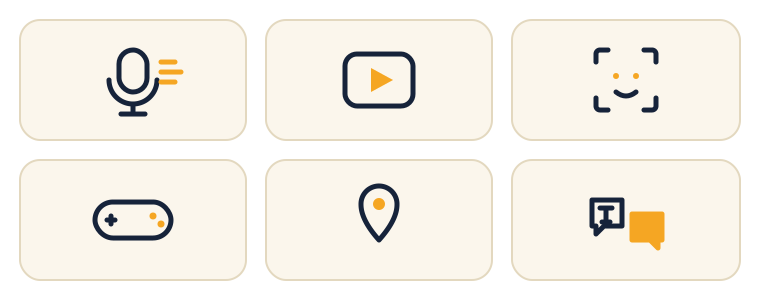
Left to right: voice assistants · video suggestions · face unlock · smart game characters · map directions · language translation.
Which of these did you use today? Can you name one that isn't in the picture?
Teach — How does a computer learn?
Computers can learn from examples — this is called Machine Learning. Think of teaching a robot to recognise a cat, and follow this diagram:
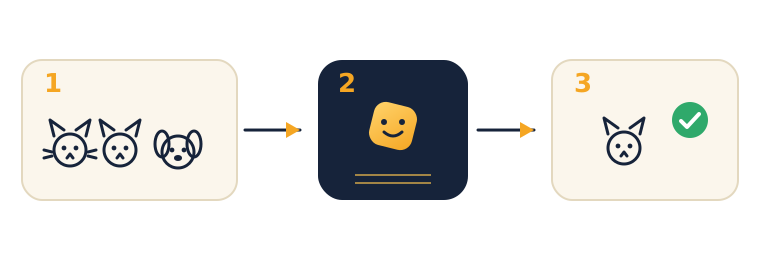
Here are the three steps:
- Show examples — we give it lots of pictures, each labelled ("this is a cat", "this is a dog").
- It finds patterns — it notices cats have pointy ears and whiskers and slowly learns.
- It makes a guess — show a brand-new picture and it predicts: "Cat!"
The big idea: the more good examples it sees, the better it guesses.
Think about it: if you only showed it 2 cats, would it be good or bad at guessing? (Bad — too few examples to find a reliable pattern.)
Activity
Activity 1 — Quick, Draw! (≈10 min). Open Quick, Draw! and play a few rounds. It learned from millions of drawings other kids made.
- As you play, notice: When did it guess right? When did it get confused? Why?
Activity 2 — Be the AI (≈10 min, no computer). Find a partner. One of you secretly picks a rule (e.g. "things that are round") and shows 5 examples; the other spots the pattern and predicts the next one. Then swap.
That's exactly what an AI does — find the pattern from examples, then make a guess.
Check yourself
Try to answer these, then check yourself after the arrow.
- What does AI stand for? → Artificial Intelligence — "made by people" + "being smart".
- How does a computer learn to recognise a cat? → From lots of labelled examples; it finds patterns (Machine Learning).
- True or False: an AI thinks exactly like a human brain. → False — it doesn't feel or think like us; it's just good at spotting patterns from examples.
Wrap-up
- Finish this sentence in your own words: "AI is…"
- Try this at home — Pattern Detective: find 3 things at home or school that use AI. For one of them, guess what examples it might have learned from. Bring the list to Session 2.
Tips & extra challenges
- Watch out: it's tempting to think "AI is alive / thinks like us." Really it's just pattern-spotting from examples.
- Want more? Try this: learn three "grown-up" words — model (the "brain" the computer builds from examples), training (the teaching part, when it studies the examples), and label (the correct answer written on each example). Then invent a made-up AI (a "homework-checker", a "lost-cat finder") and describe what examples it would need, what labels those examples would carry, and one time it might get confused. Finish by naming 3 real-world problems an AI could help solve.
Vocabulary
| Term | Meaning |
|---|---|
| AI (Artificial Intelligence) | A computer that does smart things |
| Machine Learning | Teaching a computer using examples |
| Pattern | A thing that repeats, like a rule |
| Example / Data | The pictures or facts we show the computer |
| Prediction | The answer the computer gives |
Resources
- Quick, Draw! — draw and watch AI guess (main demo).
- Teachable Machine — you'll train your own model in Session 3.
- Machine Learning for Kids — friendly projects for extension.
- AI Experiments by Google — short demos of what AI can do.
Practice set
Practise on your own — the answer comes after the arrow.
- What do the two words in "AI" stand for, and what does each mean? → Artificial = made by people; Intelligence = being smart (learning, deciding, solving). Together: a computer that does smart things.
- Name three places you have met AI today. → Any reasonable answer, e.g. voice assistant, video suggestions, face unlock, map directions, translation, a smart game character.
- A phone unlocks only for its owner's face. What examples do you think it learned from? → Lots of pictures of the owner's face (labelled "this is the owner") so it learns that face's pattern.
- True or False: an AI that recognises cats also understands that cats are alive and like to nap. → False — it only matches patterns in pictures; it has no idea what a cat really is or feels.
- You want an AI to tell apples from bananas but you only show it 2 apples and 2 bananas. What will probably go wrong, and how do you fix it? → Too few examples to find a reliable pattern, so it guesses badly; fix by showing many more labelled examples of each.
- A friend says "AI is a robot brain that thinks and feels like us." What is wrong with that, and how would you correct it? → It is not alive and has no feelings; it is just very good at spotting patterns and following examples.
Going deeper (optional)
- The "garbage in, garbage out" idea. Imagine every "cat" picture you showed the computer happened to have a red sofa in the background. What might the AI actually be learning — cats, or red sofas? It could learn the wrong pattern and then call a red cushion a "cat". The big idea: an AI is only as good as the examples it learns from, so the examples must be clear and varied. In Session 3 you'll record examples from different angles and backgrounds for exactly this reason.
- Guessing with a percentage. A real AI rarely says just "cat" — it says something like "I'm 90% sure it's a cat." Picture two guesses ("cat: 95%" vs "cat: 52%"): which one is the AI confident about, and which is almost a coin-flip? This is the word confidence, which you'll see for real on the bars in Session 3.
Common mistakes & fixes
- Mistake: thinking AI is alive or has feelings. → Fix: remember the anchor — a computer is not alive; it only spots patterns in examples. It's "smart, but not alive."
- Mistake: believing AI "just knows" things by magic, with no learning. → Fix: go back through Show examples → Find patterns → Make a guess; nothing happens without examples first.
- Mistake: assuming one or two examples are enough to learn from. → Fix: think of the "only 2 cats" question — more good examples means better, more reliable guesses.
- Mistake: calling every computer or gadget "AI" (a calculator, a light switch). → Fix: ask "does it learn from examples and make guesses?" A calculator just follows fixed rules; that is not AI.
- Mistake: mixing up the guess (prediction) with the examples (data). → Fix: look at the diagram — examples/data go in, the prediction comes out; they are different ends of the same process.
What's next
Session 2 — Patterns Everywhere: you become a pattern-spotter and teach the computer to sort things into groups.