
Session 13 — How Generative AI Works
Duration: 75 min · Format: live online
What you'll learn: by the end, you can explain classifying vs generating, describe how an LLM predicts the next token, and name where generative AI shines — and where it fails and must be verified.
Soft skill focus — Curiosity
Today you'll also grow Curiosity. Looking under the hood of an LLM — instead of just using it — is exactly what turns you from a passive user into a builder.
Try this: in the interrogate-an-LLM activity, probe a topic you know deeply and actively hunt for the one thing the model gets wrong or makes up.
Think about: what surprised you most about how the model actually works?
What you'll need
- A chatbot / LLM open in a tab (ChatGPT, Gemini, or Claude) on a school or grown-up account — you'll try things out live.
- The two diagrams below to look at (classify vs generate and next-word prediction).
- One topic you know extremely well (a hobby, your town, your school) so you can catch the model in a mistake.
- Paper and a pencil ready for your activity notes.
Hook
Before you read on, think about your own answers:
- When you type on your phone, how does it suggest the next word before you've typed it?
- What if that same trick were scaled up to a huge slice of the whole internet?
Take a guess, then here's the reveal: a Large Language Model (LLM) — the engine behind ChatGPT, Gemini, and Claude — is that same "next-word guess," supercharged. Today you'll look under the hood at how these models really work.
Teach — Classify vs generate
Here are the key words to hold onto:
- Earlier this course, you built classifiers: input → a label (picture → "Cat").
- Generative models run the other direction — they produce new content from a prompt.
- "a cat astronaut, watercolour" → a brand-new image; "explain photosynthesis" → a brand-new paragraph.
Look at this diagram and notice the two directions:
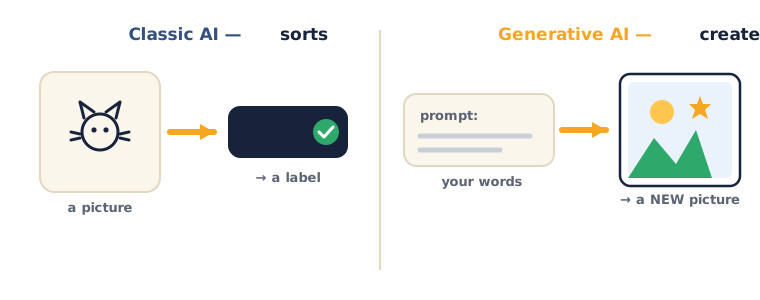
⚠ Watch for this: it's easy to think "generate" means the model looks up an answer it stored. It doesn't — it builds the output fresh, piece by piece, which is exactly why it can produce something that looks right but is completely made up.
Your turn: think of one example of classifying and one of generating from your own life.
Teach — LLMs predict the next token
An LLM writes by repeatedly predicting the most likely next piece of text — called a token. Look at the diagram:
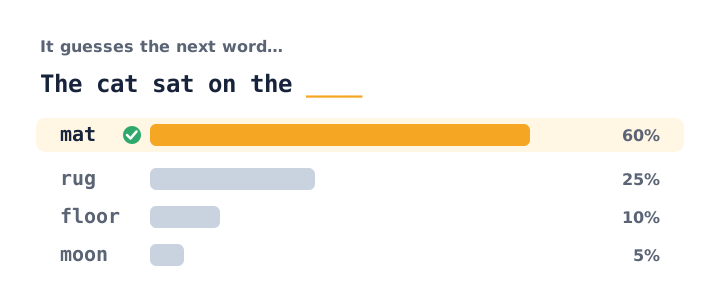
Here's the loop it runs:
- Score the options — for "The cat sat on the ___" it scores mat 60%, rug 25%, floor 10%, moon 5%. It learned these odds from a massive amount of text.
- Pick one — it chooses a likely token and adds it.
- Repeat — it does this again and again, building sentences one token at a time.
The key point: a setting called temperature controls how adventurous the picks are — higher = more creative and random, lower = safer and more predictable.
⚠ Watch for this — the big one: an LLM has no true understanding. It is an extraordinarily good pattern predictor, not a thinker. That is why it can be brilliant and confidently wrong in the same breath. Never trust it blindly — verify.
Think about: if it's just guessing the next word from patterns, why might it invent a fact that sounds totally believable? (Here's the clue: it optimises for plausible-sounding, not true.)
Teach — Superpowers and traps
Knowing what generative AI is great at — and where it fails — is what separates a smart user from a careless one. Here's the map:
| Great at | Watch out for |
|---|---|
| Drafting, summarising, explaining | Hallucinations — it invents facts confidently |
| Translating, brainstorming, rewriting | Bias — it learned society's biases |
| Helping debug or explain code | Knowledge cutoff — it may not know recent events |
⚠ Watch for over-trust: the more fluent and confident an answer sounds, the easier it is to assume it's correct. Flip that instinct — fluent language is not evidence of truth. Anything that matters, you fact-check against a real source.
Think about: which of these traps would be most dangerous in a school project — and how would you catch it?
Activity — Interrogate an LLM
Open a chatbot on a school/grown-up account and run three tests:
- Catch a hallucination (≈8 min). Ask about something you know really well (a hobby, your town, your favourite game). Your job: find one thing it gets wrong or makes up. Note down what you caught.
- Summarise (≈6 min). Paste a paragraph from a textbook → "Summarise this in 3 bullet points." Ask yourself: did it keep the meaning, or drop something important?
- Explain, then verify (≈6 min). "Explain how vaccines work, simply." Then fact-check one claim against a real source (an encyclopaedia or a trusted site).
Notice as you go: the model sounds confident even when it's wrong. The skill you're practising — checking AI's claims against reality — is a genuine 21st-century skill.
Check yourself
Try to answer these, then check yourself against the answer after the arrow:
- What does an LLM actually do to write text? → It predicts the most likely next token (piece of text), over and over.
- What is a hallucination? → When the AI confidently states something false that it essentially made up.
- Does an LLM understand what it says? → No — it's a very powerful pattern predictor, not a thinker.
- True or False: if an answer sounds fluent and confident, it's probably correct. → False — fluent wording is no proof of truth; verify anything that matters.
Wrap-up
- Finish this sentence in your own words: "An LLM writes by…"
- Try this at home — AI fact-checker: find a topic where a chatbot got a fact wrong. Write 2 sentences: what it claimed, and what the correct answer is — with your source. Bring it to Session 14.
- Remember: understanding how the magic works is what separates a user from a builder — and next session, you build.
Tips & extra challenges
- Watch out: don't fall for "the AI looks up / knows the answer." What's really happening is predicting the next token from patterns — which is why it can be fluent and wrong.
- Responsible-AI point (hallucinations): a confident tone is not evidence of truth. Make it a habit — every important claim gets checked against a trusted source before you use or share it.
- Bias and cutoff: the model learned from human text, so it can repeat society's biases, and it may not know recent events. Both are reasons to verify.
- Want more? Try this — "Hallucination hunter" mini-project: become an AI fact-checker who produces a shareable evidence log. (1) Build the scoreboard. Ask a chatbot five factual questions across topics you know well (your town, a sport, a game, a history date, a science fact) and record each answer in a small table: Claim | Sounds confident? (Y/N) | Verified against a real source? | Verdict (true / false / can't tell). (2) Test temperature intuition. Ask the same creative question twice — once phrased for a "safe, factual" answer and once for a "wild, imaginative" one — and note how the style changes; connect it back to the temperature idea from the lesson. (3) Explain the machine. In one paragraph aimed at a younger student, explain why an LLM can be fluent and wrong at once, using the words token, pattern, and verify. (4) Stretch (concept only): sketch how the model was built — pre-training (predict the next token over huge text), then fine-tuning (humans teach it to be helpful and safe) — and mention parameters (the billions of "knobs" it adjusts) and that most LLMs offer an API you can call from Python, a preview of Session 14. Keep the responsible-AI habit throughout: an answer only counts once it's checked against a trusted source, and nothing personal ever goes into the chatbot.
Vocabulary
| Term | Meaning |
|---|---|
| Generative AI | AI that creates new content |
| LLM (Large Language Model) | A model that predicts text, trained on huge amounts of writing |
| Token | A small chunk of text the model predicts |
| Hallucination | Confident, made-up output |
| Temperature | How random or creative the output is |
Resources
- Elements of AI — the famous free course (great with a teacher).
- Learn Prompting — the biggest free guide to talking to AI.
- Google — Generative AI literacy — how these models work.
Practice set
Practise on your own with these exercises on how LLMs work — easy to hard. Answers follow the arrow (→).
- (Easy) Sort each task as classify or generate: (a) label a photo "cat" or "dog," (b) write a poem about a cat, (c) mark an email as spam, (d) draft a birthday message. → (a) classify, (b) generate, (c) classify, (d) generate.
- (Easy) In one sentence, what does an LLM actually do to produce text? → It repeatedly predicts the most likely next token, building the answer one piece at a time.
- (Medium) Name three things generative AI is genuinely great at, and three traps to watch for. → Great at: drafting, summarising, explaining/translating/brainstorming/code help. Traps: hallucinations, bias, knowledge cutoff.
- (Medium) A chatbot says your town was founded in 1782 and sounds totally sure. What is your next step, and why? → Verify it against a trusted source — confident tone is not evidence of truth; the model optimises for plausible-sounding, not true.
- (Medium · prompt-improvement drill) Improve this vague prompt: "tell me about the moon." → Add a task, audience, and format, e.g. "Explain three facts about the Moon's phases for a 10-year-old, as short bullet points."
- (Hard · prompt-improvement drill) You want a study summary you can trust. Rewrite "summarise this chapter" so it's harder for the model to invent facts. → e.g. "Summarise ONLY the text I paste below in 3 bullet points. If something isn't in the text, don't add it." — grounding the model in given text reduces hallucination.
- (Hard) Explain to a classmate why a higher temperature might be good for brainstorming story ideas but bad for a history homework answer. → High temperature = more random/creative picks (good for varied ideas) but more likely to drift from facts (bad when accuracy matters).
Going deeper (optional)
Optional enrichment for a curious mind — no new tools needed, just the chatbot you already have open.
- Tokens up close. The model doesn't read whole words — it reads tokens, little chunks of text. Common words are often one token; an odd word like "unbelievability" may split into several. This is why models sometimes miscount letters or fumble spelling: they never saw the individual letters, only the chunks. A quick demo: ask the chatbot "How many letter r's are in 'strawberry'?" and watch it sometimes get it wrong — a memorable, harmless way to see that fluency is not understanding.
- Temperature, felt not just told. Think of temperature as a "creativity dial." Take one imaginative prompt ("invent a name for a friendly robot") and run it a few times: the answers vary — that's higher-temperature behaviour. Then ask a factual question ("what is 12 × 12?") where you'd want the dial low and the answer steady. The takeaway: match the dial to the job — low for facts, higher for brainstorming — and always verify facts regardless of the setting.
Common mistakes & fixes
If it's not working, check these:
- Mistake: Believing the model "looked up" or "knows" the answer. → Fix: It builds the answer token by token from patterns; that's exactly why it can invent something that sounds right but is false.
- Mistake: Trusting a fluent, confident answer as fact (accepting a hallucination). → Fix: Treat confidence as style, not proof — fact-check every claim that matters against a trusted source before using or sharing it.
- Mistake: Pasting personal or private information (real names, addresses, a friend's details) into the chatbot to get a better answer. → Fix: Never feed personal or sensitive data to an AI; use only safe, general information.
- Mistake: Using the chatbot to hand in answers instead of to understand the topic. → Fix: Use AI to explain, quiz, and get unstuck — then do the thinking yourself; that's what builds real skill (and keeps you honest).
- Mistake: Writing a vague prompt ("tell me about dogs") and blaming the AI for a vague answer. → Fix: Add a task, audience, and format; a clear prompt is your job, not the model's guess.
What's next
Session 14 — Build with Generative AI: you'll learn pro prompt patterns, design your own chatbot with a system prompt, and use AI responsibly and with integrity.