
Session 8 — Build a Smart Gadget
Duration: 75 min · Format: live online
What you'll learn: by the end, you can combine a sensor, a decision, and an output into a working gadget in the simulator, tune its threshold, and document it like an engineer.
Soft skill focus — Resilience
Today you'll also grow Resilience. Your first threshold almost never works — real engineering is staying with a gadget through round after round of testing and tuning until it behaves, not getting it right the first time.
- Try this: when your night-light triggers at the wrong moment, treat it as expected, not failure — change the threshold by one value, re-test, and keep iterating, so the tuning loop feels like normal engineering rather than a mistake to be embarrassed by.
- Think about: how many times did you tweak and re-test before your gadget worked — and how did it feel to keep going?
What you'll need
- Tinkercad Circuits, signed in and ready to Create new Circuit — this is where you'll build and simulate your gadget.
- The Sense → Think → Act diagram below, plus the decision code you'll type in.
Hook
Think about this:
- "A night-light turns itself on when the room gets dark — how does it decide?"
Take a guess, then here's the reveal: it has all three pieces you've met — a sensor to sense, code to think, and an output to act. Today you'll snap those pieces into your own real gadget.
Teach — Plan it: Sense → Think → Act
Every gadget starts with a plan. Look at the diagram and pick one idea to build.
Look at this diagram:
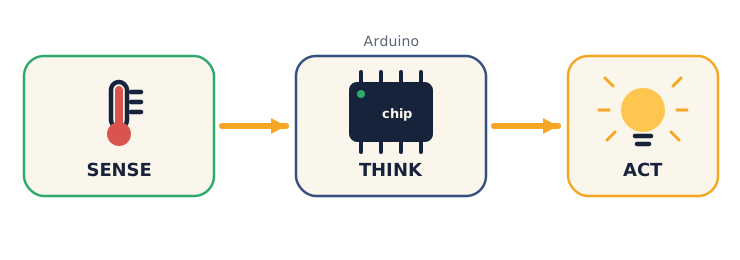
Here are three starter ideas:
- Automatic night-light: if it's dark → turn the LED on.
- Heat alarm: if temperature is high → sound the buzzer.
- Door reminder: if the button is pressed → blink an LED.
Finish this sentence for your own gadget — "My gadget will sense ___, think (if ___), and act by ___."
Teach — Code the decision (the "Think")
The magic is an if statement — it lets the gadget decide for itself. Read the code line by line and name the Sense, Think, and Act.
Type and run this in Tinkercad:
void setup() {
  pinMode(13, OUTPUT);
}

void loop() {
  int light = analogRead(A0);   // SENSE
  if (light < 400) {            // THINK: is it dark?
    digitalWrite(13, HIGH);     // ACT: light ON
  } else {
    digitalWrite(13, LOW);      // ACT: light OFF
  }
}
⚠ Watch for the #1 misconception: it's tempting to expect it to work perfectly first try and give up when it doesn't. Remember — the number
400is a threshold you tune, and real engineers spend most of their time testing and adjusting, not getting it right the first time.
Ask yourself: "What happens if I make the threshold 900 instead of 400? When would the LED come on then?" (Answer: it turns on much more easily — almost all the time.)
Activity — Build, test & tune
Build your gadget in the simulator, then work through these steps.
- In Tinkercad Circuits, add the Arduino, a sensor (e.g., photoresistor on A0), and an output (LED on pin 13 with a resistor). Wire it up.
- Add the decision code above (adapt it to your chosen gadget).
- Start Simulation. Cover the sensor — does the LED turn on?
- Tune the threshold: the number
400decides when it triggers. Too sensitive, or not enough? Change it and re-test. This tuning is engineering.
Ask yourself: "What threshold worked for my gadget? How did I know?"
Debrief: be ready to share your gadget, your threshold, and one thing you changed while testing.
Check yourself
Try these — then check your answers:
- What are the three parts of a smart gadget? → Sense → Think → Act — a sensor, an
ifdecision, and an output. - What does the
ifstatement do? → It lets the gadget decide between options based on the sensor reading. - What is the threshold? → The value that triggers the action (here,
400) — you tune it by testing.
Wrap-up
- Explain your gadget in one sentence: what it senses, decides, and does.
- Try this at home — Finish the project checklist and keep it for your portfolio:
- [ ] I wrote my Sense → Think → Act plan
- [ ] I built the circuit in Tinkercad
- [ ] I wrote code with an
ifdecision - [ ] I tested it and tuned the threshold
- [ ] I took a screenshot for my portfolio
- [ ] I can explain how it works in one sentence
Tips & extra challenges
- Watch out: it's easy to think "it should work perfectly the first time." It won't — engineers test and tune; the threshold almost always needs adjusting, and that iteration is the real skill.
- Want more? Try this — the "smarter gadget" mini-project: make it your own and document it like an engineer, in three stages. (1) Redesign: build an independent prototype with a different sensor + output (temperature + buzzer, distance + LED) so you're not just re-running the demo. (2) Add a middle state with
else if, so the gadget has three behaviours instead of two — for example a night-light that's OFF in bright light, DIM at dusk, and FULL in the dark:
void loop() {
  int light = analogRead(A0);
  if (light < 300) {                 // very dark
    digitalWrite(13, HIGH);          // full
  } else if (light < 600) {          // dusk
    analogWrite(13, 60);             // dim (PWM)
  } else {                           // bright
    digitalWrite(13, LOW);           // off
  }
}
(3) Document it in a one-page engineering report: Problem → Design (Sense/Think/Act) → Build → Test results (what thresholds worked and how you found them) → Next steps. Record the actual sensor readings you measured for each state — that's real test data. (Prefer software? Build a data prototype instead — a mini analysis or model with a short report, same structure.)
Vocabulary
| Term | Meaning |
|---|---|
if statement |
Code that decides between options |
| Threshold | The value that triggers an action |
| Prototype | A first working version |
| Debug | Finding and fixing problems |
| Iterate | Test → tweak → test again |
Resources
- Tinkercad Circuits — build, code, and simulate.
- Arduino Project Hub — ideas to make yours cooler.
- Arduino
ifreference — the language guide.
Practice set
Practise on your own — extra tasks on if decisions, thresholds, and building/testing a gadget, easy to hard. Answers follow each arrow.
1. Read the decision. In if (light < 400) { ... }, when does the code inside run? → Only when the sensor reading is below 400 (i.e., when it's dark).
2. Plan a gadget. Fill in: "My gadget will sense , think (if ), and act by ___." for a heat alarm. → Sense temperature; think if temperature > threshold; act by sounding a buzzer.
3. Predict the tuning. The night-light triggers at light < 400. If you change it to light < 900, when does the LED come on now? → Much more easily — almost all the time, because most readings are below 900.
4. Add a buzzer (build task). Change the night-light so a buzzer on pin 8 beeps when it's dark instead of an LED.
void setup() { pinMode(8, OUTPUT); }

void loop() {
  int light = analogRead(A0);
  if (light < 400) {
    tone(8, 1000);      // beep at 1000 Hz
  } else {
    noTone(8);          // silence
  }
}
5. Spot the bug. A student writes if (light = 400) and the gadget acts weird. What's wrong? → = assigns a value; a comparison needs == (or <, >). They meant something like if (light < 400).
6. Three-way decision (harder sketch task). Rewrite the night-light so it's OFF in bright light, DIM at dusk, and FULL in the dark, using else if.
void loop() {
  int light = analogRead(A0);
  if (light < 300) {
    digitalWrite(13, HIGH);   // dark → full
  } else if (light < 600) {
    analogWrite(13, 60);      // dusk → dim
  } else {
    digitalWrite(13, LOW);    // bright → off
  }
}
7. Design a fair tuning test (hardest). Your night-light flickers on and off right at dusk. Describe how you'd find a threshold that stops the flicker. → Record the sensor reading at the exact light level where flicker happens, set the threshold clearly below it (or add a small gap / "deadband" between on and off levels), then re-test at that light level. Change one number at a time and note what happens — that's engineering iteration.
Going deeper (optional)
Optional — for when you've built the basic gadget and want it to behave like a real product.
Hysteresis — why real thermostats have a "gap." A single threshold flickers: right at the trigger point, tiny sensor wobble flips the output on-off-on-off. Real thermostats fix this with two thresholds — turn ON below one level, turn OFF above a higher level, and do nothing in between. Picture it with a heater: turn on below 18°C, turn off above 21°C — the 3-degree gap stops the constant clicking. If you're ready for a challenge, add this with a variable that remembers the current state and two if checks. It's a satisfying "aha": the fix for flicker isn't a better sensor, it's a smarter decision.
Calibration — every sensor is a little different. The "right" threshold isn't universal: a photoresistor in a bright room reads differently from one in a dim room, and two sensors rarely give identical numbers. That's why you tune the threshold rather than trusting one magic value. Real products calibrate: they take a reading in a known condition (e.g., "this is what 'dark' looks like here") and set the threshold relative to it. Measure your own sensor's "bright" and "dark" readings and set the threshold halfway between — a mini calibration.
Common mistakes & fixes
- Mistake: Using
=instead of==in a comparison (if (light = 400)). → Fix: Use==,<, or>for comparisons;=assigns a value and will make theifmisbehave. - Mistake: Expecting the first threshold guess to work perfectly. → Fix: Treat the number as something to tune — measure real readings, change one value, re-test; iteration is the actual engineering.
- Mistake: Forgetting the
else, so the output never turns back off. → Fix: Add anelse(or a second condition) that sets the output back to its off state when theifisn't true. - Mistake: Threshold set so the gadget triggers almost always or almost never. → Fix: Pick a value between the sensor's "trigger" and "rest" readings — measure both first, then aim for the middle.
- Mistake: Testing by changing several things at once (threshold and wiring and code), then not knowing what fixed it. → Fix: Change one thing per test and note the result — the same fair-test discipline from the research sessions.
What's next
Unit 3 — Competition & Portfolio: the finale — you'll turn your work into a competition entry, a research paper, and a standout presentation.