
Session 3 — Your First Prediction
Duration: 75 min · Format: live online
What you'll learn: by the end, you can explain how a model learns a pattern, why we split data into training and test sets, and build and run a real prediction with scikit-learn.
Soft skill focus — Critical thinking
Today you'll also grow Critical thinking. A model that scores well on its own training data can look perfect while having learned nothing — you have to question a good-looking result, not just accept it.
- Try this: when the predictor returns a number for 6 hours of study, don't take it on trust — ask "does this answer actually make sense?" and think about why we hide a test set instead of scoring the model on data it has already seen.
- Think about: when would a high accuracy score fool you — and how would you check whether the model really learned?
What you'll need
- A Google account so you can open your own Colab notebook.
- Google Colab → New notebook, where you'll build the predictor live. (scikit-learn is already installed in Colab — no setup needed.)
Hook
Think about these questions:
- "If someone studies more hours, do they usually score higher?"
- "How did you know that — did anyone give you a formula?"
Here's the idea: your brain already sees the pattern. A model is just a program that finds that pattern in data and uses it to predict new cases. Today you'll make a computer predict — not magic, just patterns and math.
Teach — A model learns the pattern, then predicts
Give a model some data points, and it finds the line — the pattern — that fits them. Then it can predict a new value by reading off that line.
Look at this diagram — notice the three parts:
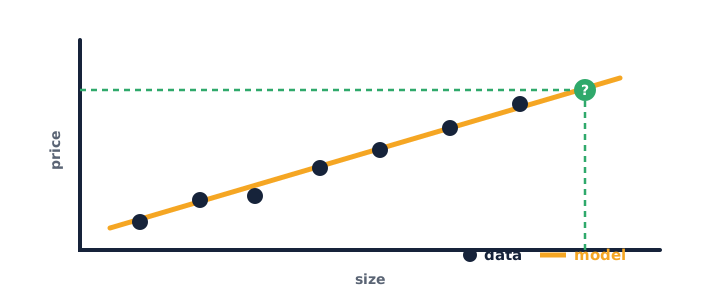
- Dots = the data we already have (for example, size → price).
- Line = the pattern the model learned.
- ? = a prediction for a new input, read straight off the line.
Ask yourself: "If all the dots sat perfectly on one straight line, how confident would the prediction be? What if they were scattered everywhere?" (Answer: a tight line means a strong, reliable pattern; a scattered cloud means a weak one.)
⚠ Watch for: it's tempting to think the model "memorises" the answers. It doesn't store the dots — it learns a general rule (the line) it can apply to inputs it has never seen.
Teach — Train, then test — no cheating
You never test a model on the same data it learned from — that's like handing it the exam answers first. Instead, you split the data into two parts.
Look at this diagram — walk through the split:
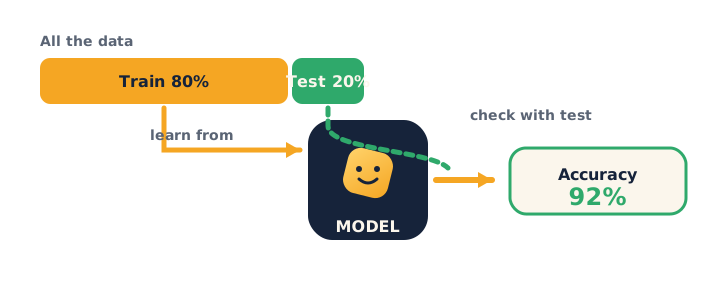
- Training set (≈80%) — the model learns from this.
- Test set (≈20%) — kept hidden, used to check if it really learned.
- Accuracy = how often it's right on the test set.
Ask yourself: "Why would testing on the training data give a misleadingly high score?" (Answer: the model has already seen those answers, so it can look perfect without having learned a general pattern.)
⚠ Watch for: it's tempting to judge a model by how well it does on data it trained on. Remember the test set — data it has never seen — is the only honest measure.
Activity — Build a real predictor
Open your own Google Colab and build a working predictor, line by line.
Type and run this in Colab:
from sklearn.linear_model import LinearRegression

# our data: hours studied  ->  test score
hours  = [[1], [2], [3], [4], [5]]
scores = [52, 60, 71, 79, 90]

model = LinearRegression()
model.fit(hours, scores)          # 1) learn the pattern

prediction = model.predict([[6]]) # 2) predict for 6 hours
print("Predicted score:", prediction[0])
- Ask yourself: "What score does it predict for 6 hours of study? Does that seem reasonable?"
- Change the data or predict for
[[8]], then ask yourself: "Does the answer still make sense?"
Watch out for the double-brackets confusion — hours is a list of lists ([[1], [2], …]), and predict also needs [[6]], not [6]. This is the error most people hit.
You just trained a machine learning model in six lines. That .fit() step is the learning.
Check yourself
Try these — then check your answers:
- Why do we keep a separate test set? → To check if the model really learned — not just memorised. Testing on the training data would be cheating.
- In the code, which line is the "learning" step? →
model.fit(hours, scores)—.fit()finds the pattern in the data. - What does higher accuracy mean? → The model is right more often on data it hasn't seen before.
Wrap-up
- Explain what
.fit()does in your own words. - Try this at home — Your own predictor: make a tiny dataset (e.g. minutes of practice → free throws made). Train the model, predict a new value, and write one sentence: is the prediction believable? Why or why not? Bring it to Session 4.
Tips & extra challenges
- Watch out: it's easy to think "the model memorises the data." It doesn't — it learns a general pattern it can apply to new, unseen inputs, which is exactly why the hidden test set matters.
- Common coding errors: forgetting the double brackets —
hoursmust be[[1], [2], …]andpredictneeds[[6]]; mixing up which list is the input (hours) and which is the target (scores); calling.predict()before.fit(); readingpredictionas a plain number instead of a list (henceprediction[0]). - Want more? Try this — model showdown mini-project: real data scientists compare models and measure them properly. Turn it into a small experiment: take a real dataset with several rows, split it into train/test, then train two different models on the same data and print each one's error. Your job is to declare a winner (lowest error) and then re-run with a different
random_stateortest_sizeto see whether the winner holds — a genuine first controlled experiment, with a one-sentence conclusion. Run this with a real dataset that has several rows (X= features,y= target):
from sklearn.model_selection import train_test_split
from sklearn.tree import DecisionTreeRegressor
from sklearn.linear_model import LinearRegression
from sklearn.metrics import mean_absolute_error

# X = features, y = target (use a real dataset with several rows)
X_train, X_test, y_train, y_test = train_test_split(X, y, test_size=0.2, random_state=1)

for model in [LinearRegression(), DecisionTreeRegressor()]:
    model.fit(X_train, y_train)
    preds = model.predict(X_test)
    print(type(model).__name__, "error:", mean_absolute_error(y_test, preds))
Remember lower error = better — which model wins on your data? Now change test_size or random_state and see whether the winner changes (your first real experiment).
Vocabulary
| Term | Meaning |
|---|---|
| Model | A program that learns a pattern to predict |
| Train / Fit | Teaching the model with data (.fit) |
| Test set | Hidden data used to check the model |
| Feature | An input used to predict (e.g. hours) |
| Accuracy | How often the model is right |
Resources
- Kaggle — Intro to Machine Learning — free, hands-on, a perfect next step.
- scikit-learn — getting started — the official guide.
- Google Colab — where you run it all.
Practice set
Practise on your own — extra exercises on models, train/test, .fit()/.predict(), and the double-bracket shape, easy to hard.
1. Vocabulary check: in model.fit(hours, scores), which list is the feature and which is the target? → hours is the feature (input); scores is the target (what we predict).
2. Spot the "learning" line: in a scikit-learn script, which method actually learns the pattern — .fit() or .predict()? → .fit() finds the pattern; .predict() just uses it.
3. Fix the shape bug: this errors — why, and how do you fix it? → scikit-learn needs a list of lists. Fix: model.predict([[7]]), not [7].
model.predict([7])
4. Fix the order bug: why does this crash? → .predict() is called before .fit(); the model hasn't learned yet. Move model.fit(X, y) above the predict line.
model = LinearRegression()
print(model.predict([[3]]))
model.fit(X, y)
5. Predict and read the result: after fitting on the study-hours data, write the line that prints the predicted score for 7 hours as a plain number. → print(model.predict([[7]])[0]) — the [0] pulls the single value out of the result list.
6. Write the split (harder): using train_test_split, split X and y so that 20% is held out for testing, reproducibly. →
from sklearn.model_selection import train_test_split
X_train, X_test, y_train, y_test = train_test_split(
    X, y, test_size=0.2, random_state=1)
7. Reasoning (hardest): a classmate reports 100% accuracy but tested on the same rows the model trained on. Is the score trustworthy? → No — the model has already seen those answers, so it looks perfect without proving it learned a general pattern. Test on the held-out set instead.
Going deeper (optional)
If you're flying through this, open the black box: a LinearRegression model is just learning the line score = slope × hours + intercept. After fitting, you can read those two numbers straight out of the model:
from sklearn.linear_model import LinearRegression

hours  = [[1], [2], [3], [4], [5]]
scores = [52, 60, 71, 79, 90]

model = LinearRegression()
model.fit(hours, scores)

print("slope:", model.coef_[0])        # points gained per extra hour
print("intercept:", model.intercept_)  # predicted score at 0 hours
Interpret it in plain English: "each extra hour of study adds about coef_ points, starting from intercept_." Then check that slope * 6 + intercept gives the same answer as model.predict([[6]]) — proving the model really is just that line, not magic. This connects .fit() back to the best-fit line you can picture.
Common mistakes & fixes
- Mistake: passing single-bracket data, e.g.
model.predict([6]). → Fix: scikit-learn expects a 2D shape (a list of rows):model.predict([[6]]). - Mistake: calling
.predict()before.fit(). → Fix: always.fit()first so the model has learned a pattern, then.predict(). - Mistake: swapping feature and target in
.fit(), e.g.model.fit(scores, hours). → Fix: it's.fit(features, target)— inputs first, the thing you're predicting second. - Mistake: judging the model on its training data and trusting a high score. → Fix: measure on the held-out test set — the only honest check of whether it generalises.
- Mistake: treating the prediction as a plain number, e.g.
print("Score:", prediction)showing[87.4]. → Fix:.predict()returns a list; take the first element withprediction[0].
What's next
Session 4 — What AI Can (and Can't) Do: before going further, the most important lesson of the unit — you'll learn to use this power responsibly and fairly.