
Session 16 — Capstone Showcase
Duration: 75 min · Format: live online
What you'll learn: by the end, you can shape a project into a compelling capstone, present it clearly to an audience (problem, method, results, demo, what's next), and both give and receive the kind of feedback that actually makes work better.
Soft skill focus — Teamwork
Today you'll also grow Teamwork. A showcase isn't a solo exam — it's a room of builders making each other's work better. The best engineers aren't the loudest presenters; they're the ones who listen hard, ask the sharp-but-kind question, and lift the whole group. Today you're both presenter and audience, and both roles matter.
- Try this: for every project you watch, commit to giving one "I like… / I wonder…" — one genuine strength, one honest, curious question. It's specific, it's kind, and it's the format real research teams use to improve each other's work.
- Think about: "Do I listen to understand and help — or just wait for my turn to talk?"
What you'll need
- Google Colab with your capstone project ready to run, and your live demo link and GitHub repo open.
- Your four-part write-up from last session, as the backbone of your talk.
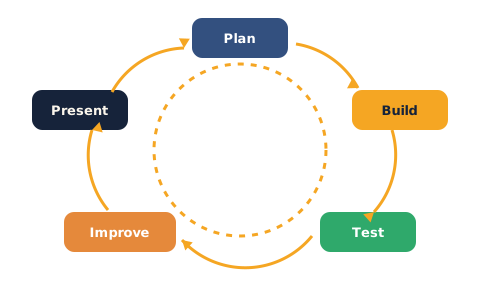
- The project-cycle diagram below open — you'll point to where your project sits in it.
Hook
This is it — the finale of The Future Builders. Everything you've learned, from a single neuron to transformers to deployment, comes down to one moment: you, standing up, saying "here's what I built, here's what I found, here's what's next."
Presenting isn't a bolt-on to the real work — for a scientist or engineer, it is the work. A result nobody hears about changes nothing. A discovery you can explain clearly can change a field, win a place at a university, or start a career. Today you turn your project into a story, tell it well, and help others tell theirs.
Teach — The five-part talk
A great project talk has the same skeleton as a great research paper. Aim for about five minutes, one part flowing into the next:
- Problem — what did you set out to do, and why should anyone care? Hook them in one sentence.
- Method — how did you approach it? The data, the model, the key decisions (not every line of code).
- Results — what did you find? Show a number, a chart, or the confusion matrix. Be honest about what worked and what didn't.
- Demo — the moment they remember. Open your live app and use it in front of them.
- What's next — where would this go with more time? This shows vision and self-awareness.
Notice this is your four-part write-up plus a live demo — you've already done most of the thinking. Now it's about telling it well.
⚠ Watch out: the number-one presentation killer is a demo that breaks live. Never rely on training a model or a fresh install during your talk — pre-run everything, have your app already open in a tab, and keep a screenshot or short recording as backup in case the wifi dies. Professionals always have a plan B.
Teach — Feedback that actually helps
When you're the audience, vague praise ("nice job!") and harsh dismissal ("that's wrong") are equally useless. Useful feedback is specific, kind, and actionable:
- Specific — point to one real thing, not a general vibe. "Your accuracy chart made the improvement really clear" beats "good visuals".
- Kind — assume the presenter worked hard and wants to improve. Feedback is a gift, not a verdict.
- Actionable — leave them with something they could actually do next: "I wonder if a baseline comparison would make the 80% land harder."
The "I like… / I wonder…" format bakes all three in. Use it for every project today — and you'll find people give you far better feedback in return.
Showcase — Present your capstone
This session, you present. Here's the flow — go in turns, everyone both presents and gives feedback.
Before you present, run this checklist:
- Is your demo open and working in a tab right now (not something you'll launch live)?
- Can you state your problem in one sentence a non-coder would find interesting?
- Do you have one honest result to show — a number, a chart, a screenshot?
- Do you have a backup (screenshot/recording) in case the live demo fails?
Then present, using the five-part shape:
1. Problem     — one hooking sentence: what and why
2. Method      — data, model, key decisions (keep it high-level)
3. Results     — show ONE piece of real evidence, be honest
4. Demo        — open your live app and use it in front of the room
5. What's next — one sentence on where it could go
While others present, give feedback using the format:
I like…    (one specific strength you genuinely noticed)
I wonder…  (one honest, curious, actionable question)
Aim to give at least one "I like… / I wonder…" to every presenter. Notice how the questions people ask often reveal the best next step for your project — that's the project cycle turning: plan, build, test and improve, again.
Showcase + reflection
Instead of the usual quick quiz, close by reflecting on your own showcase — write a few honest lines:
- What landed? → Which part of your talk or demo got the strongest reaction, and why do you think it worked?
- What would you change? → If you presented this again tomorrow, what's the one thing you'd do differently?
- What's your next loop? → From the feedback you got, name the single most useful next step for your project — the "test and improve" that starts the cycle again.
There are no fixed answers here — the honest reflection is the answer, and it's exactly what turns a finished project into a better next one.
Wrap-up
You did it. You built real AI, deployed it, showcased it, and helped others do the same. More than any single model, you now own the whole loop — plan, build, test, improve, present — and the confidence to stand behind your work in a room full of people. That's what a Future Builder is.
- Try this at home: record a two-minute version of your talk (phone camera is fine) and watch it back once. Note one thing you did well and one to improve. A short, clear recording of you explaining your project is a portfolio asset in itself — and superb interview practice.
Tips & extra challenges
- Watch out: don't cram every detail into the talk. Trying to explain all your code loses the audience; pick the three things that matter and cut the rest. Clarity beats completeness on stage.
- Want more? Try this: present with a peer as a two-person team — one drives the demo while the other narrates. Coordinating a smooth handoff is a real teamwork skill, and paired demos often feel more polished and confident than solo ones.
Vocabulary
| Term | Meaning |
|---|---|
| Capstone | A final, larger project that pulls together everything you've learned |
| Demo | A live run of your working app in front of an audience |
| Showcase | A session where builders present projects and exchange feedback |
| "I like / I wonder" | A feedback format: one specific strength, one curious question |
| Project cycle | Plan → build → test & improve, repeated — how real projects grow |
Resources
- Google Colab — have your capstone notebook open and pre-run for the demo.
- Hugging Face Spaces — your live demo link; open it in a tab before you present.
- GitHub — your portfolio and READMEs, ready to show alongside the talk.
Practice set
Practise on your own — work these easy → hard. Answers follow each arrow.
1. Order the talk. Put in order: Demo, Problem, What's next, Method, Results. → Problem, Method, Results, Demo, What's next.
2. Fix the feedback. "Nice job, it was good." How do you make it useful? → Make it specific and actionable — e.g. "I like how your demo let me change the age live; I wonder if adding a baseline would make your 80% stand out more."
3. Prevent the disaster. Why should you never install libraries or train a model live during a demo? → It's slow and can fail live; pre-run everything and open your app in a tab, with a screenshot as backup.
4. Sharpen the hook. A talk opens with "I used a Random Forest on the Titanic dataset." Better opener? → Lead with the problem and why it's interesting — e.g. "Could we predict who survived the Titanic, and find out what mattered most?" — then name the method.
5. Reflect honestly (harder). After presenting, what makes a good reflection versus a lazy one? → A good one is specific and points to a next action ("I'd add a confusion-matrix chart, my results were hard to read"); a lazy one is generic ("it went fine").
6. Give real feedback (harder). Write an "I like… / I wonder…" for a project that got 78% accuracy but showed no baseline. → e.g. "I like that you were honest about 78%; I wonder what a simple baseline scores, so we can see how much your model really added." (Any specific, kind, actionable pair works.)
Going deeper (optional)
Optional — for when you want to present like a researcher.
Anticipate the questions before they're asked. Strong presenters don't fear the Q&A — they pre-empt it. Before your talk, list the three hardest questions someone could ask ("Isn't 80% just because most people died?", "Did you check for bias?", "How do you know it's not overfitting?") and prepare a one-line honest answer for each. Weave the answers into your talk before anyone raises them, and you look like someone who truly understands their work — because you do. This habit, connected to everything you learned about honest evaluation and responsible AI, is exactly what separates a demo from real science.
Common mistakes & fixes
- Mistake: Relying on a live install or training run during the demo. → Fix: pre-run everything, open the app in a tab, and keep a screenshot/recording as backup.
- Mistake: Cramming every technical detail into the talk. → Fix: pick the three things that matter and cut the rest; clarity beats completeness.
- Mistake: Giving (or getting) vague feedback. → Fix: use "I like… / I wonder…" — specific, kind, and actionable.
- Mistake: Overselling results. → Fix: be honest about what worked and what didn't; a candid 78% with a next step earns more respect than a shaky 99%.
- Mistake: Skipping the "what's next". → Fix: always end with a forward step — it shows vision and turns the project cycle for the next loop.
What's next
Projects & Assessment: pull it all together in your capstone portfolio, then earn your certificate.