
Session 3 — Build a Neural Network
Duration: 75 min · Format: live online
What you'll learn: by the end, you can build a real neural network with Keras/TensorFlow, train it on a real dataset of images, and measure how well it does — all in a handful of lines. You'll meet
Sequential,Dense,compile,fitandevaluate, the five commands you'll use in every project from here on.
Soft skill focus — Resilience
Today you'll also grow Resilience. Your first training run will probably throw a shape error, or hit low accuracy, or warn about something. That's not failure — that's normal. Everyone who builds models reads red error text and keeps going. Resilience is the muscle that turns a broken run into a working one.
- Try this: when you hit an error, don't close the tab. Read the last line of the message out loud — it usually names the exact problem (a shape, a missing step). Fix that one thing, re-run, and notice how good it feels to beat it.
- Think about: "Do I treat a red error as 'I can't do this' or as 'the computer just told me exactly what to fix next'? Which belief will get me further?"
What you'll need
- Google Colab open in a new notebook — Keras and TensorFlow are already installed there, nothing to set up.
- Sessions 1 and 2 in mind: a network is layers of neurons (Session 1), and it learns by the training loop (Session 2). Today Keras runs that loop for you.
- Patience for one or two errors — see the Soft skill box. They're part of the job.
Hook
Last session you trained one weight by hand, and it took a dozen lines. A real network has thousands of weights across several layers. Writing all those gradient updates yourself would take pages.
Here's the good news: you never have to. Keras — the friendly front end of Google's TensorFlow — runs the entire training loop for you. You describe the shape of the network, hand it the data, and it does the predicting, the loss, and the weight updates automatically. In the next 75 minutes you'll build a network that looks at a handwritten digit and tells you which number it is — and it'll get most of them right.
Teach — The five commands
Almost every Keras model is built from the same five steps. Learn these once and you can build anything.
Sequential— a stack of layers, one after another. You list the layers and Keras wires them together.Dense— a fully-connected layer: every neuron connects to every input, exactly like Session 1. You say how many neurons and which activation.compile— tell the model how to learn: which loss to measure and which optimizer (the gradient-descent engine from Session 2, usually"adam") to use.fit— run the training loop for a number of epochs. This is where the learning actually happens.evaluate— test the trained model on data it has never seen, to get an honest accuracy.
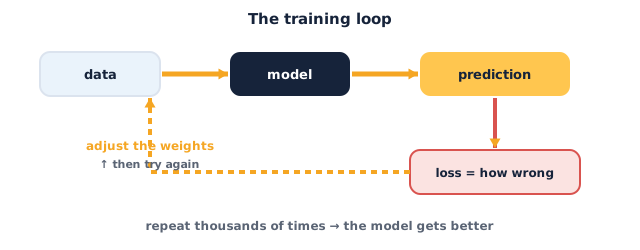
That's the whole workflow. The training loop you built by hand in Session 2 is hiding inside fit — same loss, same gradient descent, same repeat, just done for thousands of weights at once.
Teach — The data: MNIST digits
You'll train on MNIST — 70,000 small grayscale images of handwritten digits 0–9, the classic first dataset in deep learning. Each image is 28×28 pixels.
Two things you always do to image data before training:
- Flatten or shape it so the network can read it. Our first network wants a flat list of 784 numbers (28 × 28), so we'll flatten each image with a
Flattenlayer. - Normalize the pixel values from
0–255down to0–1by dividing by255. Networks learn far better when the inputs are small — it keeps the gradients well-behaved.
Keras splits the data for you into a training set (to learn from) and a test set (to be judged on) — never test on the data you trained on, or you're just checking its memory.
Activity — Build and train a real network
Open a fresh Colab notebook. You'll build this in three short cells so you can see each part work before moving on.
Cell 1 — load and prepare the data. Type and run this:
import tensorflow as tf

# Load MNIST: 60,000 training images, 10,000 test images
(x_train, y_train), (x_test, y_test) = tf.keras.datasets.mnist.load_data()

# Normalize pixels from 0-255 down to 0-1
x_train = x_train / 255.0
x_test  = x_test  / 255.0

print("training images:", x_train.shape)   # (60000, 28, 28)
print("one label:", y_train[0])            # a digit 0-9
Cell 2 — build and compile the network. Type and run this:
model = tf.keras.Sequential([
    tf.keras.layers.Flatten(input_shape=(28, 28)),   # 28x28 image -> 784 numbers
    tf.keras.layers.Dense(128, activation="relu"),   # a hidden layer of 128 neurons
    tf.keras.layers.Dense(10, activation="softmax"), # 10 outputs: one score per digit
])

model.compile(
    optimizer="adam",                          # the gradient-descent engine
    loss="sparse_categorical_crossentropy",    # loss for whole-number class labels
    metrics=["accuracy"],                      # report accuracy as it trains
)

model.summary()   # prints the layers and how many weights it will learn
Cell 3 — train it, then judge it. Type and run this:
# fit = run the training loop for 5 epochs
model.fit(x_train, y_train, epochs=5)

# evaluate = honest score on images it has never seen
test_loss, test_acc = model.evaluate(x_test, y_test)
print("test accuracy:", round(test_acc, 4))
Now read your results:
- As
fitruns, does the accuracy climb each epoch (e.g.0.92 → 0.95 → 0.97)? That's the training loop working — loss down, accuracy up. - What was your final test accuracy? Anything around
0.97(97%) means your network correctly reads about 97 out of 100 unseen digits. - Look at
model.summary(). The bottom line shows total params — that's how many weights your loop just tuned. It's in the hundreds of thousands. Imagine setting those by hand!
You just built and trained a real deep-learning model. Everything from here is variations on these three cells.
Check yourself
- What do
compile,fitandevaluateeach do? →compilesets the loss and optimizer;fitruns the training loop;evaluatescores the model on unseen test data. - Why divide the pixels by 255? → To normalize them to
0–1— small, well-scaled inputs make training faster and more stable. - Why is test accuracy more honest than training accuracy? → Because the test set is data the model has never seen, so it measures real learning, not memorising.
Wrap-up
You built a neural network with Sequential and Dense layers, told it how to learn with compile, trained it with fit, and judged it honestly with evaluate — and it reads handwritten digits at around 97% accuracy. Those five commands are the backbone of every model in this course.
- Try this at home: swap the dataset for Fashion-MNIST — clothes instead of digits, same shape. Change one line,
mnisttofashion_mnist:tf.keras.datasets.fashion_mnist.load_data(). Re-run all three cells unchanged. Is your accuracy higher or lower than on digits, and why might clothes be harder to tell apart than numbers?
Tips & extra challenges
- Watch out: more epochs isn't always better. Past a point, training accuracy keeps rising while test accuracy stalls or drops — the model is memorising, not learning (overfitting, Session 12). Watch the gap between the two, not just training accuracy.
- Want more? Try this: add a second hidden layer — a
Dense(64, activation="relu")line between the two you have — and re-run. Does accuracy improve, stay flat, or get worse? Bigger isn't automatically better; you have to measure.
Vocabulary
| Term | Meaning |
|---|---|
| Keras | The friendly high-level API for building networks on TensorFlow |
| Sequential | A model that stacks layers one after another |
| Dense layer | A fully-connected layer — every neuron sees every input |
| Optimizer | The gradient-descent engine that updates weights (e.g. Adam) |
| Test set | Held-out data, unseen in training, used for an honest score |
Resources
- Google Colab — free notebooks with Keras/TensorFlow pre-installed and free GPUs.
- Keras — Getting started — the official quickstart, in the same style you used today.
- TensorFlow — Beginner quickstart — the MNIST walkthrough this session is built from.
Practice set
Practise on your own — work these easy → hard. Answers follow each arrow.
1. Name the step. Which command actually runs the training loop and updates the weights? → fit.
2. Read the shape. x_train.shape prints (60000, 28, 28). How many images are there, and how big is each? → 60,000 images, each 28 × 28 pixels.
3. Why softmax? The last layer is Dense(10, activation="softmax"). Why 10, and why softmax? → 10 because there are 10 digit classes (0–9); softmax turns the scores into probabilities that add up to 1.
4. Fix the prep. A classmate's model trains terribly and they forgot to normalize. Write the one line that fixes it. → x_train = x_train / 255.0 (and the same for x_test) — scaling pixels to 0–1.
5. Change the network (harder). In code, add a hidden layer of 64 ReLU neurons between the existing 128-neuron layer and the output. Write the new Sequential list. →
model = tf.keras.Sequential([
    tf.keras.layers.Flatten(input_shape=(28, 28)),
    tf.keras.layers.Dense(128, activation="relu"),
    tf.keras.layers.Dense(64, activation="relu"),
    tf.keras.layers.Dense(10, activation="softmax"),
])
Going deeper (optional)
Optional — for when you want to know what the loss and optimizer names mean.
What is sparse_categorical_crossentropy, and why Adam? Session 2 used squared error, which is perfect for predicting a number. But here the model predicts which class out of ten — so we need a loss built for probabilities. Cross-entropy measures how far the predicted probability for the correct digit is from 1: confident-and-right gives tiny loss, confident-and-wrong gives huge loss. The "sparse" part just means your labels are plain integers (7) rather than one-hot vectors. As for Adam — it's gradient descent from Session 2 with two upgrades: it gives each weight its own learning rate and it keeps a little momentum so it rolls through flat spots. It's the default optimizer for good reason; you'll reach for it in nearly every project.
Common mistakes & fixes
- Mistake: A shape error like "expected shape (28, 28)". → Fix: make sure a
Flattenlayer is first, and that you didn't reshape the images by accident — printx_train.shapeto check. - Mistake: Accuracy stuck near
0.10(random guessing). → Fix: you almost certainly forgot to normalize — divide the pixels by255.0and re-run. - Mistake: Using the wrong loss for the task. → Fix: for whole-number class labels use
sparse_categorical_crossentropy, notmse— the loss must match the job. - Mistake: Testing on the training data. → Fix: always call
evaluateonx_test/y_test, the held-out set — never on the data you fit on. - Mistake: Re-running
fitand expecting a fresh start. → Fix:fitcontinues training the same weights; to start over, re-run the cell that builds the model first.
What's next
Session 4 — Deep Vision with CNNs: your Dense network flattens an image into a line of numbers and loses all the shapes. Next you'll build a convolutional neural network that keeps the picture as a picture — finding edges, corners and objects the way real computer-vision models do.