
Session 13 — An End-to-End ML Project
Duration: 75 min · Format: live online
What you'll learn: by the end, you can run a complete machine-learning project from start to finish on a real dataset — get the data, clean and explore it, train a model, evaluate it honestly, and decide whether it's ready to deploy — using pandas and scikit-learn in Colab.
Soft skill focus — Problem-solving
Today you'll also grow Problem-solving. A real project never arrives clean. Columns are missing, the accuracy is disappointing, the code throws an error you've never seen. The skill isn't knowing every answer in advance — it's breaking a messy, scary problem into small steps you can solve, one at a time.
- Try this: whenever you get stuck today, write the problem as one sentence starting with "I need to…" (e.g. "I need to fill the empty Age values"). Naming the exact sub-problem is half the solve. Then tackle only that sentence before looking at the next.
- Think about: "When something breaks, do I panic — or do I get curious and shrink the problem until it's solvable?"
What you'll need
- Google Colab open, signed in, a fresh notebook ready.
- The pipeline diagram below open, so you can tick off each stage as you complete it.
- A notebook or doc to jot down decisions you make (which column you dropped, why) — a real project keeps a record.
Hook
Everything you've built so far in this course was one piece of the puzzle: a neuron, a CNN, a transformer, an evaluation. But a real machine-learning project is a pipeline — a chain where the messy early stages quietly decide whether the fancy model at the end has any chance.
Here's the secret professionals know: the model is often the easy part. Getting good data, cleaning it, and understanding it is where most of the real work — and most of the winning or losing — happens. Today you run the whole chain yourself, end to end, on a real dataset.
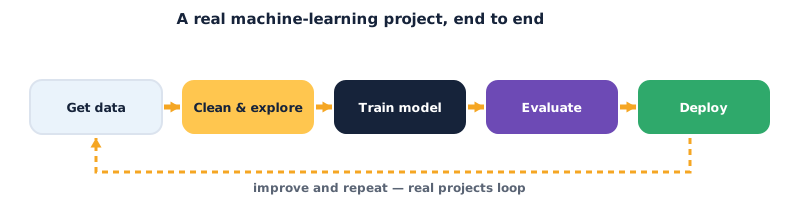
Teach — The five stages of a real project
Every serious ML project moves through the same stages. Learn the shape once and you can apply it to any dataset forever.
- Get data — load it and look at its actual shape: how many rows, how many columns, what does each column mean?
- Clean & explore — handle missing values, fix types, and explore (EDA — exploratory data analysis): which features seem to matter? This stage usually takes the most time.
- Train — split into train/test, pick a model, and fit it on the training half only.
- Evaluate — measure honestly on the test half the model never saw. Is it actually good, or just lucky?
- Deploy (and loop) — if it's good enough, ship it so people can use it (that's next session) — then loop back with what you learned.
⚠ Watch out: the single biggest mistake in a whole pipeline is letting the test set leak into training — cleaning or fitting using the test data, then evaluating on it. Your numbers will look amazing and mean nothing. Split first, then only ever look at the test set to score. Treat it like a sealed exam.
Teach — Cleaning is the real job
When people imagine ML, they picture the training line. In reality you'll spend most of a project here:
- Missing values — real data has gaps. You either drop those rows or fill them (e.g. with the median). Deleting too much throws away signal; filling badly invents signal.
- Wrong types — a number stored as text (
"3") won't do maths. A category ("male"/"female") has to become numbers before a model can use it. - Understanding, not just fixing — a quick chart or a
groupbyoften reveals the answer before any model runs. If survivors were mostly women and children, a model will "discover" the same thing — but you should see it first.
Do this stage well and a simple model shines. Skip it and no amount of deep learning saves you.
Activity — Run the whole pipeline
You'll use the classic Titanic dataset (who survived the shipwreck) — small, real, and perfect for one session. Open a new Colab notebook and go stage by stage.
Stage 1 — Get the data. Load it straight from a URL and look at it:
import pandas as pd

url = "https://raw.githubusercontent.com/datasciencedojo/datasets/master/titanic.csv"
df = pd.read_csv(url)

print("shape (rows, cols):", df.shape)
df.head()
Stage 2 — Explore, then clean. First look, then decide:
print(df.isnull().sum())          # how many gaps per column?
print(df.groupby("Sex")["Survived"].mean())   # explore: does Sex matter?

# clean: fill missing Age with the median, drop columns we won't use
df["Age"] = df["Age"].fillna(df["Age"].median())
df = df[["Survived", "Pclass", "Sex", "Age", "Fare"]].dropna()

# turn the Sex category into numbers (male=0, female=1)
df["Sex"] = df["Sex"].map({"male": 0, "female": 1})
df.head()
Stage 3 — Split, then train (split before you fit — no leakage):
from sklearn.model_selection import train_test_split
from sklearn.ensemble import RandomForestClassifier

X = df.drop("Survived", axis=1)   # features
y = df["Survived"]                # the answer we want to predict

X_train, X_test, y_train, y_test = train_test_split(
    X, y, test_size=0.2, random_state=42)

model = RandomForestClassifier(n_estimators=100, random_state=42)
model.fit(X_train, y_train)       # fit on TRAIN only
Stage 4 — Evaluate honestly on the untouched test set:
from sklearn.metrics import accuracy_score, confusion_matrix

preds = model.predict(X_test)
print("accuracy:", accuracy_score(y_test, preds))
print(confusion_matrix(y_test, preds))
Now investigate:
- What accuracy did you get? (Around
0.80is normal here.) Is that good, given that always guessing "did not survive" scores about0.62? - Ask the model what it learned: run
dict(zip(X.columns, model.feature_importances_)). Which feature mattered most? Does it match what yourgroupbyin Stage 2 hinted at?
You just ran a full, real ML pipeline — the exact shape of every project a data scientist ships.
Check yourself
- Why do you split before cleaning-with-statistics or training? → To prevent data leakage — if the test set influences training, your score is fake. The test set must stay unseen until you score.
- Which stage usually takes the most time? → Clean & explore — real data is messy, and understanding it well is what makes the model work.
- Why compare your accuracy to "always guess the most common class"? → That's the baseline. If your model can't beat it, it hasn't learned anything useful yet.
Wrap-up
You now have the whole map: get → clean & explore → train → evaluate → deploy → loop. The model is one box in that chain, and often the smallest. Master the messy early boxes and you can tackle any dataset — which is exactly what a portfolio project needs.
- Try this at home: swap the
RandomForestClassifierforLogisticRegression(fromsklearn.linear_model), rerun Stages 3–4, and write one sentence comparing the two accuracies. Then note which model you'd choose to deploy, and why.
Tips & extra challenges
- Watch out: an accuracy of
1.0is a red flag, not a trophy. It almost always means leakage — a feature that secretly contains the answer, or the test set sneaking into training. Investigate before you celebrate. - Want more? Try this: engineer a new feature. Create
df["FamilySize"]by adding a couple of the raw columns you dropped (SibSp+Parch+ 1), include it inX, and see if accuracy moves. Inventing useful features is one of the highest-value skills in ML.
Vocabulary
| Term | Meaning |
|---|---|
| Pipeline | The full chain of stages from raw data to a deployed model |
| EDA | Exploratory data analysis — looking at and charting data before modelling |
| Data leakage | When test/future information sneaks into training, faking good scores |
| Baseline | The score of a trivial guess; your model must beat it to be useful |
| Feature importance | How much each input column contributed to the model's decisions |
Resources
- Google Colab — run the whole pipeline here, no install needed.
- pandas — 10 minutes to pandas — the fast tour of the cleaning-and-exploring toolkit.
- scikit-learn — Getting Started — train/test splits, models and metrics, all in one place.
Practice set
Practise on your own — work these easy → hard. Answers follow each arrow.
1. Name the stage. You're filling missing ages and turning "Sex" into numbers. Which pipeline stage is this? → Clean & explore (the cleaning part).
2. Spot the leak. A friend cleans the whole dataset using the overall median, then splits into train/test. Is that leakage? → Yes — the median was computed using test rows too, so test info leaked into training. Split first, compute the median on train only.
3. Read the baseline. 62% of passengers did not survive. Your model scores 60%. Good or bad? → Bad — it's below the "always guess did-not-survive" baseline of 62%, so it's worse than a trivial guess.
4. Choose a fix. A column is 90% empty. Fill it or drop it? → Usually drop the column — filling 90% of it invents far more data than it keeps; too little real signal remains.
5. Write the split (harder). Write the line that splits X and y into 80% train / 20% test with a fixed seed. → X_train, X_test, y_train, y_test = train_test_split(X, y, test_size=0.2, random_state=42).
6. Interpret importance (harder). Your model reports Sex: 0.45, Fare: 0.20, Age: 0.20, Pclass: 0.15. In one sentence, what's the takeaway? → Sex was by far the strongest predictor of survival; fare, age and class each mattered less and roughly equally.
Going deeper (optional)
Optional — for when you wonder how professionals keep a pipeline reliable.
Why wrap the steps in a Pipeline object? Doing cleaning and modelling in separate cells works for learning, but it's easy to accidentally leak — for example, scaling using the whole dataset. scikit-learn's Pipeline bundles your preprocessing and your model into one object that is .fit() on train only and applied identically to test, making leakage much harder. It also means the exact same steps run in deployment, so what you tested is what ships. As your projects grow, moving from loose cells to a single Pipeline is a mark of real maturity — explore sklearn.pipeline.Pipeline when you're ready.
Common mistakes & fixes
- Mistake: Cleaning or scaling using the full dataset before splitting. → Fix: split first; compute any statistic (median, scaler) on train only, then apply it to test.
- Mistake: Feeding text categories straight into the model. → Fix: convert categories to numbers first (
.map(...)or one-hot encoding) — models do maths, not words. - Mistake: Judging the model by accuracy alone. → Fix: compare to a baseline and check the confusion matrix — accuracy can hide which class the model keeps getting wrong.
- Mistake: Dropping every row with any missing value. → Fix: you can lose most of your data that way; fill sensible gaps (median for numbers) and only drop when a column is mostly empty.
- Mistake: Believing a perfect score. → Fix:
accuracy == 1.0almost always means leakage; hunt for the feature that leaked the answer.
What's next
Session 14 — Deploy Your AI: you have a trained, evaluated model sitting in a notebook where only you can use it. Next you'll wrap it in a simple app with Gradio and publish it on Hugging Face Spaces — so anyone in the world can try your model from a single link.