
Session 15 — Your University-Ready Portfolio
Duration: 75 min · Format: live online
What you'll learn: by the end, you can turn your projects into a portfolio that stands out to universities and employers — a clean GitHub, a strong README for each project (problem → approach → result → what you learned), and a clear, confident way to talk about what you built.
Soft skill focus — Communication
Today you'll also grow Communication. A brilliant project that no one can understand is, to a reviewer, a blank page. The whole point of a portfolio is communication: making a busy stranger grasp — in under a minute — what you built, why it matters, and how good you are. The code is the evidence; the words are what let anyone read that evidence.
- Try this: for every project, write the "so what?" first — one sentence a non-coder would find interesting. If you can't make your grandmother care in one line, you don't yet understand your own project well enough to present it.
- Think about: "If a reviewer only read the first three lines of my README, would they know what I made and want to keep reading?"
What you'll need
- A free GitHub account — create one now if you don't have it; this becomes your public work portfolio.
- Two or three projects from this course to write up (a trained model, your deployed demo, a research reproduction).
- The portfolio diagram below open, so you can see how the pieces support each other.
Hook
Imagine an admissions officer with 400 applications and a coffee going cold. They open your GitHub. They have — honestly — about thirty seconds before they decide whether you're serious. What do they see?
If it's a wall of untitled files and empty READMEs, they close the tab. If it's a clean profile with three sharp projects, each opening with a clear line about what it does and a result to back it up, they lean in. Same work, wildly different outcome. The difference isn't more coding — it's presentation. Today you build the thing that makes your months of work land.
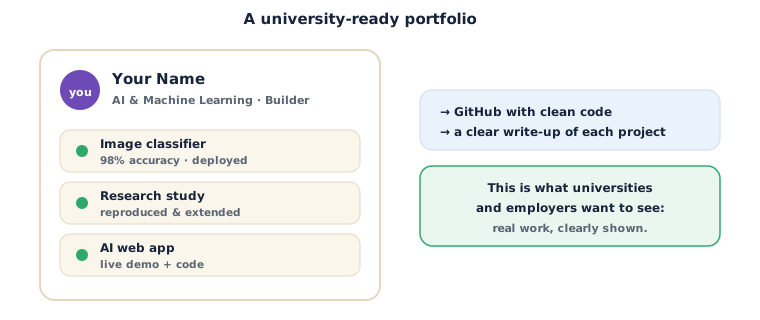
Teach — What a strong portfolio has
A portfolio isn't a dumping ground for every file you ever wrote. It's a curated set of your best few projects, each easy to understand. Three things make it strong:
- Focus — 3 to 5 finished, polished projects beat 20 half-done ones. Reviewers judge your best work, not your most.
- Clarity — each project explains itself in seconds: what problem, what you did, what happened.
- Evidence — real results, real code, and where possible a live link (your deployed demo from last session) or a screenshot. Claims backed by proof.
Your GitHub profile page (a special repo named after your username with a README.md) is the front door: a short intro, what you're into, and links to your best repos.
Teach — The four-part write-up
Every project README should answer four questions, in order. Memorise this shape — it works for a README, a college essay, or an interview answer:
- Problem — what were you trying to do, and why is it interesting? (One or two sentences.)
- Approach — how did you tackle it? Which data, which model, which key decisions?
- Result — what happened? Numbers where you have them (accuracy, a chart), and a link or screenshot.
- What I learned — the honest reflection. What was hard, what you'd do next, what surprised you.
That last part matters more than students expect. Universities aren't only buying your results — they're buying your ability to learn and reflect. Part 4 is where you prove you're a thinker, not just a copier.
⚠ Watch out: never dress up results you didn't get. Claiming "99% accuracy" when you got 78%, or implying you built something you copied, is the fastest way to lose all credibility — one probing question and it collapses. Honest 78% with a clear reflection beats a fake 99% every single time. Reviewers can tell.
Activity — Write a project README
Pick your strongest project from this course and write its README. Create a repo for it on GitHub, add a README.md, and fill in this exact skeleton — then improve each line.
# Titanic Survival Predictor

Predicts a passenger's survival chance from their details.
**[Try the live demo →](your-huggingface-link-here)**

## Problem
Given passenger data (class, sex, age, fare), can we predict who
survived the Titanic — and which factors mattered most?

## Approach
- Cleaned the data with pandas (filled missing ages, encoded Sex).
- Trained a Random Forest classifier with scikit-learn.
- Evaluated on a held-out test set and compared to a baseline.

## Result
- **80% accuracy** on unseen data (baseline: 62%).
- Most important feature: **Sex**, then Fare and Age.
- Deployed as a live Gradio app (link above).

## What I learned
Cleaning the data mattered more than the choice of model. I also
learned to compare against a baseline — my first "good" score was
actually barely better than guessing.

## Run it yourself
Open `notebook.ipynb` in Google Colab and run all cells.
Now sharpen it:
- Read your first three lines as if you'd never seen the project. Would a stranger understand what it does? If not, rewrite the top line until they would.
- Add one piece of evidence — a real number, a link, or a screenshot of the confusion matrix. Claims without evidence read as hopes.
- Make "What I learned" specific and honest. Delete anything generic like "I learned a lot about AI" — say the one real thing that surprised you.
Check yourself
- What are the four parts of a project write-up? → Problem, Approach, Result, What I learned.
- Why is 3–5 polished projects better than 20 rough ones? → Reviewers judge your best work and its clarity, not the count; polish and focus signal quality.
- Why is "What I learned" so valued? → It shows you can reflect and grow — universities and employers hire learners, not just people with results.
Wrap-up
You've turned a folder of experiments into a portfolio a stranger can read and respect in under a minute. GitHub for the code, a four-part README for each project, a live link for proof, and honest reflection to show you think. This is the asset you'll actually send to universities and employers — keep it alive as you build more.
- Try this at home: create your profile README (a repo named exactly your GitHub username). Add three sentences: who you are, what you build, and links to your two best repos. It's the first thing anyone sees — make it count.
Tips & extra challenges
- Watch out: don't commit secrets or huge data files to GitHub. API keys in a public repo get stolen within minutes; use a
.gitignoreand never paste keys into code you push. - Want more? Try this: add a screenshot or a short GIF of your live demo to the top of the README. A picture of your app working is worth a paragraph of description and dramatically raises how finished the project looks.
Vocabulary
| Term | Meaning |
|---|---|
| Portfolio | A curated set of your best projects, presented to be understood fast |
| GitHub | A site that hosts your code publicly and acts as your work portfolio |
| README | The front-page file of a repo that explains the project |
| Profile README | A special repo named after your username; the intro on your profile |
.gitignore |
A file listing what git should never track (secrets, big data, junk) |
Resources
- GitHub — host your repos and build your public portfolio.
- GitHub — About READMEs — how READMEs work and how to make a profile one.
- Google Colab — link your notebooks here so reviewers can run your work in one click.
Practice set
Practise on your own — work these easy → hard. Answers follow each arrow.
1. Order the parts. Put these in README order: Result, Problem, What I learned, Approach. → Problem, Approach, Result, What I learned.
2. Judge the top line. A README opens with "This is my project for week 15." Good opener? → No — it says nothing about what the project does; open with the "so what?" (e.g. "Predicts Titanic survival from passenger details").
3. Spot the risk. A student pushes app.py containing their API key to a public repo. Problem? → Yes — public keys get stolen fast; remove it, rotate the key, and use .gitignore.
4. Add evidence. A README claims "the model works well" with no numbers. What single edit helps most? → Add a concrete result — e.g. "80% accuracy on unseen data (baseline 62%)" — evidence beats adjectives.
5. Rewrite the reflection (harder). Improve: "I learned a lot about machine learning." → Make it specific, e.g. "I learned that cleaning the data changed my accuracy more than switching models did." (Any specific, honest lesson works.)
6. Curate (harder). You have 12 projects, 4 polished and 8 rough. What goes in the portfolio? → The 4 polished ones, front and centre; reviewers judge your best, and clutter hides your strengths.
Going deeper (optional)
Optional — for when you want your portfolio to feel genuinely professional.
Tell a story across your projects, not just within each. Individually strong projects are good; a portfolio that shows a direction is better. Order your pinned repos so a reviewer sees a narrative — say, "learned deep learning → applied it to a real dataset → deployed it → studied its fairness". That arc signals someone who doesn't just finish tasks but pursues something. Add a short line to your profile README naming the thread that connects your work ("I'm interested in making ML models people can actually trust and use"). The projects prove the interest is real — and a genuine, evidenced interest is exactly what strong applications are built on.
Common mistakes & fixes
- Mistake: Empty or missing READMEs. → Fix: every repo you want seen gets the four-part write-up; an unexplained repo counts as invisible.
- Mistake: Uploading 20 unfinished projects. → Fix: curate to your best 3–5; hide or archive the rest so your strengths aren't buried.
- Mistake: Vague, generic reflections. → Fix: name one specific, honest thing you learned or struggled with — specificity signals real understanding.
- Mistake: Claims with no proof. → Fix: back every claim with a number, link, or screenshot; evidence is what makes a reviewer believe you.
- Mistake: Committing secrets or giant files. → Fix: use a
.gitignore; keep API keys and large datasets out of the repo entirely.
What's next
Session 16 — Capstone Showcase: you have the projects, the deployment, and the portfolio. In the finale you'll pull it all together — plan and polish a capstone, present it (problem, method, results, demo, what's next), and give and receive real feedback. Time to show the world what a Future Builder can do.