
Session 8 — Building with LLMs
Duration: 75 min · Format: live online
What you'll learn: by the end, you can call a large language model through an API (keeping your key private), steer it with pro prompt-engineering patterns, and use RAG to ground its answers in real documents — and you'll assemble a small, responsible AI assistant of your own.
Soft skill focus — Creativity
Today you'll also grow Creativity. An LLM is the most open-ended tool you've ever touched — it does whatever your prompt imagines. Creativity is what separates a boring "summarise this" from an assistant that tutors, role-plays, brainstorms, or explains code like a patient friend. The model supplies the horsepower; your ideas supply the direction.
- Try this: for every prompt you write today, write a second, weirder version. "Explain photosynthesis" → "Explain photosynthesis as a heist movie." Range is how you discover what these models can really do.
- Think about: "If I had a tireless expert who'd answer anything, instantly, what would I actually want to build with it — that doesn't exist yet?"
What you'll need
- Google Colab open in a tab, signed in, ready for a new notebook.
- The diagram below open so you can picture how RAG feeds documents to the model.
- A free API key from Google AI Studio (sign in, click "Get API key"). Keep it somewhere private — you'll load it safely below.
Hook
Everything so far has run on your machine. Now you plug into something far bigger: a state-of-the-art LLM living in a data centre, reachable in one line of code through an API — a doorway that lets your program send it a prompt and get a reply.
But raw power isn't enough. Ask an LLM about your homework, your company's docs, or yesterday's news and it may confidently invent an answer — a hallucination — because it only knows its training data. Today you learn to steer it precisely with good prompts, and to ground it in real documents with RAG so it answers from facts, not guesses. This is how real AI products are built.
Teach — Calling an LLM safely
An API key is like a password that bills to your account. Never paste it into your code, commit it to GitHub, or share it in a screenshot — a leaked key can be abused and run up costs. The professional habit: keep the key out of the code and load it from a private place at runtime.
In Colab, use the Secrets panel (the icon on the left): add a secret named GOOGLE_API_KEY, paste your key there, and your code reads it without the key ever appearing in the notebook.
Type and run this (install, then load the key privately):
!pip install -q google-generativeai
import google.generativeai as genai
from google.colab import userdata      # Colab's private Secrets store

genai.configure(api_key=userdata.get("GOOGLE_API_KEY"))   # key never shown in code
model = genai.GenerativeModel("gemini-1.5-flash")

reply = model.generate_content("In one sentence, what is a large language model?")
print(reply.text)
⚠ Watch out: treat your API key like your bank PIN. Load it from Colab Secrets (or
getpass), never hard-code it, and if a key ever appears in code you're sharing, revoke it and make a new one immediately. One leaked key in a public GitHub repo is a real, common, expensive mistake — don't make it.
Teach — Prompt engineering that actually works
The same model can be brilliant or useless depending on how you ask. Prompt engineering is the craft of asking well. Four patterns pros rely on:
- Give it a role. "You are a patient physics tutor for a 15-year-old." — sets tone and level.
- Be specific about the output. "Answer in exactly 3 bullet points, each under 12 words." — vague prompts get vague replies.
- Show an example (few-shot). Give one or two input→output examples, then the real input. The model copies the pattern.
- Ask it to think step by step. For reasoning or maths, "Work through it step by step before giving the final answer" measurably improves accuracy.
Type and run this — see role + structure in action:
prompt = """You are a friendly coding tutor for beginners.
Explain what a 'for loop' does.
Rules: exactly 3 bullet points, each under 15 words, no code.
"""
print(model.generate_content(prompt).text)
Now experiment:
- Delete the "Rules" line and run again. Is the answer longer and vaguer?
- Change the role to "a pirate coding tutor". What changes — and what stays correct?
- Add "Then give one tiny code example" and watch it follow the new instruction.
Teach — RAG: grounding answers in real documents
An LLM only knows what it was trained on — not your PDF, your notes, or today's events. Retrieval-Augmented Generation (RAG) fixes this by fetching relevant documents first and handing them to the model along with the question.
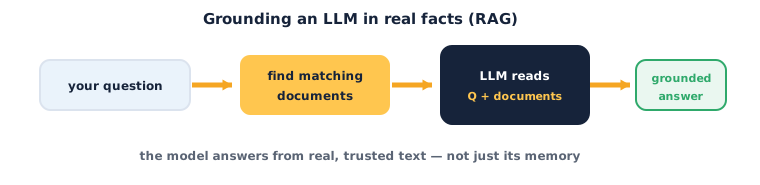
The flow:
- A question comes in.
- You retrieve the most relevant chunks from your own documents (often using embeddings from Session 5 — find chunks whose vectors are closest to the question's vector).
- You give the LLM both the question and those chunks, instructing it to answer only from them.
- It returns a grounded answer — with far less hallucination, because the facts are right there in the prompt.
RAG is why company chatbots can answer from internal manuals, and why "chat with your PDF" tools work. Let's build a tiny one.
Activity — A mini grounded assistant
Open a new Colab notebook (with your key loaded as above). We'll fake the "retrieve" step with a short document so you see the whole shape.
Type and run this:
# 1) Our private "knowledge base" (in real RAG, retrieved by embedding similarity)
docs = """
Ibnovate Academy runs live online AI courses for ages 8 to 18.
Course 3, 'The Future Builders', has 16 sessions of 75 minutes each.
Students finish with a university-ready portfolio and a certificate.
"""

question = "How long is each session in Course 3?"

# 2) Ground the model: force it to answer only from the docs
prompt = f"""Answer the question using ONLY the context below.
If the answer isn't in the context, say "I don't know".

Context:
{docs}

Question: {question}
Answer:"""

print(model.generate_content(prompt).text)
Now experiment:
- Ask something the docs don't contain (e.g. "What's the price?"). Does it correctly say "I don't know" instead of inventing an answer?
- Remove the
docsfrom the prompt and ask the same question. Watch it guess — that's the hallucination RAG prevents. - Add a new fact to
docsand ask about it. The assistant "learned" it instantly, with no retraining.
You just built the core of a real AI product: retrieve, ground, answer.
Check yourself
- How do you keep an API key safe? → Load it from a private store (Colab Secrets /
getpass) — never hard-code, commit, or share it; revoke a leaked key immediately. - Name two prompt-engineering patterns. → Any two of: give a role, specify the output format, show examples (few-shot), ask it to think step by step.
- What problem does RAG solve, and how? → It reduces hallucination by retrieving real documents and making the LLM answer only from them.
Wrap-up
You've reached the frontier: calling a top LLM through an API, steering it with deliberate prompts, and grounding it in real documents so it answers from facts. That combination — API + good prompts + RAG — is the recipe behind most serious AI assistants today. You now have every piece to build one responsibly.
- Try this at home: paste a page of your own notes into
docsand turn today's activity into a "study buddy" that answers questions only from your notes and says "I don't know" otherwise. Ask it three questions — two answerable, one not — and check it behaves.
Tips & extra challenges
- Watch out: an LLM can sound completely confident while being wrong. Confidence is not correctness — for anything that matters, ground it with RAG and verify against a trusted source.
- Want more? Try this: upgrade the "retrieve" step. Instead of pasting all docs, split a longer text into chunks, embed each with a Session-5 model, and pass the LLM only the top-2 chunks most similar to the question. That's real RAG.
Vocabulary
| Term | Meaning |
|---|---|
| API | A doorway that lets your program send a prompt to a model and get a reply |
| API key | A private, account-linked password — never hard-code or share it |
| Prompt engineering | Crafting inputs (role, format, examples, steps) to steer an LLM |
| Hallucination | When an LLM confidently states something false |
| RAG | Retrieval-Augmented Generation — grounding answers in retrieved documents |
Resources
- Google Colab — run every cell above, free.
- Google AI Studio — get your free Gemini API key and test prompts in the browser.
- Hugging Face — open models and embedding tools for building the retrieval half of RAG.
Practice set
Practise on your own — work these easy → hard. Answers follow each arrow.
1. Keep it safe. Name one place you should never put an API key. → In your code / a public GitHub repo / a screenshot (any of these) — load it from a private store instead.
2. Fix the prompt. "Tell me about dogs" gives a rambling reply. Add one instruction to tighten it. → Specify the output, e.g. "in exactly 3 bullet points under 12 words each" (or give it a role/level).
3. Diagnose it. An LLM confidently states a fake statistic about your school. What's this called, and what technique reduces it? → A hallucination; RAG (grounding it in real documents) reduces it.
4. Order the flow. Put RAG in order: retrieve documents, question arrives, model answers from both, give model question + docs. → Question arrives → retrieve documents → give model question + docs → model answers from both.
5. Reason about grounding (harder). In the mini assistant, why does telling it to say "I don't know" make it safer? → It stops the model inventing answers not supported by the context — refusing beats confidently making something up.
Going deeper (optional)
Optional — for when you want to know how retrieval finds the "relevant" docs.
How does RAG know which chunks are relevant? It reuses embeddings from Session 5. You split your documents into small chunks and embed each one into a vector, storing them in a vector database. When a question comes in, you embed the question too, then find the stored chunks whose vectors have the highest cosine similarity to it — those are the most semantically related, even if they share no exact keywords. Only those top chunks go into the prompt. So the whole modern stack connects: embeddings give you meaning-as-geometry, attention gives you a model that reads context, pre-trained models give you the reader for free, and RAG stitches them into a system that answers from your facts. That's the arc of this entire unit.
Common mistakes & fixes
- Mistake: Hard-coding the API key in the notebook. → Fix: load it from Colab Secrets /
getpass; if it ever leaks, revoke and regenerate it. - Mistake: Vague prompts, then blaming the model. → Fix: add a role, an output format, and (for reasoning) "think step by step".
- Mistake: Trusting a confident answer as fact. → Fix: confidence ≠ correctness; ground with RAG and verify anything important.
- Mistake: Stuffing an entire book into the prompt. → Fix: retrieve only the most relevant chunks — prompts have length limits and cost money per token.
- Mistake: Forgetting to tell RAG to answer only from the context. → Fix: say it explicitly, and allow "I don't know" so it won't fall back to guessing.
What's next
Session 9 — Think Like a Researcher (the start of Unit 3 — Research & Responsible AI): you can now build with the most powerful AI tools there are. Next you shift from builder to researcher — asking sharp questions, forming hypotheses, and testing claims honestly, so that what you build is not just impressive but true and responsible.