
Session 7 — Build with Pre-trained Models
Duration: 75 min · Format: live online
What you'll learn: by the end, you can load a pre-trained transformer in a few lines with Hugging Face, run four different language tasks on your own text, and explain the idea of standing on giants' shoulders — plus you'll get a first taste of fine-tuning a model to your own needs.
Soft skill focus — Problem-solving
Today you'll also grow Problem-solving. A pro doesn't build everything from scratch — they ask "has someone already solved most of this?" and assemble the answer. Today you'll solve real language problems by picking the right pre-built tool and wiring it up — the single most valuable habit in applied AI.
- Try this: when a task feels big, break it into "what's the input, what's the output, which existing model maps one to the other?" Nearly every problem this session becomes easy the moment you frame it as input → model → output.
- Think about: "What's a problem in my own life or school that I could solve this week by wiring together tools that already exist?"
What you'll need
- Google Colab open in a tab, signed in, ready for a new notebook.
- The diagram below open so you can picture the feed-in / process / answer flow.
- A short paragraph of your own text (a news snippet, a review, a story) to test on.
Hook
It took a company millions of dollars and billions of words to train a good language model. Here's the wonderful part: they gave it away. On Hugging Face there are hundreds of thousands of pre-trained models you can download and use for free, in three lines of code.
That means you don't start from zero. You start from a model that has already read more text than you could in a thousand lifetimes — and you point it at your problem. This is standing on the shoulders of giants, and it's how almost all real-world AI gets built today. Let's build.
Teach — What a pipeline is
A Hugging Face pipeline is a ready-made wrapper that hides all the messy steps — tokenising your text, running the transformer, decoding the numbers back into an answer. You just name the task, and it fetches a suitable model and runs it.
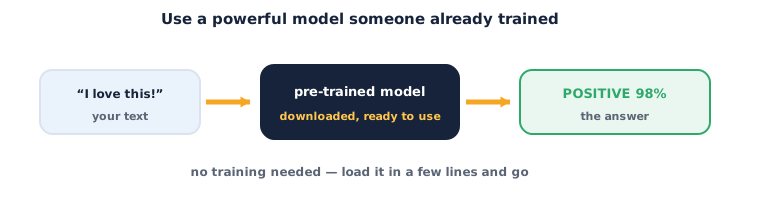
The pattern is always the same three moves:
- Feed in your text.
- A downloaded model processes it (the transformer from Session 6, already trained).
- You get an answer back — a label, a summary, an extracted phrase.
Because the model is pre-trained, you write no training code and need no dataset to get started. First run downloads the model (slow, once); after that it's instant.
Teach — Four tasks, one pattern
The same pipeline gives you many superpowers just by changing the task name:
sentiment-analysis— is this text positive or negative?summarization— shrink a long passage to its essence.question-answering— given a context paragraph and a question, extract the answer.zero-shot-classification— sort text into labels you invent on the spot, with no training. (This one feels like magic — you'll see.)
Notice the theme: you're not teaching a model anything yet. You're reusing models others trained, choosing the one whose job matches yours.
⚠ Watch out: a pre-trained model reflects the data it was trained on — usually general web and news text, mostly English. On slang, other languages, medical or legal text, or your niche topic, it can be confidently wrong. Always eyeball the output before you trust it, and never ship a model into something important without testing it on your real data.
Activity — Solve four problems with pre-trained models
Open a new Colab notebook. First, install the library.
Type and run this once (the install):
!pip install -q transformers
Task 1 — Sentiment. Feed in text, get a label:
from transformers import pipeline

sentiment = pipeline("sentiment-analysis")
for text in ["I absolutely loved this movie!", "The food was cold and slow."]:
    r = sentiment(text)[0]
    print(f"{r['label']:8s} ({r['score']:.2f})  <-  {text}")
Task 2 — Summarization. Shrink a long passage. Replace article with your own:
summariser = pipeline("summarization")
article = """Honeybees communicate the location of food using a waggle dance.
The angle of the dance shows the direction relative to the sun, and the length
of the waggle shows the distance. Other bees watch, then fly straight to the food."""
print(summariser(article, max_length=30, min_length=10)[0]["summary_text"])
Task 3 — Question-answering. Give it a context and ask:
qa = pipeline("question-answering")
context = "The Eiffel Tower is 330 metres tall and was completed in Paris in 1889."
print(qa(question="How tall is the Eiffel Tower?", context=context)["answer"])
print(qa(question="When was it completed?", context=context)["answer"])
Task 4 — Zero-shot (the magic one). Invent your own labels:
classifier = pipeline("zero-shot-classification")
result = classifier(
    "My laptop won't turn on and the screen stays black.",
    candidate_labels=["billing", "hardware problem", "compliment"]
)
print(result["labels"][0], "->", round(result["scores"][0], 2))
Now experiment:
- Paste your own paragraph into the summariser. Is the summary fair?
- In Task 4, add a label the text clearly isn't about. Does the model still rank the right one first?
- Try to break the sentiment model — write a sarcastic sentence ("Oh, brilliant, another delay"). Does it get fooled?
You just solved four different language problems without training a single thing.
Teach — A taste of fine-tuning
Pre-trained models are generalists. Sometimes you need a specialist — a model that knows your domain (your product reviews, your school's subjects, your language). That's fine-tuning: take a pre-trained model and continue training it a little on your labelled examples, so it adapts without forgetting everything it learned.
The beauty is you need far less data than training from scratch — the model already understands language; you're just nudging it toward your task. You won't full fine-tune today, but keep the mental model: pre-trained = a smart generalist; fine-tuned = that generalist, specialised to you. It's the natural next step when a stock pipeline is close but not quite right.
Check yourself
- What are the three moves of using a pipeline? → Feed in text → a pre-trained model processes it → you get an answer.
- Why is using a pre-trained model called "standing on giants' shoulders"? → You reuse a model that already learned from billions of words, instead of training from zero.
- What is fine-tuning? → Continuing to train a pre-trained model on your own examples so it specialises to your task, using far less data.
Wrap-up
You've gone from understanding transformers to wielding them. Four lines of code now buy you sentiment, summaries, answers and custom classification — because someone else did the expensive part and shared it. Real AI engineering is mostly this: pick the right pre-trained model, test it on your data, and only train when you truly must.
- Try this at home: pick one task from today and build a tiny useful tool with it — e.g. paste in five of your own product reviews and print each one's sentiment, or summarise a news article you read this week. One cell, one real use.
Tips & extra challenges
- Watch out: the first time you call a pipeline it downloads the model — that's the slow part, and it needs internet. After that, calls are fast. Don't re-create the pipeline inside a loop; build it once, reuse it.
- Want more? Try this: browse the Hugging Face model hub, pick a specific model (e.g. a multilingual sentiment model) and load it with
pipeline("sentiment-analysis", model="…"). Compare its answers to the default on the same sentences.
Vocabulary
| Term | Meaning |
|---|---|
| Pre-trained model | A model already trained on huge data, ready to reuse |
| Pipeline | A Hugging Face wrapper that runs a task end-to-end in a few lines |
| Task | The job you want (sentiment, summarization, QA, zero-shot…) |
| Zero-shot | Classifying into labels you invent, with no task-specific training |
| Fine-tuning | Further training a pre-trained model on your own data to specialise it |
Resources
- Google Colab — run every cell above here, free.
- Hugging Face — the model hub, docs and the
transformerslibrary you used today. - Hugging Face Tasks — a visual menu of every task and the models that do it.
Practice set
Practise on your own — work these easy → hard. Answers follow each arrow.
1. Name the flow. What are the three stages of using a pre-trained model? → Feed in text → model processes it → get an answer.
2. Pick the task. You want to sort support emails into "refund", "bug", "praise" with no training data. Which pipeline? → zero-shot-classification — you supply your own candidate labels.
3. Spot the cost. Why is the first pipeline call slow but later ones fast? → The first call downloads the model; after that it's cached locally and runs instantly.
4. Reason about fit. A general sentiment model does badly on medical notes. What's a fix, and why does it need little data? → Fine-tune it on labelled medical text; it already understands language, so you only nudge it toward the new domain.
5. Write the code (harder). Write the two lines that build a summarization pipeline and print a summary of a string text. → summariser = pipeline("summarization") then print(summariser(text)[0]["summary_text"]). (Any correct equivalent earns it.)
Going deeper (optional)
Optional — for when you wonder how one library serves a hundred thousand models.
Why does the same pipeline call work for so many models? Hugging Face standardised the interface. Every model on the hub ships with a matching tokenizer (turns your text into the exact tokens that model expects) and a config (its shape and task type). When you name a task, the pipeline looks up a default model, downloads its weights, tokenizer and config together, and wires them into the feed-in → process → answer flow. That standardisation is the real breakthrough of the ecosystem: because everyone follows the same format, swapping one model for a better one is often a single string change — which is exactly what lets you experiment fast and stand on ever-taller shoulders.
Common mistakes & fixes
- Mistake: Re-building the pipeline on every call (very slow). → Fix: create it once, then reuse the object for all your inputs.
- Mistake: Trusting the output without checking. → Fix: these are generalists; test on your real data — they can be confidently wrong on niche text.
- Mistake: Passing a question with no context to QA. → Fix: extractive
question-answeringneeds a context paragraph to pull the answer from. - Mistake: Summarising a passage shorter than
min_length. → Fix: give it enough text, or lowermin_length/max_lengthto sensible values. - Mistake: Expecting perfect results on other languages or slang. → Fix: default models are mostly English/general — pick a language-specific model from the hub instead.
What's next
Session 8 — Building with LLMs: pipelines run on your machine and do one task each. Next you'll call a full large language model through an API — keeping your key private — learn pro prompt-engineering patterns, and use RAG to ground the model's answers in real documents so it stops making things up. You'll build a small, responsible AI assistant of your own.