
Session 4 — Deep Vision with CNNs
Duration: 75 min · Format: live online
What you'll learn: by the end, you can explain how a convolutional neural network sees — finding edges with convolution, shrinking with pooling, and stacking layers to recognise whole objects — and you'll build a small CNN in Keras and reuse a giant pre-trained one with transfer learning.
Soft skill focus — Critical thinking
Today you'll also grow Critical thinking. A CNN that scores 90% still gets one in ten wrong — and which ones it misses tells you more than the score alone. Critical thinking is refusing to accept a single number as the whole story, and asking what's really going on underneath it.
- Try this: when your CNN makes a mistake, don't just note it — look at the image it got wrong. Is it blurry? Unusual? Would you have got it right? The pattern in the errors is where the real understanding hides.
- Think about: "When someone shows me an impressive accuracy number, what question should I ask before I believe the model is actually good?"
What you'll need
- Google Colab open in a new notebook, ideally with a GPU on (
Runtime → Change runtime type → GPU) — CNNs train faster on one. - Session 3 fresh: you know
Sequential,compile,fit,evaluate. Today you keep those and swap in new layer types. - Curiosity about how your phone recognises faces and objects — you're about to build the same machinery, small.
Hook
Your Dense network from Session 3 did something wasteful: its first move was to flatten the image, turning a 28×28 picture into a straight line of 784 numbers. The instant it did that, it threw away where things are — that two pixels were neighbours, that an edge curved, that a shape sat in the corner.
But a picture is not a list. A picture is a grid, and the meaning is in the arrangement. Convolutional neural networks (CNNs) keep the image as a grid and slide small pattern-detectors across it. They power almost all of modern computer vision — self-driving cars, medical scans, the camera in your pocket. Today you build one.
Teach — Convolution finds patterns
The core idea is the filter (also called a kernel) — a tiny grid of weights, maybe 3×3, that slides across the image. At each spot it multiplies its weights against the pixels underneath and adds them up, producing one number: how strongly this patch matches the pattern I'm looking for.
- One filter might light up on vertical edges, another on horizontal edges, another on a curve.
- Sliding it across the whole image makes a feature map — a new grid showing where that pattern appears.
- Crucially, the same filter is used everywhere, so a CNN needs far fewer weights than a Dense layer, and it finds a pattern no matter where in the image it sits.
And here's the beautiful part: you don't design the filters. Training learns them — the same gradient descent from Session 2 discovers, on its own, that edge- and shape-detectors are useful.
Teach — Pooling shrinks, layers stack
Two more ideas complete the picture.
Pooling shrinks a feature map by keeping only the strongest signal in each little region — max pooling takes the biggest value in each 2×2 patch. This makes the network faster, and it means "there's an edge around here" without fussing over the exact pixel. The image gets smaller; the meaning survives.
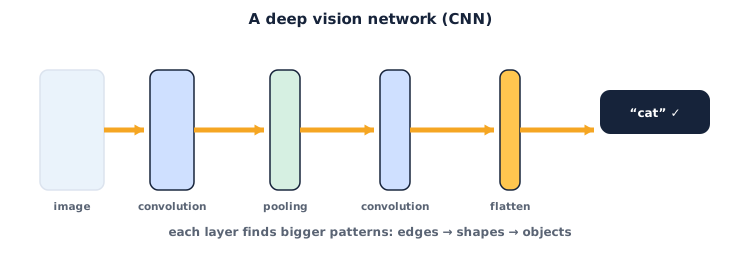
Stacking is where the depth pays off. Layer by layer, the CNN builds understanding:
- Early layers detect tiny pieces — edges and corners.
- Middle layers combine those into parts — an eye, a wheel, a loop of a digit.
- Late layers combine parts into whole objects — a face, a car, the number
8.
At the end you flatten what's left and pass it to a Dense layer for the final decision. That's the whole architecture: convolution → pooling → convolution → pooling → flatten → dense. Simple parts, stacked deep.
⚠ Watch out: a CNN expects an image with a channel dimension — shape
(28, 28, 1)for grayscale, not(28, 28). Forgetting the1is the number-one CNN error. Reshape your data (x_train.reshape(-1, 28, 28, 1)) before you fit, or Keras will reject it.
Activity — Build a small CNN
Open a new Colab notebook. You'll reuse everything from Session 3 and swap the layers.
Cell 1 — load and shape the data. Type and run this:
import tensorflow as tf

(x_train, y_train), (x_test, y_test) = tf.keras.datasets.mnist.load_data()

x_train = x_train.reshape(-1, 28, 28, 1) / 255.0   # add channel dim + normalize
x_test  = x_test.reshape(-1, 28, 28, 1) / 255.0

print("training shape:", x_train.shape)   # (60000, 28, 28, 1)
Cell 2 — build the CNN. Type and run this:
model = tf.keras.Sequential([
    tf.keras.layers.Conv2D(32, (3, 3), activation="relu", input_shape=(28, 28, 1)),
    tf.keras.layers.MaxPooling2D((2, 2)),
    tf.keras.layers.Conv2D(64, (3, 3), activation="relu"),
    tf.keras.layers.MaxPooling2D((2, 2)),
    tf.keras.layers.Flatten(),
    tf.keras.layers.Dense(64, activation="relu"),
    tf.keras.layers.Dense(10, activation="softmax"),
])

model.compile(optimizer="adam",
              loss="sparse_categorical_crossentropy",
              metrics=["accuracy"])
model.summary()
Cell 3 — train and evaluate. Type and run this:
model.fit(x_train, y_train, epochs=5)
test_loss, test_acc = model.evaluate(x_test, y_test)
print("test accuracy:", round(test_acc, 4))
Now think critically about it:
- Is your test accuracy higher than the Dense network from Session 3 (often
~0.99vs~0.97)? The CNN keeps the shape information the Dense one threw away. - In
model.summary(), look at theConv2Dlayers — notice they use fewer weights than a big Dense layer would, because one small filter is reused across the whole image. - Which digits does it still miss? Sloppy
7s that look like1s? That error pattern is the model telling you where it's unsure.
Teach — Transfer learning: stand on giants
Training a big vision model from scratch needs millions of images and huge compute. You almost never do it. Instead you use transfer learning: take a network someone already trained on millions of photos (it already knows edges, textures and shapes), and reuse it for your task.
The trick is simple: freeze the pre-trained layers so their learned filters stay put, chop off the last layer, and train a fresh small Dense head on your classes. You get most of the power of a giant model with a few minutes of training.
A transfer-learning skeleton (read it, and run it if you have a GPU):
base = tf.keras.applications.MobileNetV2(
    input_shape=(96, 96, 3), include_top=False, weights="imagenet")
base.trainable = False   # freeze the pre-trained filters

model = tf.keras.Sequential([
    base,
    tf.keras.layers.GlobalAveragePooling2D(),
    tf.keras.layers.Dense(5, activation="softmax"),   # 5 = your number of classes
])
model.compile(optimizer="adam",
              loss="sparse_categorical_crossentropy",
              metrics=["accuracy"])
MobileNetV2 was trained on ImageNet's 1.4 million photos. By freezing it and adding your own head, you borrow all that vision for free. This is how most real image projects are actually built.
Check yourself
- What does a convolution filter do? → It slides a small grid of weights across the image and reports where a pattern (edge, curve, shape) appears — producing a feature map.
- What is max pooling for? → To shrink the feature map by keeping the strongest signal in each region — faster, and less fussy about exact pixel positions.
- Why use transfer learning instead of training from scratch? → A pre-trained model already knows general visual features, so you get high accuracy with far less data and time by reusing it.
Wrap-up
You now understand how machines see: convolution finds patterns, pooling shrinks while keeping meaning, and stacked layers build from edges to objects. You built a CNN that reads digits near-perfectly, and you saw how transfer learning lets you borrow a giant model for your own task. This is the toolkit behind almost all of computer vision.
- Try this at home: run your CNN on Fashion-MNIST (
fashion_mnist.load_data(), same shapes). Then pick three test images it got wrong, display them withmatplotlib, and write one sentence per image on why you think the model was confused. That's critical thinking about a model, not just a score.
Tips & extra challenges
- Watch out: a CNN that scores 99% on clean MNIST can fail badly on a photo you take with a phone — different lighting, size and background. High accuracy on one dataset does not promise it in the real world (you'll test this properly in Session 12).
- Want more? Try this: after training, grab one test image, run
model.predict()on it, and print all ten softmax scores. When the model is right but unsure, the top two scores are close — you can literally read its confidence.
Vocabulary
| Term | Meaning |
|---|---|
| Convolution | Sliding a small filter over an image to detect a pattern |
| Filter / kernel | A tiny grid of learned weights that detects one feature |
| Pooling | Shrinking a feature map by keeping the strongest values |
| Feature map | The grid showing where a filter's pattern was found |
| Transfer learning | Reusing a pre-trained model on a new, smaller task |
Resources
- Google Colab — turn on a GPU (
Runtime → Change runtime type) to train CNNs faster. - Keras — Convolutional layers — the reference for
Conv2Dand friends. - TensorFlow — Transfer learning tutorial — a full walkthrough of the freeze-and-retrain pattern.
Practice set
Practise on your own — work these easy → hard. Answers follow each arrow.
1. Match the job. Which layer finds patterns, and which one shrinks the image? → Conv2D finds patterns; MaxPooling2D shrinks.
2. Fix the shape. Your CNN rejects the data with a shape error on (28, 28). What's missing and how do you add it? → The channel dimension — reshape to (28, 28, 1) with x_train.reshape(-1, 28, 28, 1).
3. Read the depth. In a trained CNN, which layers detect edges and which detect whole objects? → Early layers detect edges; late layers detect whole objects.
4. Choose the strategy. You have only 200 photos of 3 flower types. Train from scratch, or use transfer learning? Why? → Transfer learning — 200 images is far too few to train a big model from scratch, but plenty to train a small head on top of a pre-trained one.
5. Build a layer stack (harder). Write a Sequential list with: one Conv2D of 16 filters (3×3, ReLU) for (28,28,1) input, a 2×2 max-pool, a flatten, and a 10-way softmax output. →
model = tf.keras.Sequential([
    tf.keras.layers.Conv2D(16, (3, 3), activation="relu", input_shape=(28, 28, 1)),
    tf.keras.layers.MaxPooling2D((2, 2)),
    tf.keras.layers.Flatten(),
    tf.keras.layers.Dense(10, activation="softmax"),
])
Going deeper (optional)
Optional — for when you want to know why CNNs beat Dense networks on images.
Two superpowers: parameter sharing and translation invariance. A Dense layer gives every pixel-pair its own weight, so a 28×28 image needs hundreds of thousands of weights just in the first layer — and a cat learned in the top-left corner is unknown in the bottom-right, because different pixels feed different weights. A convolution fixes both problems at once. It shares one small filter across the entire image (so far fewer weights to learn, less data needed, less overfitting), and because that same filter slides everywhere, a pattern is recognised wherever it appears — a property called translation invariance. That's why a 3×3 filter with nine weights can outperform a Dense layer with hundreds of thousands: it matches how images actually work. This insight — build the structure of the problem into the network — is one of the deepest ideas in deep learning, and you'll see it again with attention and transformers next unit.
Common mistakes & fixes
- Mistake: Shape error — the CNN wants 4 dimensions. → Fix: reshape images to include the channel dim:
(-1, 28, 28, 1)for grayscale,(-1, H, W, 3)for colour. - Mistake: Forgetting
Flattenbefore the finalDense. → Fix: convolution/pooling output is still a grid; addFlatten()before the Dense classifier layers. - Mistake: Training is painfully slow. → Fix: turn on the GPU in Colab (
Runtime → Change runtime type → GPU) — CNNs run many times faster on one. - Mistake: In transfer learning, retraining the whole base model. → Fix: set
base.trainable = Falsefirst, so you keep the pre-trained filters and only train your new head. - Mistake: Feeding the pre-trained model the wrong input size or channels. → Fix: match the model's expected shape (e.g. MobileNetV2 wants 3-channel colour at a supported size like
96×96or224×224).
What's next
Session 5 — Teaching Machines Language: you've taught a network to see. Next you cross into Unit 2 — Modern AI and teach it to read — turning words into numbers with embeddings, the first step toward the transformers and large language models behind today's AI.